Picking the right printer in 2026 is less about specs on paper and more about matching the machine to your actual workload. A small-business apparel shop needs transfer print muscle, while a home office mainly wants reliable black-and-white pages without surprise cartridge swaps. This roundup walks through ten printers and supplies built for very different jobs, so you can match the right tool to your routine without overspending.
A Snapshot Of The Selections
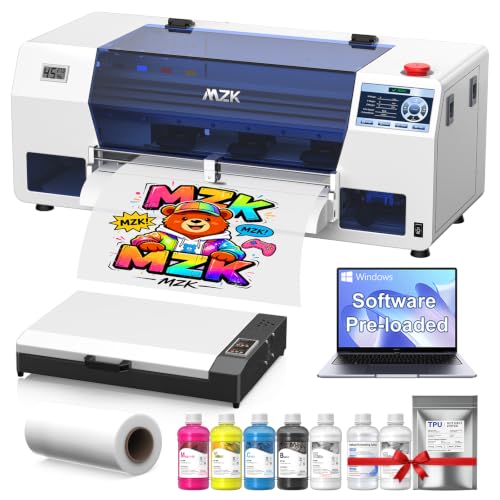
MZK Industrial-Grade A3 i3200 DTF Printer with Oven & Laptop

DSV A3 DTF Printer with i3200 Printhead and Shaker
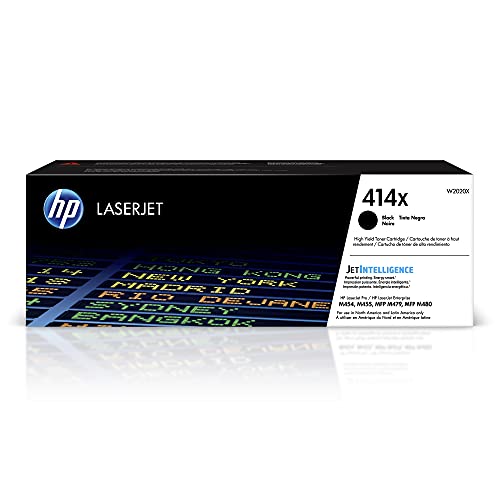
HP 414X Black High-Yield Toner Cartridge (W2020X)

HP 63/65 Tri-Color Ink Cartridge (B7RT2AN)

HP 414X Magenta High-Yield Toner Cartridge (W2023X)

HP 414X Yellow High-Yield Toner Cartridge (W2022X)

HP 414X Cyan High-Yield Toner Cartridge (W2021X)

Liene M100 4×6″ Photo Printer Bundle (180 Sheets)

HP 63XL/65XL Black High-Yield Ink Cartridge

HP 63XL/65XL Black High-Yield Ink Cartridge 2-Pack
More Details On Our Top Picks
Custom apparel shops usually stitch together a printer, oven, and PC from different vendors, then spend weeks getting them to talk to each other. The MZK A3 i3200 DTF (Direct-to-Film) package wraps the whole pipeline into one box, so you can go from unboxing to first transferred shirt far faster than usual.
For most small studios running 20 to 50 garments a day, the 720×3660 DPI (dots per inch) resolution handles detailed artwork, and the 5-inch smart panel keeps ink and film controls accessible. Setup requires a stable counter, decent ventilation, and willingness to learn DTF workflow.
Noteworthy Benefits
- Includes an oven and laptop, skipping the usual parts chase.
- Industrial i3200 printhead (the component that sprays ink onto film) for faster output versus consumer models.
- Auto-timer cleaning and anti-clog filter reduce maintenance guesswork.
- A3 print width fits chest-sized graphics on a single sheet.
Things To Consider
- DTF workflow has a steeper learning curve than basic inkjet printing.
- Requires dedicated floor or bench space for printer, oven, and venting.
Feature Card
Who It Suits Best
A new apparel-printing shop owner who wants a turnkey (ready-to-run out of the box) DTF system without piecing together a printer, oven, and computer.
Consider Something Else When
Garment decorators printing huge daily runs should weigh the DSV A3 DTF Printer, which ships with a shaker and purifier for heavier throughput.
The DSV A3 DTF package takes the same i3200 printhead platform and bolts on a powder shaker and purifier, which are key for studios chasing volume. The shaker evenly distributes adhesive powder across wet ink, and the purifier captures airborne particles that would otherwise settle on prints.
For shops producing hundreds of shirts per week, that closed-loop workflow keeps hands off the film between print and cure. This setup suits a busy print room more than a hobby corner.
Strengths Worth Knowing
- Complete system including shaker, purifier, and PC.
- Industrial printhead rated for sustained production cycles.
- Smart auto-clean cycles cut manual printhead wiping sessions.
- White-ink stirring prevents settling and clogged channels.
Worth Noting
- Larger footprint than the MZK setup, so plan bench space accordingly.
- Curated workflow assumes you already know DTF basics.
Made For
Production-focused apparel studios turning out bulk custom transfers every week.
Skip It When
Brand-new DTF users may prefer the MZK Industrial-Grade A3 i3200 DTF Printer, which includes an oven and laptop for a softer learning curve.
Office laser printers only earn their keep when their cartridges last. The HP 414X black high-yield toner is the workhorse behind the Color LaserJet Enterprise M455dn, MFP M480f, Pro M454, and MFP M479 series. If your team runs black-and-white reports, contracts, and invoices all day, this is the supply that quietly keeps the paper moving.
For a five-person office printing a few hundred pages weekly, the high-yield design cuts swap frequency dramatically. Smaller teams with only occasional printing may find standard-yield cartridges a better fit.
The Case For It
- High-yield design suits heavy text workloads.
- Drop-in fit on multiple LaserJet Enterprise and Pro models.
- Original HP toner formulation helps prevent the streaking that refilled cartridges can cause.
Trade Offs
- Only fits specific HP Color LaserJet models listed in compatibility.
- Higher upfront cost than standard-yield cartridges, though cost-per-page drops.
Feature Snapshot
Right Fit For
Mid-size offices running heavy monochrome print volumes on compatible HP Color LaserJet models.
Look Elsewhere When
Home users with HP DeskJet or Envy inkjets need the HP 63/65 Tri-Color Ink Cartridge instead, since inkjet and laser supplies aren’t interchangeable.
Tri-color cartridges (a single cartridge holding cyan, magenta, and yellow) are often the first supply to run dry on home inkjets. The HP 63/65 tri-color replaces both the 63 and 65 series in one part number, which simplifies ordering across DeskJet 1100, 2100, 2600, and 3600, plus Envy 4500, 5000, and OfficeJet 3800, 4600, and 5200 models.
For a household that prints the occasional school worksheet or boarding pass, this single cartridge covers the color side without buying three separate supplies.
Useful Highlights
- Dual compatibility with 63 and 65 cartridge series.
- Covers a wide range of DeskJet, Envy, and OfficeJet models.
- Single color cartridge means no juggling separate cyan, magenta, and yellow slots.
Minor Gripes
- If one color runs dry, the whole cartridge must be replaced.
- Not compatible with printers requiring individual color tanks.
Best Suited To
Home users printing mixed text and graphics on supported HP DeskJet, Envy, or OfficeJet models.
Another Choice May Suit
Heavier text printing households should pair this with the HP 63XL/65XL Black High-Yield Ink Cartridge for fewer black-ink swaps.
Color accuracy on a laser printer is only as strong as its weakest toner. The HP 414X magenta high-yield cartridge keeps the Color LaserJet Enterprise M455dn, MFP M480f, Pro M454, and MFP M479 series printing accurate reds, pinks, and purples for marketing collateral and client-facing reports.
For a small agency or design studio where brand colors matter, this supply holds its own against standard-yield versions. Casual home users rarely need the magenta yield separately.
What Stands Out
- High-yield design reduces swap frequency on busy color runs.
- Fits the same compatible LaserJet line as the black 414X.
- Maintains color consistency across longer print batches.
Honest Caveats
- Magenta runs out faster than black on text-heavy color documents.
- Requires one of the listed HP Color LaserJet models to function.
Quick Technical Notes
Who Should Grab It
Offices that produce color-heavy marketing materials, charts, and client presentations on a supported HP Color LaserJet.
Reach For A Different Pick When
Users of HP DeskJet or OfficeJet inkjets should skip this entirely and choose the HP 63XL/65XL Black High-Yield Ink Cartridge for compatible inkjet output.
Yellow toner may not seem exciting, yet it’s the supply behind every chart highlight and warning label a business prints. The HP 414X yellow high-yield cartridge targets the same LaserJet Enterprise M455dn, MFP M480f, Pro M454, and MFP M479 series covered by its sibling magenta and cyan cartridges.
For teams that batch large color print runs in one session, stocking the yellow alongside the cyan and magenta cartridges avoids mid-job interruptions.
Useful Strengths
- High-yield capacity suits offices batching color print jobs.
- Shared fit across the 414X LaserJet family simplifies inventory.
- Original HP formulation helps maintain consistent yellow tone across reprints.
Softer Spots
- Limited to specific HP Color LaserJet Pro and Enterprise models.
- Color printers left idle for months can clog toner pathways; periodic use helps.
Perfect Match For
Color-document-heavy offices that already run the magenta and cyan 414X cartridges and need to complete the set.
Where A Sibling Pick Shines
Home users without a compatible Color LaserJet should consider the Liene M100 photo printer for color output instead.
Cyan rounds out the trio that makes full-color laser output look right. The HP 414X cyan high-yield cartridge works across the same LaserJet Enterprise M455dn, MFP M480f, Pro M454, and MFP M479 line, which makes it easy to keep spares for all three colors stocked together.
For an in-house print room where presentations and reports travel to clients, cyan accuracy keeps company materials looking polished.
Points In Its Favor
- Matches the 414X family compatibility across multiple LaserJet models.
- High-yield capacity suits larger print batches.
- Original HP toner helps preserve the printer’s warranty coverage.
A Few Limitations
- Won’t work outside the listed HP Color LaserJet compatibility range.
- Premium price tag versus third-party refilled options, with trade-offs in print consistency.
Built With In Mind
Offices that need a complete high-yield cyan supply for a compatible HP Color LaserJet printer.
Swap It Out When
Anyone running an HP inkjet printer should pick the HP 63XL/65XL Black High-Yield Ink Cartridge instead, since inkjet and laser cartridges aren’t cross-compatible.
Photo printers used to feel like specialty gear that only enthusiasts bothered with. The Liene M100 flips that idea by arriving with 180 sheets of 4×6 paper and five ink cartridges, so you can print from your phone the same day you unbox it.
Dye-sublimation printing (a process that uses heat to turn dye into gas that bonds with the paper, producing continuous-tone images) produces vibrant, smudge-resistant snapshots with a protective overcoat. For scrapbookers, families archiving vacations, or anyone building a small photo booth setup, the included supplies cover the first hundred or so prints.
Why It Works Well
- Bundle includes 180 photo sheets and five ink cartridges, removing the first refill scramble.
- Wi-Fi connection works with iPhone, Android, and computer workflows.
- Compact size fits on a desk or craft-table corner.
- Dye-sublimation output has a protective overcoat that resists water and fingerprints.
Practical Considerations
- Limited to 4×6 prints, so larger formats need a different printer.
- Dye-sub cartridges are brand-specific, so third-party paper may not print at full quality.
Spec Overview
Whose Shelf It Belongs On
Home users, scrapbookers, and casual event hosts who want tangible photos without a trip to a print kiosk.
A Better Fit Elsewhere
Offices printing text and reports need something like the HP 414X Black High-Yield Toner Cartridge on a Color LaserJet instead.
Black ink is the workhorse supply for any home inkjet. The HP 63XL/65XL black high-yield cartridge replaces both the 63XL and 65XL versions, covering the same DeskJet, Envy, and OfficeJet families supported by the standard 63/65 tri-color cartridge.
For a student printing essays or a remote worker running a household printer, the high-yield XL design holds noticeably more pages than the standard version. Households with very light use may not benefit enough from XL pricing to justify the cost.
Reasons It Performs
- XL high-yield capacity suits text-heavy households.
- Single black-cartridge design simplifies ordering for monochrome printing.
- Compatible with both 63XL and 65XL printer series.
Details To Watch
- Inkjet cartridges left idle for long stretches can dry out and clog.
- Higher per-cartridge price, though lower cost-per-page than standard-yield.
The Right Fit
Text-heavy home and small-office printing on compatible HP DeskJet, Envy, or OfficeJet models.
Where A Sibling Pick Shines
Busy households who constantly swap black cartridges should consider the HP 63XL/65XL 2-Pack to keep a backup ready.
Running out of black ink mid-project is one of life’s smaller frustrations, and the HP 63XL/65XL 2-Pack helps you skip it. Two high-yield black cartridges in a single package cover a busy household or a small student printer setup.
For families printing school assignments, work documents, and the occasional boarding pass, the second cartridge acts as a buffer until the next supply run. Casual users printing a few pages a week may find the single cartridge option plenty.
Where It Helps
- Two-pack format keeps a backup cartridge on hand.
- High-yield XL capacity covers longer print intervals.
- Compatible with the same DeskJet, Envy, and OfficeJet models as the single-pack version.
Factors To Consider
- Higher upfront cost than a single cartridge, which only pays off with steady use.
- Bulk packaging can be harder to store in a small desk drawer.
Who Will Love This
Busy households and remote workers who want a spare black cartridge ready before the first one runs dry.
Not Your Match When
Light users printing only a handful of pages monthly should grab the single HP 63XL/65XL Black High-Yield Ink Cartridge to avoid storing extra ink.
What Matters Most Before Choosing Printers
Print technology sets the tone for everything else. Laser printers (which use powdered toner fused to paper with heat) excel at text-heavy office output, while inkjet printers handle mixed photos and documents on home desks. Dye-sublimation printers like the Liene M100 specialize in photo prints with a protective overcoat. DTF printers transfer designs from film onto fabric, which is a totally different craft from paper output.
For most home users, inkjet still wins on upfront price and photo quality. For offices printing thousands of pages monthly, laser toner delivers a lower cost-per-page even when cartridges cost more. Apparel shops need DTF systems with industrial printheads, ovens, and powder management.
Match the printer to your volume, not the other way around. A home user buying a DTF transfer printer is overspending on capability they’ll never touch. A custom apparel shop buying a basic inkjet will burn through ink in days. Cartridge compatibility matters too: HP 414X toner only fits specific Color LaserJet models, while 63/65 inkjet cartridges cover a different DeskJet and Envy lineup entirely.
Finally, think about supplies ahead of the printer purchase. High-yield toner and XL ink cartridges reduce swap frequency, while bundle photo printer packages like the Liene M100 ship with starter paper and ink so first-day printing is realistic.
Key Considerations Across These Picks
Where Shoppers Go Wrong
The most common slip is buying a printer, then buying cartridges that don’t fit it. HP 414X toner fits specific LaserJet Enterprise and Pro models, while 63/65 cartridges fit DeskJet, Envy, and OfficeJet inkjets. Always confirm your exact printer model before stocking supplies.
Another trap is ignoring total cost of ownership. A cheap printer with expensive standard cartridges can cost more over two years than a mid-range model with high-yield supplies. For shops, a low-cost DTF printer without an oven or shaker often means buying those pieces separately later, which adds up fast.
Where The Extra Money Goes
Premium printers and supplies earn their higher tags through duty cycle (the maximum recommended monthly page volume), printhead longevity, and consistency over long runs. Industrial DTF printheads like the Epson i3200 handle sustained daily output that entry-level printheads can’t. High-yield toner cartridges hold more pages and cut the labor of swapping supplies mid-week. Bundle packages that include ovens, shakers, or starter paper save the time you’d spend sourcing each piece from different vendors, which is real money for a new shop.
Frequently Asked Questions
How do I know if my printer uses ink or toner?
Inkjet printers use liquid ink stored in cartridges, while laser printers use powdered toner. Check your printer model: DeskJet, Envy, and OfficeJet lines typically use inkjet cartridges like the HP 63/65 family. Color LaserJet Enterprise and Pro models use toner cartridges like the HP 414X series. Mixing the two won’t work, since the cartridges are physically different.
Are high-yield cartridges worth the higher price?
For moderate to heavy printing, high-yield cartridges lower the cost per page and reduce swap frequency. For occasional printing, standard-yield cartridges may make more sense because ink can dry out before you finish them. Match the cartridge yield to your actual monthly page volume.
What’s the difference between DTF and regular inkjet printing?
DTF (Direct-to-Film) printing transfers designs from a printed film onto fabric using adhesive powder and heat. It needs specialized equipment like the MZK or DSV A3 systems, plus an oven or heat press. Regular inkjet printing puts ink directly onto paper for documents and photos, which is what home printers do.
Can I use third-party cartridges in my HP printer?
Third-party cartridges exist, but using them may affect print consistency and could raise warranty questions depending on the manufacturer. Original HP cartridges are formulated for the specific printer model and toner fuser temperatures, which helps maintain reliable output over time.
How often should I print to avoid ink drying out?
Inkjet printers benefit from at least occasional use, ideally once a week or every few days. Long idle periods let ink dry inside the printhead nozzles, which causes streaking or clogs. Running a test page occasionally keeps the ink flowing.
Wrap Up
The right printer is the one that quietly handles your everyday workload without constant attention. Match the technology to your volume, confirm cartridge compatibility before you buy supplies, and think about throughput if you’re running a print shop. Any of the picks above can serve you well, as long as the use case matches the gear.