Receipts multiply faster than you’d think, and a year of paper clutter turns into a real chore when tax season or an audit rolls around. The right scanner turns shoeboxes into searchable files in a single afternoon, freeing up space and your nerves. This roundup covers desktop workhorses, USB-powered portables, and a protective case for scanners already in your bag, each picked for a specific type of user.
A Snapshot Of The Selections

Canon imageFORMULA DR-C225 II Office Document Scanner (Black)

Fujitsu ScanSnap iX1500 Color Duplex Document Scanner (Black)
Canon imageFORMULA R10 Portable Document Scanner (White)

Caseling Hard Case for Epson ES-50 / ES-60W / DS-70 Scanners
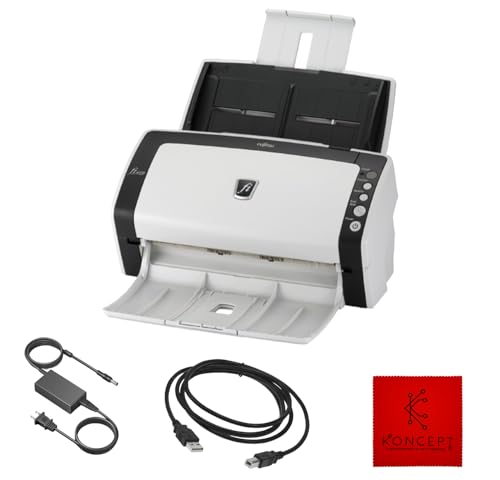
FI-6130Z Fujitsu Duplex Sheet-Fed Receipt & Document Scanner (Renewed)

Fujitsu ScanSnap iX500 Scanner for PC and Mac (PA03656-B005)
Canon imageFORMULA R40II Office Document Scanner

Fujitsu ScanSnap iX500 Deluxe Bundle Scanner for PC

FI-7160 Fujitsu Document Scanner (Renewed) with USB 3.0 Cable
A Breakdown Of The Leading Choices
The DR-C225 II stands upright rather than sprawling across your desk, which is a real gift in a cubicle or shared workspace. The vertical path feeds paper over the top and spits clean sheets out the front, so you can park it next to a monitor without losing elbow room. For anyone processing stacks of receipts, contracts, or client forms, the workflow feels less like a chore and more like a routine.
Canon pairs that footprint with searchable PDF output, so scanned receipts aren’t just pictures but actually findable later by keyword. Duplex, or two-sided, capture is built in, meaning a five-page packet becomes ten images without you flipping anything by hand. Setup stays simple: a USB connection, the bundled driver, and you’re scanning in minutes.
What It Does Well
- Upright J-Path design shrinks the desk footprint to roughly a dictionary’s width
- Duplex capture handles two-sided receipts and signed forms in a single pass
- Searchable PDF output makes monthly expense reports much easier to compile
- Feed tray adjusts for mixed batches, from sticky receipts to letter-size contracts
- Strong fit for a permanent desk that sees daily paper traffic
Trade Offs
- No built-in wireless, so scanning to a phone or tablet requires a computer middleman
- The vertical feed takes a beat longer to learn than a flatbed’s open-lid approach
Who It Suits Best
Office managers and small-business owners with a fixed desk who process paperwork every day.
Consider Something Else When
You split your week between home and the road, in which case the Canon imageFORMULA R10 portable scanner slips into a laptop bag far more easily.
The iX1500 brings a touchscreen to a category that historically hid every setting inside a desktop app. Tapping an icon on the built-in display fires off a saved profile, so the partner who scans to Dropbox and the teenager who scans homework to Google Drive can share the same hardware without fighting over software. Compared to the Canon DR-C225 II’s no-frills approach, this is a friendlier face for a household that isn’t all that technical.
Speed is the other headline. The iX1500 chews through double-sided color pages quickly, and the automatic document feeder holds a satisfying stack so you’re not babysitting each sheet. Cloud-direct shortcuts mean a scanned receipt can land in your accounting folder before you stand up from the desk.
What Makes Sense
- Touchscreen profiles let multiple users switch workflows with a single tap
- Direct-to-cloud shortcuts cut out the middle step of saving to a folder first
- Generous feeder capacity trims time off large monthly batches
- Mac and PC compatibility keeps mixed households happy
Things To Consider
- The price step up is real, so casual scanners may not use what they pay for
- Taller housing demands a deeper shelf than slimmer options like the Canon R40II
Right Fit For
Multi-user home offices where two or three people scan to different destinations each week.
Not Your Match When
Your scanning happens twice a year at tax time, in which case the simpler Canon imageFORMULA R40II covers that need without the touchscreen premium.
Pull the R10 out of a backpack, plug the USB cable into a laptop, and it just works. No power brick to hunt for at a client’s conference table, no driver disc to lose. That cable-only setup is the entire appeal for mobile professionals who bill per diem and want signed receipts digitized before they leave the parking lot.
Duplex scanning still shows up here, which is unusual for a scanner this small. The trade-off, of course, is that it tops out at smaller batches and slower throughput than a desktop unit. Most people using the R10 aren’t processing 200-page packets, though. They’re handling a day’s worth of receipts, a few signed contracts, and a couple of business cards, all of which it handles comfortably.
What Earns Its Place
- USB-powered operation removes the hunt for outlets on the road
- Compact body slides into a laptop bag without dominating the space
- Duplex scanning in a portable form is genuinely rare at this size
- Compatible with both Windows and Mac for mixed-device travelers
Worth Noting
- Smaller feeder means reloading more often on big projects
- Speed trails desktop units like the Fujitsu ScanSnap iX500 noticeably
Made For
Consultants, real-estate agents, and field-service pros who scan signed documents wherever the meeting happens.
Look Elsewhere When
You mostly scan at the same desk, in which case the upright Canon DR-C225 II handles larger stacks without giving up the duplex advantage.
A portable scanner only stays portable if it survives the trip. The Caseling case wraps a compatible Epson portable in rigid EVA material (a dense, molded foam-rubber shell) with a hard exterior that shrugs off the kind of bumps and squeezes that happen in a crowded commuter bag. Inside, a custom-cut cavity holds the scanner snugly, so it isn’t rattling around against a water bottle or charging cable.
Keep in mind this is an accessory, not a scanner. The real value shows up over months of daily carrying, when the alternative is a scuffed plastic shell or a cracked feed roller. For anyone who already owns one of the listed Epson models, this case is the cheapest insurance on this entire list.
Bright Spots
- Custom-cut interior locks the scanner in place during transit
- Hard EVA shell resists drops and pressure from heavier items in a bag
- Mesh pocket holds the USB cable so nothing gets lost in the gaps
Points To Note
- Only fits specific Epson models, so verify your exact scanner before ordering
- Adds bulk to an already portable workflow, which some users may not want
Best Suited To
Anyone who already owns an Epson ES-50, ES-60W, or DS-70 and carries it to client sites or coworking spaces.
A Better Fit Elsewhere
You need an actual scanner to start with, in which case the Canon imageFORMULA R10 portable scanner ships ready to use and rolls up small without needing an accessory case.
The FI-6130Z is the kind of workhorse you find in the back office of a small accounting firm. The sheet-fed design handles long receipt runs without you standing over it, and the duplex path captures both sides of a printed invoice in a single sweep. As a renewed unit, you get the same professional-grade internals at a more approachable price than a brand-new equivalent.
The one thing to know going in: this scanner supports Windows 10 and earlier, but not Windows 11. For shops running older workstations or dedicated bookkeeping machines, that’s a non-issue. For households on the newest operating system, it rules the unit out entirely.
Notable Gains
- Sheet-fed duplex design eats through receipt stacks without constant attention
- Receipt-focused construction handles thin thermal paper reliably
- Renewed pricing undercuts a new unit with similar throughput
Honest Caveats
- No Windows 11 support, which is a hard limit for newer machines
- Requires the included 24V power adapter, so it’s a desk-only solution
- Renewed condition means cosmetic wear is possible, depending on the unit
Who Should Grab It
Bookkeepers and small-business owners still on Windows 10 who want a receipt-heavy scanner without the newest-model markup.
Skip It When
You run Windows 11, in which case the Canon imageFORMULA R40II is a safer plug-and-play match for a modern setup.
The iX500 has been around long enough that the formula feels proven rather than experimental. Color duplex scanning at a quick pace, a Wi-Fi option for cable-free placement, and ScanSnap’s polished software for naming and routing files. It lands in that sweet spot for households that have been scanning for years and want a familiar upgrade path.
One software note: the iX500 driver does not support TWAIN or ISIS, which are two industry-standard scanner protocols that some accounting and document-management programs rely on. If your workflow runs through QuickBooks or a basic cloud app, this won’t matter. If your office depends on specialized TWAIN-based software, the FI-7160 in this roundup is a more compatible fit.
Strengths Worth Knowing
- Quick color duplex capture keeps daily batches moving
- Wi-Fi connection option removes cable clutter from the desk
- Mature ScanSnap software handles file naming and routing cleanly
Trade-Offs To Consider
- No TWAIN or ISIS driver support limits some specialized software integrations
- Older model means fewer modern conveniences than the iX1500 touchscreen
Perfect Match For
Long-time home office users who already trust the ScanSnap ecosystem and want a familiar upgrade.
Reach For A Different Pick When
Your business software requires TWAIN or ISIS drivers, in which case the FI-7160 Fujitsu Document Scanner handles enterprise-grade software hooks more reliably.
The R40II is the no-drama desktop scanner that handles whatever gets tossed into the tray. The foldable paper feed tucks flat when you’re done, reclaiming a few inches of desk space that a fixed-tray scanner would steal. For most home offices, that fold-away design is the difference between a scanner that lives on the desk and one that gets returned to a closet.
Setup is genuinely simple, and cloud scanning means a tax document can head straight to Google Drive or Dropbox without a stop in a local folder. Compared to the larger iX1500, the R40II is more compact and aimed at a single user, which fits a freelancer or a couple far better than a shared household.
Where It Helps
- Foldable feed tray flattens out to free up desk real estate
- Cloud-direct scanning skips a local save step in the workflow
- Handles a wide range of document sizes and thicknesses in one tray
- Setup is simple enough for a first-time scanner owner
Things To Weigh
- Single-user design lacks the iX1500’s multi-profile touchscreen
- Plastic feed tray needs gentle handling to avoid warping over years of use
Feature Snapshot
Who Will Love This
Freelancers and remote workers who want a low-fuss daily scanner that disappears when the workday ends.
Where Another Pick Suits Better
Multiple household members each need their own scanning profile, in which case the Fujitsu ScanSnap iX1500’s touchscreen profiles handle that without reconfiguring software.
The Deluxe Bundle takes the well-known iX500 chassis and adds the extras that a first-time scanner owner tends to forget to order separately. You get the same quick color duplex performance and Wi-Fi option that the standard iX500 offers, but with additional software and accessories included to bridge the gap between unboxing and productive scanning.
This is the right pick for someone setting up a paperless system from scratch. If you already own a ScanSnap and know exactly which cable and software you want, the standard iX500 makes more sense. If you’re starting fresh and don’t want to chase add-ons, the bundle is a more complete out-of-box experience.
Useful Highlights
- Includes extras that smooth out the first-time setup experience
- Wi-Fi and USB connectivity both supported out of the box
- Duplex color capture keeps daily scans moving at a steady clip
Points To Keep In Mind
- Bundle contents vary by listing, so verify what’s in the box before ordering
- Same TWAIN and ISIS limitations as the standard iX500 model
Built With In Mind
First-time scanner owners who want a complete starter package without separate accessory orders.
Swap It Out When
You already own ScanSnap accessories and only need the core scanner, in which case the standard Fujitsu ScanSnap iX500 keeps things leaner.
The FI-7160 is built for the kind of daily grind that wears lesser scanners out. With a duty cycle rated for thousands of scans per day, an 80-sheet automatic feeder, and a 60 page-per-minute throughput, this is the unit that belongs in a busy back office or a shared workspace. The renewed listing brings that enterprise build into reach for shops that don’t need a brand-new model.
The included USB 3.0 cable and 24V power adapter mean a full setup is in the box, no extra shopping required. You also get full TWAIN and ISIS support, which keeps the door open for the specialized document-management software that accountants and legal offices often depend on. For most home users, this is overkill. For a small office with serious paperwork, it’s exactly right.
Practical Advantages
- High duty cycle handles thousands of scans per day without strain
- 80-sheet auto feeder means fewer reloads on big batches
- TWAIN and ISIS compatibility opens the door to professional software
- USB 3.0 keeps file transfers snappy on modern computers
Less Ideal Details
- Larger footprint demands a dedicated spot on a desk or shelf
- Renewed condition means cosmetic variation between units
- Overkill for a household that scans a handful of receipts per month
Quick Facts
Whose Shelf It Belongs On
Small offices, accounting practices, and shared workspaces with serious daily paper volume.
Another Choice May Suit
Your scanning fits inside a single weekly folder, in which case the Canon imageFORMULA R40II is a friendlier fit for lighter daily use.
What To Weigh Before Choosing Scanners For Documents And Receipts
Match The Scanner To The Volume
A scanner you love at 20 pages a week feels sluggish at 200 pages a day, and a heavy-duty unit is wasted on a household that scans quarterly. Match the duty cycle (the daily page count a manufacturer rates the scanner to handle) to your actual paper flow. For occasional tax-time batches, a basic desktop like the Canon R40II is more than enough. For daily bookkeeping, something like the FI-7160 earns its keep.
Understand Duplex And Feeder Capacity
Duplex, or two-sided, scanning captures both sides of a page in one pass, which doubles effective speed for any document printed on both sides. Feeder capacity determines how often you reload. An 80-sheet feeder on the FI-7160 is overkill for home use, while a 20-sheet feeder on a portable like the Canon R10 is plenty for a day’s worth of signed receipts on the road.
Portability Versus Desktop Power
Portable scanners trade speed and feeder size for a small footprint and USB power. Desktop scanners trade a fixed spot on the desk for faster throughput and larger feeders. Decide which trade-off matters more for your week: if you scan at the same desk, a desktop wins. If your work happens at client sites, a portable is the only practical choice.
Software And Cloud Integration
Some scanners push files directly to Dropbox, Google Drive, or OneDrive through shortcut buttons. Others expect you to save locally and upload manually. If you already live in a cloud workflow, that first kind saves several clicks per scan and adds up fast over a year. If you archive to a local folder or external drive, the simpler local-save approach is fine.
Key Considerations Across These Picks
Common Slip Ups Worth Dodging
Plenty of shoppers pick a scanner based on the speed spec alone and end up with a unit that doesn’t fit their operating system, doesn’t have the right driver for their accounting software, or simply takes up too much desk. Before you order, confirm the supported operating system (especially for renewed units like the FI-6130Z, which tops out at Windows 10), the bundled software, and the physical footprint. A scanner that doesn’t fit your desk or your workflow will frustrate you far more than a slightly slower model.
Where The Extra Money Goes
Higher-tier scanners cost more for reasons that aren’t always obvious from a spec sheet. The iX1500’s touchscreen and multi-user profiles save time for shared households. The FI-7160’s duty cycle and TWAIN support matter to professional offices. The bundle version of the iX500 includes accessories that smooth out the first-month experience. If those specific features match your situation, the upgrade is worth it. If they don’t, the money is better spent on a solid mid-tier unit that covers the basics well.