Running a small shop out of your garage, basement, or a corner of the living room means every parcel matters. The right shipping label printer turns a frustrating, ink-smeared afternoon into a quiet afternoon of click, print, peel, and ship. This roundup covers compact home-office machines, retail-grade thermal workhorses, and a few clever niche picks for Etsy sellers, eBay resellers, and side-hustle operators who just want labels on packages without a tangle of cables.
Your Options, Compared

Nelko P21 Label Maker Machine, White
Nelko P21 Label Maker Machine, Green

ETIKEZ Bluetooth Thermal Shipping Label Printer

Arkscan 2054K-USB Shipping Label Printer

Nelko P21 Label Maker Machine, Black
Arkscan 2054A Shipping Label Printer

Rollo USB Commercial Grade 4×6 Thermal Printer

NIIMBOT M2 Thermal Transfer Label Maker, Blue
Inside Each Recommended Option
The white Nelko P21 feels purpose-built for the kind of person who labels mason jars in the pantry and spice tins in the drawer. It runs on Bluetooth, weighs roughly half what traditional label makers carry, and slips into a tote or desk drawer without protest. For anyone shipping the occasional small parcel or organizing a craft room, the portability alone is a quiet win.
Compared with the dedicated 4×6 thermal units later in this list, the P21 is more about neat organization than bulk shipping. Owners commonly reach for it when filing, gift wrapping, or batching a handful of Etsy orders. The trade-off is print width and throughput: it’s a personal organizer first, a shipping hub second.
Useful Strengths
- Pocketable form factor makes it easy to move between rooms or carry to a pop-up event.
- Bluetooth connectivity cuts the cable clutter that frustrates users of older handheld printers.
- Clean white finish blends into minimalist kitchens, craft rooms, and home offices.
- Lower complexity suits users who just want a label, not a learning curve.
Things To Consider
- Not designed for high-volume 4×6 shipping label runs, so heavy sellers will outgrow it fast.
- Print quality depends heavily on using brand-recommended thermal paper, which adds a small ongoing cost.
- Some mobile users report pairing quirks with certain phone models that require a quick app restart.
Who It Suits Best
Home organizers, hobbyists, and casual gift-taggers who value portability over raw printing power.
Consider Something Else When
You ship dozens of parcels a week, in which case the Rollo USB shipping label printer is a stronger fit.
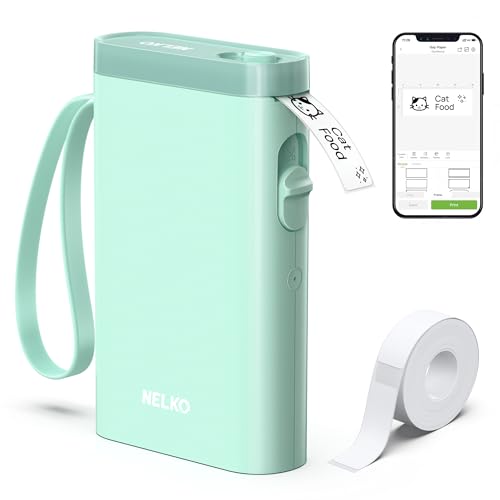
The green Nelko P21 is essentially the same machine as the white version you just read about, wrapped in a sage-toned shell that suits craft rooms and plant-filled studios. For someone whose desk doubles as a creative workspace, the color alone can be reason enough to pick this variant. It still pairs over Bluetooth and runs on the same compact chassis.
Functionally, nothing separates it from its white or black siblings. The decision comes down to aesthetic preference and how the printer looks sitting next to a cutting mat, a glue gun, or a stack of washi tape. If your workspace already leans earthy and warm, this is the version that disappears into the decor.
Notable Upsides
- Distinctive color stands out on a busy shelf and is easy to spot in a shared workspace.
- Same portable Bluetooth experience as other P21 variants, so feature parity is guaranteed.
- A practical choice for craft sellers who photograph their tools for social content.
- Lightweight body makes it a comfortable companion for craft fairs and pop-up markets.
Worth Noting
- Color preference is the only real differentiator, so the price gap over the white model should be small.
- Still built for light labeling duty rather than warehouse-scale printing.
- The finish may show smudges from craft glue or ink more visibly than darker variants.
Made For
Crafters, Etsy sellers, and creative studios who want their gear to look as considered as their products.
A Better Fit Elsewhere
Cross-platform sellers managing many channels should look at the Arkscan 2054K-USB shipping label printer instead.
This is the first entry on the list that actually targets shipping rather than home organization. The ETIKEZ 4×6 thermal printer runs without ink or toner, prints on standard direct-thermal label stock, and connects over Bluetooth so you can run it from a phone or laptop across the room. For sellers without a fixed packing station, that wireless reach is a real advantage.
Unlike the pocket-sized Nelko units above, this is a dedicated shipping tool meant to sit on a counter and churn out 4×6 labels. Thermal printing works by applying heat to a coated paper, so there are no cartridges to swap. The honest read is that the print is crisp and dark, but you should expect labels to fade in direct sunlight over many months.
Reasons It Performs
- Bluetooth connectivity removes the need to park your laptop right next to the printer.
- Thermal technology eliminates ink costs, which matters for sellers printing dozens of labels weekly.
- 4×6 output matches the default size for major carrier labels right out of the box.
- Compact footprint fits on a small folding table in a studio apartment or shared space.
Points To Note
- Thermal labels can fade under heat or sunlight, so storage conditions matter for long-term archiving.
- Bluetooth reliability depends on your device and OS, and pairing hiccups are occasionally reported.
- Not suited for label types that require a ribbon, such as certain glossy or weatherproof stocks.
At A Glance
Right Fit For
Mobile sellers and small operations that want cable-free printing without sacrificing 4×6 label compatibility.
Look Elsewhere When
You need to print across many operating systems in a multi-user warehouse, where the Arkscan 2054A shipping label printer is a stronger match.
The Arkscan 2054K-USB is the upgraded sibling of the 2054A and is aimed squarely at sellers juggling multiple platforms from the same laptop. It speaks fluent Windows, Mac, and Chromebook, and it plays nicely with the usual suspects: Amazon, Etsy, Shopify, ShipStation, and direct UPS, USPS, and FedEx portals. For anyone tired of “this printer only works on one OS” headaches, that flexibility is the headline feature.
The body accepts both roll and fanfold label formats, which removes the small daily annoyance of being forced into one consumable style. Compared with the Bluetooth-only ETIKEZ above, this unit trades wireless freedom for a more stable USB connection and broader platform support. The trade-off shows up when you want to print from a phone in the next room.
What Pays Off
- Accepts both roll and fanfold label stock, so you can pick whichever is cheaper locally.
- Works on Windows, Mac, and Chromebook out of the box, easing transitions between devices.
- Direct thermal design keeps ongoing ink and toner costs at zero.
- Broad carrier and marketplace support covers Amazon, Shopify, ShipStation, and the major shipping portals.
Honest Caveats
- Wired USB only, so cable routing and port placement need a moment of planning.
- Bulkier than the pocket Nelko units and the ETIKEZ, so it claims more desk space.
- Driver setup on Chromebook can occasionally require manual steps depending on the OS build.
Best Suited To
Multi-channel e-commerce operators running Amazon, Shopify, or Etsy from a laptop they swap between systems.
Reach For A Different Pick When
You mostly print from a phone in a small space, where the ETIKEZ Bluetooth thermal shipping label printer fits better.
The black Nelko P21 is the most office-friendly of the three color variants. It sits naturally next to a monitor, a mechanical keyboard, or a stack of manila folders without drawing attention. For home offices that double as packing stations, the understated finish earns its keep.
Performance mirrors the white and green versions, so this is essentially a styling decision with identical internals. If you have already mentally committed to the P21 platform, the black shell simply gives you a more neutral companion for daily use. Anyone working in a dim garage or workshop will appreciate how smudges disappear on the dark surface.
A Few Highlights
- Dark finish hides fingerprints and minor scuffs better than lighter shells.
- Same compact Bluetooth design that makes the P21 platform popular for casual labeling.
- Pairs naturally with most office aesthetics, from minimalist to industrial.
- Light enough to move between rooms as your packing workflow shifts.
Small Caveats
- Still a personal organizer scale printer, not a 4×6 shipping workhorse.
- Print darkness can read slightly less crisp on darker thermal stock.
- Like other P21 variants, ongoing paper costs add up for frequent users.
Who Will Love This
Home-based sellers and office organizers who want a discreet printer that does not clash with serious workspaces.
Swap It Out When
You need Android device support and broader carrier compatibility, in which case the Arkscan 2054A shipping label printer is the upgrade path.
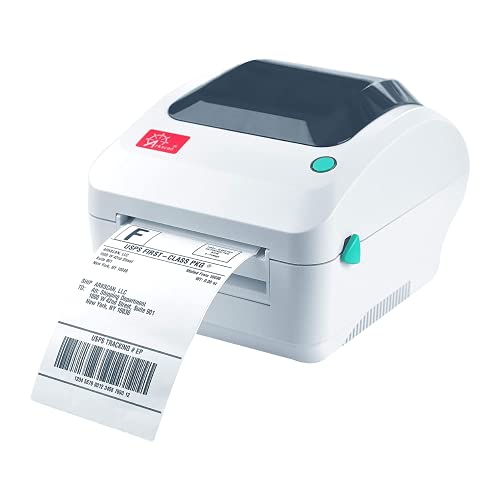
The original Arkscan 2054A stands out by adding Android support on top of the usual Windows, Mac, and Chromebook lineup. For sellers who run their store from a phone or tablet while fulfilling orders on the fly, that extra compatibility matters. It accepts both roll and fanfold 4×6 stock, which keeps consumable choices flexible.
This is the printer for the seller who prints in the morning from a laptop and in the evening from a phone, with no interest in swapping setups. Compared with the 2054K-USB above, the 2054A is the broader compatibility sibling. The trade-off is that very high-volume operations may eventually want the commercial-grade Rollo further down this list.
A Strong Showing
- Supports Windows, Mac, Chromebook, and Android, covering nearly every device a small seller owns.
- Compatible with Amazon, eBay, Etsy, Shopify, ShipStation, Stamps, and major carrier portals.
- Direct thermal output removes ink and toner from the running cost equation.
- Roll and fanfold flexibility lets you shop around for the cheapest local label stock.
Room For Improvement
- Android support depends on app compatibility, which can lag behind desktop driver updates.
- Not aimed at very high daily volumes, so warehouse-scale sellers may push its limits.
- Lacks wireless connectivity entirely, which is a step back from the ETIKEZ Bluetooth unit.
Feature Snapshot
Built With In Mind
Sellers who bounce between a phone, a tablet, and a laptop throughout the day without wanting different printer setups.
Not Your Match When
You need wireless printing from a single workstation, where the ETIKEZ Bluetooth thermal shipping label printer is the cleaner solution.
The Rollo sits at the top end of the small-business ladder. It’s a commercial-grade 4×6 thermal printer that connects over USB to a Windows or Mac computer and is built to keep up with daily shipping volume. Sellers who have outgrown a hobbyist printer and need something that just runs, all day, every day, tend to land here.
Setup is straightforward: connect via USB, install the Rollo drivers, and start printing. Because it doesn’t lock you into proprietary label stock, you can shop for thermal paper in bulk and cut your per-label cost meaningfully. Compared with the Arkscan units above, the Rollo feels more like equipment and less like a gadget, and that is exactly the point.
Everyday Advantages
- Commercial-grade build supports heavy daily print volumes without slowing down.
- Compatible with any direct thermal label stock, so you are not tied to one supplier.
- Connects to Windows XP and newer plus Mac 10.9 and newer for broad system support.
- Includes a companion shipping app to streamline label creation for common carriers.
Trade Offs
- USB only, so wireless printing from a phone requires extra adapters or workarounds.
- Initial driver installation takes a few minutes and occasional troubleshooting.
- Larger footprint than the Nelko and ETIKEZ units, so desk space planning matters.
Feature Card
The Right Fit
High-volume shippers running a dedicated packing station who need consistent, fast label output throughout the workday.
Where A Sibling Pick Shines
Casual sellers who mostly print from a phone should consider the lighter, wireless ETIKEZ Bluetooth thermal shipping label printer instead.
The NIIMBOT M2 takes a different route than the rest of this list. Instead of direct thermal printing, it uses thermal transfer, which means a heated printhead presses a ribbon onto the label. The result is a print that holds up to water, oil, scratches, and temperature swings far better than the standard thermal labels the Arkscan and Rollo produce.
That durability matters for products stored in garages, freezers, or warehouses, and for labels that need to survive shipping themselves. The M2 prints on 2-inch tape and ships with starter supplies included. The honest read is that this is a specialty pick: not your everyday Amazon label machine, but a lifesaver when the label absolutely must not smudge.
Strengths Worth Knowing
- Thermal transfer printing produces waterproof, oil-resistant, and scratch-resistant labels.
- 300 DPI resolution keeps small text and barcodes readable for scanning.
- Compact blue housing fits neatly on a workshop bench or packing counter.
- Better temperature tolerance than direct thermal, useful for freezers and outdoor storage.
Some Limits To Know
- 2-inch label width is narrower than the 4×6 shipping standard used by major carriers.
- Ribbon replacement adds an extra consumable to manage compared with direct thermal units.
- Smaller label size means it cannot replace a full shipping printer on its own.
Quick Facts
Whose Shelf It Belongs On
Shop owners and warehouse organizers who need tough, smudge-proof product or inventory labels on top of their shipping setup.
Skip It When
You mainly print standard 4×6 carrier labels, where the Rollo USB shipping label printer covers the workload more directly.
Matching the Right Printer to Your Shipping Workflow
Buying a shipping label printer starts with honestly answering how many parcels you ship per week and where they ship from. A home seller mailing a handful of orders monthly has very different needs from someone fulfilling a hundred packages from a garage workshop. Start there, and the rest of the spec sheet falls into place.
Connection Type Shapes Your Daily Routine
Bluetooth models like the ETIKEZ win when you print from a phone in a small space, while USB units like the Arkscan and Rollo deliver stable performance from a fixed workstation. Wired connections rarely drop mid-job, which matters when a long batch of orders is queued up. Wireless printers trade that stability for the freedom to print from anywhere within range.
Label Format Compatibility Saves Money Over Time
Printers that accept both roll and fanfold stock let you buy whichever consumable is cheaper locally. Models locked to one format may feel convenient until you discover a better price elsewhere. For small businesses where margins are thin, that flexibility compounds quickly.
Throughput Matches Volume
Direct thermal printing, which uses heat instead of ink, is the standard for shipping label printers because it eliminates cartridges and ribbons. NIIMBOT’s thermal transfer approach is the exception, producing tougher prints for harsh environments at the cost of an extra consumable. Most sellers should default to direct thermal and only consider thermal transfer when labels absolutely must survive rough conditions.
Platform Support Reduces Setup Headaches
Sellers using Chromebooks or Android tablets need to confirm OS compatibility before buying. The Arkscan 2054A and 2054K-USB explicitly cover Windows, Mac, and Chromebook, with the 2054A adding Android. The Rollo covers Windows and Mac but skips mobile OS support, which is fine for desk-based setups.
Smart Habits for Picking the Right Model
Common mistakes can turn a sensible purchase into a daily annoyance, so a little planning upfront pays for itself many times over.
Mistakes Worth Dodging
New sellers often grab the cheapest handheld label maker and try to use it for shipping. The Nelko P21 is wonderful for organizing jars and gift tags, but its print width and throughput do not match 4×6 carrier labels. Match the printer to your actual workload, not to the lowest visible price.
Another trap is buying a printer locked to a proprietary label stock. Over a year of shipping, the per-label cost difference between a flexible printer and a captive one can be significant. Choosing a model that accepts standard thermal rolls keeps that door wide open.
Where The Extra Money Goes
Higher-tier printers like the Rollo USB command more money because they are built for sustained daily use. The housing, motor, and printhead are designed to keep running, which is why commercial-grade units tend to last longer in busy operations. For sellers printing a few labels a week, the extra cost is harder to justify; for those printing dozens a day, it pays back through reliability and speed.
Key Considerations Across These Picks
Pitfalls Shoppers Hit
A common buying mistake is choosing a personal organizer label maker for shipping, only to discover it cannot print 4×6 carrier labels at all. Another is overlooking operating system support and discovering the new printer refuses to talk to a Chromebook. Always confirm label size, OS compatibility, and consumable flexibility before checkout.
What The Higher Tier Buys
Premium thermal printers justify their cost with stronger housings, longer-lasting printheads, and broader software compatibility. For warehouse-scale shippers, that upgrade shows up as fewer jams and faster throughput over months of daily use. Casual sellers will not see enough return to make the jump worth it.
Frequently Asked Questions
Do shipping label printers need ink?
Direct thermal models print using heat on coated paper, so no ink or toner is required. Thermal transfer printers like the NIIMBOT M2 do need a ribbon, but produce much more durable labels.
Can I print shipping labels from my phone?
Yes, on Bluetooth-enabled models like the ETIKEZ and on Android-compatible units like the Arkscan 2054A. Wired USB models generally require a computer connection.
What label size do most carriers use?
The standard format for UPS, USPS, and FedEx is 4×6 inches. The Arkscan and Rollo models print that size natively, while the Nelko units target smaller organizer labels.
Are these printers compatible with Shopify and Etsy?
The Arkscan units and the Rollo all support common marketplaces and shipping platforms. The Nelko P21 line is designed more for organization than for carrier integration.
How long do thermal labels last?
Direct thermal labels can fade over months in heat or sunlight, so store important labels in cool, dark conditions. Thermal transfer prints from the NIIMBOT resist fading far longer.
Final Takeaway
The right shipping label printer is the one that fits your actual workload, your device lineup, and the labels you already prefer. Casual organizers should feel comfortable with the Nelko P21 family, while growing sellers will find their stride on the Arkscan or Rollo. For labels that need to survive rough conditions, the NIIMBOT M2 fills a niche no other pick in this roundup covers. Match the tool to the task, and the daily grind of packing orders quietly gets easier.