Running three monitors from a single converter is a different animal than stacking two. The footprint gets wider, the lift mechanism needs more muscle, and the keyboard tray has to stay usable at full standing height. Anyone who has tried cramming a 27-inch center display with two flanking panels onto a riser built for a laptop and one screen knows the wobble, the tilt, and the daily frustration.
This roundup sorts through the options that actually handle a triple-monitor workload. The picks below span electric lifters that glide between sitting and standing with one button, manual spring-loaded converters that feel almost weightless to adjust, and fixed-height monitor shelves that lift your screens to eye level without any moving parts at all. Your call depends on how often you switch postures, how much desk depth you have, and whether cable clutter matters.
A Snapshot Of The Selections

VERSADESK PowerPro 40 Inch Electric Standing Desk Converter

VERSADESK PowerPro 36 Inch Electric Standing Desk Converter

Vari VariDesk Pro Plus 36 Adjustable Desk Converter

VERSADESK PowerPro 48 Inch Electric Standing Desk Converter

VIVO Black 32 in Single Top Standing Desk Converter (DESK-V032J)
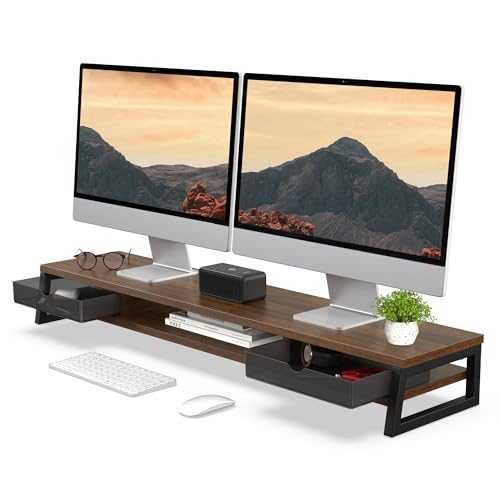
Fenge Dual Monitor Stand Riser, 42.5in with 2 Drawers (Brown)

Fenge Dual Monitor Riser for Desk with 3 Storage Compartments
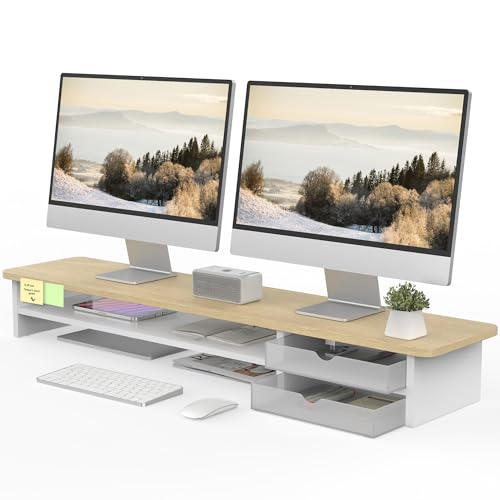
Fenge Monitor Stand with Frosted Storage Drawer (Oak)
The Details Behind The Selections
Triple-monitor work without a single manual crank is the pitch here, and the 40-inch platform delivers exactly that. The push-button electric lift means you go from seated to standing without wrestling a spring-loaded arm, which matters when the rig carries three panels of glass and a laptop tucked underneath. Compared to the Vari below, this trades the mechanical feel for a smooth, quiet motor that does the heavy lifting on your behalf.
The wide keyboard tray gives your wrists a proper landing zone at both heights, and the surface handles a triple-screen layout without forcing panels into an awkward overlapping arc. Most home-office desks in the 48-inch range swallow this converter whole, leaving you working space on either side.
Practical Advantages
- One-touch height changes keep your workflow uninterrupted during long coding or trading sessions.
- 40-inch surface fits three 24-inch monitors side-by-side without crowding the bezels.
- Wide keyboard tray stays level through the lift, so your wrists never re-angle mid-transition.
- Motorized lift removes the daily strain of fighting counterbalance springs under a heavy load.
Things To Consider
- The motor adds weight, so plan on a sturdy base table that can handle a fully loaded converter.
- Cable management becomes more involved once three displays start moving up and down together.
Key Specs
Who Will Love This
Triple-monitor professionals who switch between sitting and standing several times a day and want one-button convenience.
Look Elsewhere When
Shoppers working with only two displays should consider the smaller VERSADESK PowerPro 36 Inch Electric Standing Desk Converter below.
Two screens plus a laptop is the sweet spot for this 36-inch electric converter. The motorized lift carries the same quiet, push-button personality as the wider 40-inch model, just trimmed down for setups that don’t need the full triple-monitor span. Office workers running dual 27-inch panels get a clean ergonomic lift without overspending on extra surface they would leave empty.
Compared to the manual Vari that follows, this one asks for nothing from your hands or shoulders when you change posture. You press, you wait a few seconds, you keep typing.
The Upside
- Motorized lift makes frequent posture changes effortless, especially during back-to-back meetings.
- 36-inch platform fits two full-size monitors plus a centered laptop without feeling cramped.
- Wide keyboard tray keeps input devices stable through every height transition.
Worth Noting
- Surface is too narrow for a true triple-monitor row without overlapping bezels.
- Heavier than spring-loaded alternatives, so rearranging the desk becomes a two-person job.
Made For
Dual-monitor professionals who want motorized height changes on a slightly smaller footprint than the 40-inch sibling.
Consider Something Else When
Triple-monitor users should step up to the VERSADESK PowerPro 40 Inch Electric Standing Desk Converter instead.
This is the converter that put Vari on the map, and it still earns a spot on most shortlists. The spring-loaded lift mechanism uses a counterbalance system, so adjusting height feels almost frictionless once you balance your monitor weight correctly. Eleven lockable height positions let you dial in the precise level your body prefers, and the dual-tier layout gives you a real keyboard tray that doesn’t float above the desk.
Compared to the motorized VERSADESK above, this one asks you to nudge it by hand, but it ships fully assembled and ready to use right out of the box.
What Earns Its Place
- Spring-loaded counterbalance makes adjustments quick, even under a loaded dual-monitor setup.
- Eleven height settings cover a wide range of sit-to-stand positions for different body types.
- Arrives fully assembled, so you skip the build-out step entirely.
Points To Note
- 36-inch width handles two monitors comfortably but crowds a true triple-monitor row.
- Spring mechanism needs occasional re-balancing whenever you change the monitor weight on top.
Feature Snapshot
Best Suited To
Home-office workers with dual monitors who want a no-fuss, no-electricity sit-stand converter that ships ready to use.
Reach For A Different Pick When
Triple-monitor users should consider the VERSADESK PowerPro 40 Inch Electric Standing Desk Converter for the wider span.
Sprawling monitor walls, trading desks, and editing bays all share the same problem: there is no such thing as too much surface. The 48-inch PowerPro answers with a top deck wide enough for four screens, a heavy laptop dock, and a few inches of breathing room between bezels. The motorized push-button lift keeps every gram level through the full height range, which matters once you load the surface past 30 pounds of glass and metal.
Versus the 40-inch PowerPro reviewed earlier, you give up a few inches of clearance on smaller desks in exchange for room to spread out.
What Works In Its Favor
- 48-inch top surface handles three to four large monitors with room for accessories alongside.
- Motorized lift keeps the entire rig level regardless of total weight on top.
- Wide keyboard tray accommodates full-sized mechanical keyboards and a mouse pad side-by-side.
A Few Limitations
- Footprint requires a deep desk, since the converter itself extends back several inches.
- Heavier than the smaller PowerPro models, so initial setup takes two people.
Right Fit For
Power users running wide multi-monitor arrays who need the largest lift surface in the motorized category.
A Better Fit Elsewhere
Smaller home offices should consider the VERSADESK PowerPro 40 Inch Electric Standing Desk Converter for a less imposing footprint.
Not every desk has the depth for a 40-inch converter with a second tier hanging off the front. The VIVO single-top model solves that with a slim 31.5 by 18.5-inch platform that lifts straight up without a separate keyboard deck below. Your keyboard stays on the base desk, freeing up front-to-back space in tight corners, studio apartments, and shared workstations.
Compared to the dual-tier VERSADESK and Vari above, you lose the dedicated wrist platform but reclaim a chunk of usable desk depth.
Real Benefits
- Ultra-slim footprint fits on shallow desks where dual-tier converters would crowd your legs.
- Patented lift mechanism handles frequent transitions between sitting and standing.
- 32-inch surface accommodates a single monitor and laptop with a full-size keyboard alongside.
Honest Caveats
- Single-tier design means your keyboard sits on the base desk, not on a dedicated tray.
- Surface is sized for one screen rather than a triple-monitor row.
Quick Facts
Whose Shelf It Belongs On
Anyone working with a single monitor in a tight space who still wants sit-stand flexibility without sacrificing desk depth.
Swap It Out When
Triple-monitor setups need a wider platform like the VERSADESK PowerPro 40 Inch Electric Standing Desk Converter.
Fixed-height monitor shelves split the difference between a full sit-stand converter and a basic monitor stand. This Fenge model lifts your screens roughly 5 inches off the desk, which is enough to bring most monitors to natural eye level for seated work. The two integrated drawers turn dead space under the shelf into a spot for cables, notebooks, and small desk accessories that usually pile up next to your keyboard.
Versus the height-adjustable converters above, this one stays put once placed. The trade-off is a more organized desk and a lower price point.
Reasons It Performs
- 42.5-inch shelf accommodates two side-by-side monitors with a few inches of clearance per side.
- Two built-in drawers convert the under-shelf zone into usable storage.
- Wood and metal construction blends with most home-office furniture styles.
Trade-Offs
- Fixed height means no standing-desk benefit without stacking it on another riser.
- Brown finish limits compatibility with lighter or modern monochrome desk setups.
Perfect Match For
Seated workers who want a tidier desk with hidden storage and don’t need to switch between sitting and standing.
Skip It When
Standing-desk users should pick the Vari VariDesk Pro Plus 36 Adjustable Desk Converter for actual height changes.
Some shelves sag after a year under a pair of 27-inch monitors. This one is engineered against that problem with a single thickened wood panel rather than split boards, paired with reinforced steel legs. The 5.4-inch lift brings most monitors to a comfortable seated eye line, and the open three-compartment shelf underneath keeps gear visible and accessible.
Unlike the drawer-equipped Fenge reviewed just before, this version prioritizes open storage you can see into at a glance.
A Favorable Mix
- Reinforced steel legs support up to 99 pounds without wobble under heavy monitor loads.
- Single-piece wood panel resists the splitting that plagues budget monitor shelves.
- Open compartments keep cables, laptops, and supplies within easy reach.
Minor Gripes
- Open shelving shows dust buildup faster than enclosed drawer designs.
- Fixed-height build means no standing-desk benefit on its own.
Feature Rundown
Who Should Grab It
Shoppers running heavy dual-monitor setups who want an open-shelf design and rock-solid stability without paying for a height-adjustable converter.
Another Choice May Suit
Anyone wanting hidden storage instead of open compartments should consider the Fenge Dual Monitor Stand Riser, 42.5in Desk Shelf with 2 Drawers, Brown.
The oak finish sets this Fenge shelf apart from the brown and open-shelf siblings reviewed above. The two semi-transparent frosted drawers add a softer visual element while still hiding the cable clutter and small accessories that build up under any monitor. The 42.5-inch platform supports a dual-monitor load and gives you 5.5 inches of lift, which lands most screens right at seated eye level.
Compared to the brown Fenge drawer version earlier, this one trades the warmer wood tone for a lighter oak finish that pairs well with Scandinavian and minimalist setups.
Good Reasons To Consider
- Oak finish matches lighter Scandinavian and minimalist desk aesthetics.
- Frosted drawers soften the look while still concealing desk clutter.
- 42.5-inch width supports two monitors side-by-side with room to spare.
Points To Keep In Mind
- Wood-grain tone won’t suit darker walnut or espresso desk furniture.
- Like other fixed shelves here, it adds no standing-desk capability on its own.
Built With In Mind
Style-conscious home-office workers who want a lighter oak monitor shelf with frosted drawers that complement a minimalist setup.
Where Another Pick Suits Better
Anyone needing actual height changes should consider the Vari VariDesk Pro Plus 36 Adjustable Desk Converter instead.
What To Weigh Before Choosing Standing Desk Converters For 3 Monitors
Surface Width And Monitor Footprint
A triple-monitor row typically needs 45 to 55 inches of horizontal space, depending on bezel thickness and panel size. Converters in the 36-inch range handle two screens comfortably but crowd three, while 40 to 48-inch models give your displays room to breathe. Measure the base of your center monitor and add the stand widths of the flanking panels before committing to a converter width.
Lift Mechanism And Daily Use
Electric push-button lifts remove physical effort from every posture change. Spring-loaded counterbalances feel almost weightless once properly tuned, but they require you to nudge the surface by hand. Manual crank converters are the most affordable option, though the daily cranking adds up faster than most people expect.
Keyboard Tray Layout And Desk Depth
A separate keyboard tray adds 6 to 10 inches of front-to-back depth, which can push your knees against the converter on shallow desks. Single-top designs keep the keyboard on your base desk and reclaim that depth. Measure from the back of your current desk to where your knees sit, then leave at least 4 inches of clearance.
Storage And Cable Considerations
Fixed monitor shelves with built-in drawers or compartments turn dead airspace under your monitors into usable storage. Converters that move up and down need slack in your cables to avoid pinching during the lift, so plan a cable route that loops behind the unit before plugging in.
Key Considerations Across These Picks
Where Shoppers Go Wrong
The most common slip-up is choosing a converter width based on the desk size rather than the monitor footprint. A 32-inch surface looks generous on a small desk until you try to fit three 24-inch panels side-by-side. Measure your monitor bases first, then add 2 inches of clearance per side. Another pitfall is underestimating desk depth: a 40-inch converter with a keyboard tray can extend 18 inches back from your monitors, which crowds shallow desks fast.
Where The Extra Money Goes
Higher-tier electric converters buy you a motor, a wider platform, and a heavier-duty frame rated for sustained daily use. The jump from spring-loaded to motorized matters most for users who switch postures more than four or five times a day, since the lift goes from a manual nudge to a one-button operation. Premium wood-and-metal fixed shelves trade lift capability for stronger materials, hidden storage, and a finish that holds up under years of monitor weight.
Frequently Asked Questions
Can a 36-inch converter really hold three monitors?
A 36-inch converter can hold three monitors only if the panels are 22 inches or smaller, or if you accept overlapping bezels. Most 24-inch and 27-inch panels need at least 40 inches of surface to sit side-by-side without crowding.
Do electric standing desk converters need to be plugged in?
Yes, electric converters need a power outlet for the motor, and the cable typically runs out the back to a standard wall socket. Spring-loaded converters need no power at all and work anywhere a desk fits.
Will a fixed monitor shelf help with neck pain?
A fixed shelf lifts your monitors roughly 5 inches off the desk, which brings most screens to natural seated eye level. That alone reduces the daily downward tilt that strains your neck, even without standing-desk capability.
How much weight can these converters actually hold?
Spring-loaded and electric converters in this category typically handle 30 to 45 pounds of monitor weight, while reinforced fixed shelves like the Fenge models support up to 99 pounds. Always check the rated capacity before loading up three screens.
Is assembly usually required?
Most electric and spring-loaded converters arrive fully assembled or with minimal setup. Fixed monitor shelves sometimes need basic assembly of the legs and drawer compartments, which usually takes 10 to 20 minutes with included hardware.
Closing Remarks
The right standing desk converter for three monitors comes down to how often you switch postures and how wide your monitor row actually is. Electric lifters like the VERSADESK PowerPro 40 and 48-inch models handle triple-screen workloads with one-button convenience, while spring-loaded options like the Vari give you a quieter, electricity-free alternative. Fixed shelves with drawers and compartments from Fenge keep your desk tidy when height adjustment isn’t part of the plan. Match the platform width to your monitor footprint, leave a few inches of clearance on each side, and your triple-screen setup will sit at the right height from day one.