A working printer shouldn’t drain your ink budget before you’ve finished a single project. Whether you’re running a small apparel shop from home, printing shipping labels for an online store, or just trying to keep a photo printer alive between family events, the right combination of hardware and consumables makes all the difference. This guide breaks down eight options that genuinely earn their place on a workbench, a craft table, or a small office desk, plus the practical habits that keep them running smoothly.
A Fast Comparison Of The Options
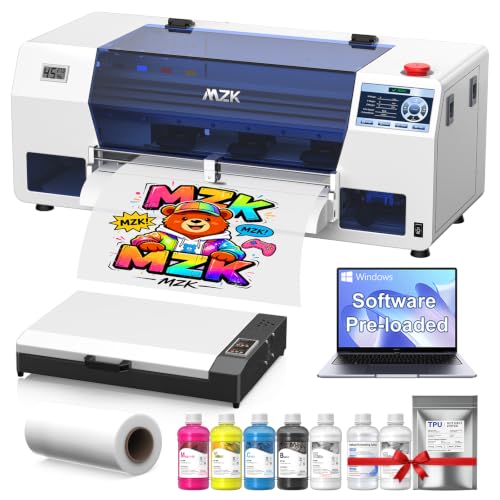
MZK Industrial A3 i3200 DTF Printer With Oven and Laptop

DSV A3 DTF Printer with i3200 Printhead, Shaker, Purifier and PC

LUXJA Photo Printer Case for Canon SELPHY CP1500, CP1300 and CP1200

Lebakort Storage Case for Liene 2×3 Inch Mini Photo Printer (Green)

Liene M100 4×6 Inch Photo Printer Bundle with 180 Sheets and 5 Ink Cartridges

Rollo USB Shipping Label Printer – 4×6 Thermal

Canon imagePROGRAF TM-240 24 Inch Large Format Printer

Canon 9856B002AA Wireless Color Printer, ImagePROGRAF
The Strengths Of Each Pick
DTF, short for Direct-to-Film, is a printing method that lays ink onto a special film, which you then transfer onto garments with heat. This MZK setup arrives as a complete bundle with the oven and laptop included, so you’re not chasing down accessories the day your first order arrives.
The industrial-grade i3200 printhead, a high-resolution component that sprays ink in precise droplets, pushes resolution out to 720×3660 DPI, which is a measurement of dot density. For most apparel shops working on cotton tees, hoodies, and totes, that resolution produces clean edges and readable text on small graphics. The auto-timer cleaning cycle and built-in anti-clog filter help keep the printhead healthy between long production runs, and the white-ink stirring routine prevents pigment from settling in the lines.
Strong Points
- 720×3660 DPI output supports detailed graphics on dark and light garments.
- Five-inch smart touchscreen simplifies job control without a separate computer.
- Two-year ink and powder supply plan keeps consumables flowing for active studios.
- Auto-timer cleaning and anti-clog filter reduce the maintenance chore of long runs.
Worth Bearing In Mind
- White-ink systems need regular use; long idle periods can lead to clogs that require manual flushing.
- The bundle is heavy and demands a dedicated workspace with stable ventilation.
- First-time DTF owners may need a learning curve for color profiles and film handling.
Who It Suits Best
Small apparel shops and DIY creators who already handle heat-press transfers and want an all-in-one DTF rig with supplies bundled in.
Look Elsewhere When
The DSV A3 DTF Printer offers a similar concept for shoppers who prefer a system that ships with a built-in shaker and purifier rather than a separate oven.
The DSV package lands as a true turnkey system, meaning everything you need to start printing is in the box. Unlike the MZK’s oven-plus-laptop pairing, this one folds the curing and powder-shaking steps into dedicated hardware, so transfers move from print to press with less handling.
You get the same industrial i3200 printhead you saw in the MZK, plus an integrated shaker that applies and recycles powder evenly across each sheet. The included PC lets you run RIP software, which converts images into printer-friendly data, straight out of the box, and the two-year ink plan covers the heavy lifting for most small studios. For ecommerce sellers running custom apparel, this is the kind of setup that lets you keep production in-house rather than farming it out.
Noteworthy Benefits
- All-in-one system with built-in powder shaker reduces the manual steps between print and press.
- Two-year supply plan removes the monthly scramble for ink and powder refills.
- Smart auto-clean and white-ink stirring extend printhead life during slow weeks.
- Ready-to-run bundle cuts the setup time you would face with separate components.
Trade-Offs To Consider
- Integrated shaker adds bulk, so plan for a wider table footprint than a basic printer alone.
- DTF ink still requires steady use to avoid clogs during seasonal slowdowns.
Right Fit For
Workshop owners producing custom apparel in small to mid batches who want a single integrated system rather than a collection of separate machines.
Reach For A Different Pick When
The MZK Industrial A3 DTF Printer With Oven and Laptop suits shoppers who already own a heat-press setup and only need the printer and curing oven.
A photo printer only stays useful as long as it survives the trip to the venue. The LUXJA case wraps your CP1500, CP1300, or CP1200 in heavy-duty polyester with padded lining, which keeps the print head safe from the bumps that come with event setups.
The bottom compartment uses straps to lock the printer in place, while a detachable divider creates room for the power adapter and cables. Up top, several elastic loops and pockets handle ink cartridges and paper packs. If you’re a scrapbooker, party host, or photo booth operator, this kind of organized carry makes setup and teardown much less painful.
What Works In Its Favor
- Heavy-duty polyester shell handles travel between events without showing wear quickly.
- Padded bottom straps hold the printer steady during transport.
- Detachable divider and elastic loops keep cables, cartridges, and paper in order.
Some Limits To Know
- The case adds bulk, so it’s not ideal if your SELPHY lives on a desk and rarely moves.
- Specific Canon models only; double-check your exact printer series before ordering.
Made For
Canon SELPHY owners who take their printer to weddings, school events, craft fairs, or pop-up booths and need everything in one tidy bag.
Swap It Out When
The Lebakort case fits Liene 2×3-inch mini printers instead, making it the right choice for shoppers running a pocket-sized photo setup.
Liene’s mini 2×3-inch printer is small enough to toss in a tote, but the cable and paper still need somewhere to live. This Lebakort case is sized exactly for that hardware, with a mesh pocket up top that keeps essentials visible and easy to grab.
The mesh pocket lets you see at a glance whether you packed enough paper for the day, and the shell guards the printer from scratches in your bag. For journaling fans who print on the go or scrapbookers making pages at retreats, this is a tidy upgrade over loose gear rattling around in a backpack.
The Upside
- Compact size mirrors the mini printer’s portability, which means it slips into backpacks easily.
- Mesh pocket design keeps cable, paper, and accessories visible and accessible.
- Green color stands out in a crowded bag so you’re not digging for the case.
- Organization reduces the chance of leaving cartridges behind on a trip.
Honest Caveats
- Specific to Liene’s 2×3-inch model, which limits cross-compatibility with other mini printers.
- Light padding prioritizes portability over heavy-impact protection.
Who Should Grab It
Liene mini printer owners who print at cafes, scrapbook nights, or weekend trips and want a pocket-friendly organizer that keeps supplies together.
A Better Fit Elsewhere
The LUXJA Photo Printer Case is a stronger match for Canon SELPHY owners who need deeper padding and a dedicated compartment for the power brick.
The Liene M100 uses dye-sublimation, a process that turns solid dye into gas and bonds it to paper without liquid ink. That means your hands stay clean and the prints come out dry, with a final protective layer that resists water and fingerprints. Wi-Fi connectivity supports iPhone, Android, and laptop workflows.
This bundle ships with 180 sheets of 4×6 paper and five ink cartridges, so you can print from day one without ordering supplies. The paper design includes crop guides on both sides, so your fingers don’t touch the printed surface during refills. For households that print vacation photos, school projects, and birthday albums, the running cost feels predictable rather than stressful.
Positive Points
- Dye-sublimation output produces dry, smudge-resistant prints with a protective overcoat.
- 180-sheet paper bundle plus five ink cartridges covers the first stretch of use.
- Wi-Fi works with iPhone, Android, and computer workflows without cables.
- Crop guides on paper help avoid fingerprint smudges during refills.
Points To Keep In Mind
- Bundled supplies eventually run out, so factor in replacement cartridge cost for the long term.
- Wi-Fi printing requires stable home network coverage near the printer.
Best Suited To
Families and casual photo printers who want Wi-Fi convenience, reliable print durability, and the peace of mind of bundled supplies.
Consider Something Else When
The Rollo USB Shipping Label Printer is purpose-built for ecommerce shippers who print labels rather than photos and don’t need a color photo workflow.
Thermal printers, which use heat instead of ink to mark paper, have reshaped small ecommerce operations. The Rollo skips cartridges entirely, so your ongoing cost is the label roll, not the ink. That alone changes the math for high-volume shippers.
Setup is straightforward: plug in via USB, install the drivers on Windows or Mac, and the unit is ready for shipping labels, warehouse labels, barcodes, and stickers. It supports common ecommerce platforms through Rollo Ship, the brand’s companion app, which trims the steps between order and label. For anyone running an Etsy shop, Amazon storefront, or warehouse from a home office, this is a workhorse that pays for itself in saved ink.
What Stands Out
- Thermal printing means no ink cartridges to replace, only label rolls.
- USB connection works with Windows and Mac for plug-and-play use.
- Handles 4×6 shipping labels plus barcodes and warehouse stickers.
- Rollo Ship app streamlines label creation across multiple ecommerce platforms.
Potential Sticking Points
- Monochrome output only, so this is not a substitute for a color photo printer.
- Requires a compatible USB port and the Rollo driver install, which adds setup time on first use.
Whose Shelf It Belongs On
Small online sellers, home-based ecommerce operators, and warehouse staff who print labels daily and want a low-maintenance, ink-free workflow.
Skip It When
The Canon imagePROGRAF TM-240 24 Inch Large Format Printer is the better fit for studios needing 24-inch wide-format poster and plotter output rather than 4×6 labels.
Wide-format printers live in their own category. The TM-240 prints up to 24 inches wide on a roll, with five pigment-based color channels for poster and plotter work. The L-COA PRO II processor, Canon’s image-handling chip, drives faster throughput than the prior generation.
Built-in media detection and color calibration reduce the trial-and-error that normally comes with switching paper stocks. The PF-06 printhead holds six channels for fine detail, and at 2400×1200 DPI maximum resolution, plans and posters look crisp at typical viewing distances. Architects, design studios, and print shops looking for a 24-inch workhorse should put this near the top of the shortlist.
Where It Helps
- Five-color pigment output handles CAD plots, posters, and signage on a 24-inch roll.
- Media detection and color calibration reduce manual setup between paper changes.
- 2400×1200 DPI maximum resolution supports crisp plans and photographic prints.
Where It Is Less Suited
- Wide-format footprint demands significant floor or table space in a studio.
- Pigment ink bottles and replacement heads add long-term consumable cost to factor in.
Perfect Match For
Studios and design offices that regularly print posters, technical drawings, or signage and want a 24-inch Canon system with calibration built-in.
Where A Sibling Pick Shines
The Canon imagePROGRAF iPF770 is a sensible alternative for entry-level owners who need 36-inch width at a more accessible tier, depending on the studio’s priorities.
This is the iPF770, Canon’s 36-inch entry-level plotter aimed at first-time wide-format owners. The 36-inch width gives poster makers and signage shops more room to work than the 24-inch TM-240, which can be a real advantage for full-bleed prints.
Wireless connectivity removes the cable tether to a single workstation, and the included color profiles, which are pre-built settings that match ink to paper type, help beginners get acceptable output without advanced color knowledge. For small studios making the jump into wide-format printing, this is a sensible starting point that covers the common use cases without overwhelming the operator.
Useful Highlights
- 36-inch print width handles larger posters and signage than typical 24-inch plotters.
- Wireless setup removes the cable tether to a single workstation.
- Entry-level positioning makes the wide-format leap less intimidating for first-time owners.
Things To Consider
- Older-generation internals mean slower throughput than newer TM-series plotters.
- Wide rolls demand ample storage space for paper inventory.
Who Will Love This
First-time wide-format owners, signage makers, and small studios stepping into Canon plotters for the first time.
Not Your Match When
The Canon imagePROGRAF TM-240 24 Inch Large Format Printer fits better in tight studios that prioritize newer processing and 24-inch output over 36-inch width.
What Matters Most Before Choosing Value Printer And Inks
Match the Printer to the Workload
Start with the honest question of what you’ll actually print. A photo printer running a few albums a month needs different specs than a DTF rig running dozens of garments daily. Match output type and volume first, then worry about extras.
Ink Cost Often Beats Printer Cost
The sticker on the box rarely tells the whole story. Thermal printers skip ink entirely, dye-sublimation printers use cartridges, and DTF rigs need bottles plus powder. Calculate ongoing supply cost over a year of expected use before committing.
Consider the Workspace
Wide-format plotters and DTF ovens both demand floor space, ventilation, and stable power. Photo printers need a flat surface and good Wi-Fi. Sketch the footprint before ordering so you’re not rearranging the office the day the box arrives.
Plan for Maintenance From Day One
Printheads clog, ink lines settle, and powder dusts. Build a weekly cleaning routine into your schedule, and the printer will return the favor with years of reliable output.
Key Considerations Across These Picks
Where Shoppers Go Wrong
A common slip is chasing the highest resolution without thinking about ink cost. A 720×3660 DPI DTF rig is exciting on paper, but if the ink plan doesn’t match your volume, the printer becomes expensive shelf decor. Always compare the bundled supply plan to your realistic monthly use.
What Separates Premium From Basic
Higher-tier DTF systems tend to bundle the oven, shaker, and PC in one shipment, while entry models ask you to source accessories separately. The TM-240 versus iPF770 split follows a similar pattern: newer processing and calibration in the TM-240, larger width and lower cost in the iPF770. The right choice depends on whether speed or width matters more to your studio.