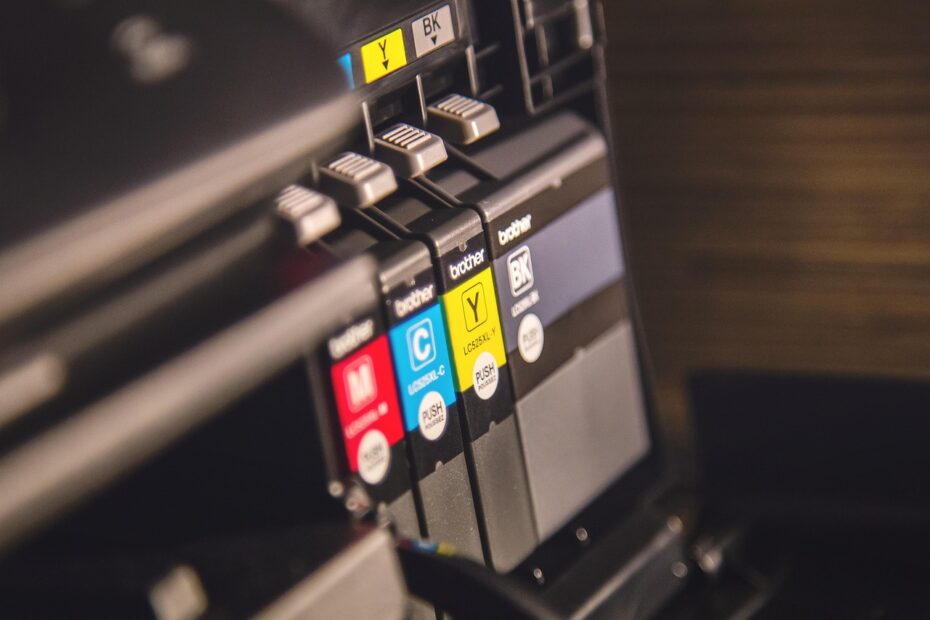
Dry toner powder in laser printers differs from the liquid ink used by inkjet models. Toner bonds to paper through electrical charge and heat; liquid ink lands as droplets. Your print volume, photo needs, and idle time point toward the stronger fit.
The sections below cover print mechanics, output, page yield, storage, and monthly volume so you can match your desk, household, or small office to its regular workload.
The Materials and Printer Hardware Work Differently
A toner cartridge holds fine dry powder, while an ink cartridge holds liquid colorant. Toner belongs inside a laser printer, and liquid ink belongs inside an inkjet printer. Your cartridges fit separate hardware, so they cannot swap between machine types.
That material split changes the route from file to paper. A laser printer forms letters through electrical charge and heat, while an inkjet printer places fluid dots directly on the sheet. Your choice affects print speed, surface finish, maintenance needs, and supply yield.
| Factor | Laser printer with toner | Inkjet printer with ink |
|---|---|---|
| Material | Dry powder | Liquid colorant |
| Image method | Charge, transfer, and heat | Microscopic droplets from a printhead |
| Document speed | Fast on multi-sheet jobs | Slower on long document runs |
| Photo output | Solid for basic graphics | Strong for detailed photos and gradients |
| Cartridge yield | Higher on text-heavy work | Lower with standard cartridges |
| Storage behavior | Powder does not evaporate | Nozzles can dry during long idle periods |
| Typical fit | Frequent reports, forms, and office text | Photos, school color work, and creative projects |
The difference between toner and ink reaches beyond cartridge shape. A black toner cartridge can resemble a black ink cartridge from across a desk, yet each material follows a separate path to the paper. Your printed page reflects that physical difference.
Laser Printers Fuse Powder With Charge and Heat
An imaging drum forms the image
Inside a laser printer, an imaging drum receives a controlled electrical charge. A laser or LED changes charge patterns across the drum to form text and graphics for your document. Toner particles carry an opposite charge and cling to those mapped areas.
The drum then rolls against paper and transfers its powder image. Heated rollers inside the fuser unit press toner into the paper fibers. Your document exits dry because the powder melts and bonds instead of soaking into the sheet.
Color toner stays a dry powder
Black is only one toner color. Cyan, magenta, yellow, and black cartridges work together in color laser printers for charts, logos, and presentation graphics. Your color documents still rely on powder rather than liquid ink.
Heat-bonded output resists casual smearing right away. A highlighter can disturb some toner surfaces, especially across heavy coverage, but routine handling is less troublesome than handling wet liquid ink. Your stack of forms is ready for filing soon after it leaves the tray.
That dry, heat-set process explains why the liquid alternative behaves differently from the moment droplets hit paper.
Inkjet Printers Place Liquid Droplets on Paper
A printhead controls tiny dots
Rather than relying on a drum and fuser unit, an inkjet printhead moves across the sheet and ejects tiny droplets through narrow nozzles. The printer controls dot size, placement, and color mix. Your photo gains detail because the dots overlap in fine patterns.
Paper absorbs part of the fluid, which changes the result. Plain copy paper can spread liquid and soften edges, while coated photo paper holds dots closer to the surface. Your family vacation photo can show sharper color separation on glossy stock.
Dye and pigment inks suit separate jobs
Dye-based ink dissolves color into liquid, producing vivid color and smooth transitions. It suits photographs and rich color images, though moisture can disturb it before drying. Your print can also fade sooner under bright display light than a pigment print.
Pigment-based ink suspends tiny solid color particles in fluid. It tends to produce sharper text and stronger water resistance on compatible paper. Canon and HP offer machines with separate ink sets, so your listed ink type says more than the printer color alone.
Droplet control gives inkjet technology an advantage on portraits, sunsets, and shaded illustrations. That liquid path brings a trade-off: nozzles sit near evaporation, and the page needs time to settle after printing. Your routine matters more with an inkjet printer left idle for weeks.
Text, Photos, Speed, and Durability Set the Trade-Offs
Laser output suits document runs
A 30-page lease, class packet, or meeting handout plays to a laser printer’s strengths. It moves sheets quickly after warm-up and produces crisp letter edges with little delay between pages. Your stack is ready to sort almost as soon as it lands in the tray.
Inkjet printers can produce sharp text, especially with pigment black ink, but long runs take more time. Their carriage moves back and forth across each line, while a laser system transfers a full image across the sheet in one pass. Your workload feels that speed gap most clearly during multi-sheet jobs.
Inkjet output suits photos and gradients
Skin tones and pale blue skies reveal coarse color transitions quickly. An inkjet printer places tiny dots with smooth overlap, making it a stronger fit for photo paper and art images. Your child’s school poster can benefit from that detail without gallery-level photo goals.
Moisture creates another split. Fresh liquid output can smear from a wet fingertip or damp desk surface, depending on paper and ink chemistry. Toner sits on the sheet as a fused layer, so your invoices and shipping labels tolerate immediate handling more comfortably.
Those performance differences also determine how quickly each consumable is used, making cartridge capacity a misleading price signal.
- Text packets: Select laser output for clean letters, fast multi-sheet jobs, and dry handling at the tray.
- Photo prints: Select inkjet output for smooth shading, dense color, and photo paper compatibility.
- Color charts: Either system works, but your detail needs and monthly volume shape the stronger fit.
- Damp settings: Favor fused toner output for documents handled near kitchens, entryways, or busy counters.
Page Yield Reveals the Real Supply Math
Cost per page puts cartridge prices in context
A replacement cartridge with a higher shelf price can cost less across a school term or office quarter. Page yield states how many standardized pages a supply produces under a published test pattern. Your real total changes with coverage, color areas, photos, and cleaning cycles.
The formula is cartridge price divided by rated page yield. A $90 toner cartridge rated for 3,000 pages equals 3 cents per page. A $30 ink cartridge rated for 300 pages equals 10 cents per page. Your printer toner vs ink decision becomes clearer after that calculation.
Those figures are estimates rather than a penny-by-penny prediction. A dense black worksheet consumes more material than a short email, and a borderless photo consumes far more color than the yield pattern. Your printer’s maintenance cycle also draws a small amount of ink.
Higher yield changes high-volume printing
Toner cartridges tend to last longer than standard ink cartridges during text-heavy output because they hold more printable material. That is why toner vs ink cost per page favors toner for high-volume text printing, even though the cartridge costs more at checkout.
An OEM cartridge comes from the printer brand and offers predictable fit. A compatible cartridge comes from another maker, while a remanufactured cartridge reuses a cleaned original shell. Your machine manual and brand service terms deserve a check before either alternative enters the printer.
Compare yield ratings for the same kind of output. A black toner yield and a six-color photo ink set do not describe the same printing task.
Storage Habits Affect Toner and Ink Reliability
Powder handles idle time well
Months of quiet do not turn toner into a dried block the way liquid can dry at a nozzle. Store unopened toner flat in a cool, dry room away from direct sun and humidity. Your cartridge still needs protection from cracked housing, torn seals, and rough handling.
Heat and moisture can affect powder flow or cartridge parts, so a garage shelf is a poor long-term location. Leave a newly installed toner cartridge level, then follow the printer instructions before printing. Your machine can suffer from scattered powder after violent shaking.
Inkjet nozzles need regular flow
Liquid ink can evaporate at printhead openings during long idle periods. Ink cartridge clogging can appear as pale colors, missing lines, or blank bands across a nozzle-check pattern. Your printer can hold ink while the route to paper remains partly blocked.
Start with the printer’s nozzle check. Run one cleaning cycle, print the pattern again, and continue only where the output improves. Your ink supply drains quickly during repeated deep cleaning, and a stubborn clog can remain.
Because cleaning cycles consume ink without producing pages, infrequent use can distort the cost picture for low-volume households.
- Print color regularly: Run a small color page every one or two weeks to keep nozzles active.
- Check before cleaning: Confirm missing lines before spending ink on a cleaning cycle.
- Limit deep cleans: Repeated intensive cycles consume supplies without clearing every blockage.
- Seal spare ink: Keep unopened cartridges in their packaging and follow the label direction.
- Match paper types: Reserve photo paper for photos and dry office stock for text-heavy tasks.
Monthly Volume Points Toward the Better Printer Type
Light home printing has its own risks
A household printing 10 to 50 sheets a month can value flexible color output more than raw speed. Inkjets suit school assignments, greeting cards, craft graphics, and photo prints. Your maintenance burden rises after long gaps between those jobs.
For example, a parent printing two worksheets on Sunday and ten photos before a holiday can prefer an inkjet printer with pigment black and color cartridges. Regular light printing keeps the printhead moving, while photo paper gives your color droplets a stronger final image.
Steady office printing favors laser capacity
Shared desks producing 200, 500, or 1,000 black-text sheets a month benefit from higher toner yield and faster print speed. A laser printer keeps reports, labels, invoices, and forms moving with fewer supply changes. Your team also avoids waiting for wet sheets to dry.
Idle time belongs in the decision as well. A person printing once every few months can favor toner storage behavior, even at low volume. Your weekly color handouts point more strongly toward inkjet output, provided regular nozzle activity fits the routine.
| Your printing pattern | Stronger starting point | Main reason |
|---|---|---|
| 10 to 50 mixed-color sheets monthly | Inkjet | Color flexibility and photo detail |
| 50 to 150 school and home documents | Either system | Output mix and idle periods decide |
| 200 or more text-heavy sheets | Laser | Speed and lower toner vs ink cost per page |
| Frequent borderless photos | Inkjet | Fine droplet placement on photo paper |
The Best Fit Follows Your Regular Print Jobs
Your most common job should outweigh a rare special project. Select an inkjet-focused path where photo quality, occasional color work, or a lower machine entry cost leads the list. Select a laser-focused path where durable text, quick output, and frequent printing matter more.
Four checks clarify your hardware choice: monthly sheet count, your most valuable output type, estimated cost per page, and idle time between jobs. Printer toner vs ink becomes practical once those four facts sit beside your usual print routine.
- Count monthly sheets: A 200-sheet text workload points toward laser capacity more clearly than a 20-sheet photo workload.
- Name key output: Photos, forms, labels, and school work place different demands on your printer.
- Calculate page cost: Divide cartridge price by rated page yield for supplies serving the same print task.
- Track idle periods: Long gaps favor dry toner storage, while regular inkjet activity keeps nozzles clearer.
Do not select a machine from cartridge price alone. A low-cost cartridge with a small yield can become the more expensive printing path.
Final Thoughts on Toner and Ink
Dry powder and liquid droplets produce separate strengths rather than a universal winner. Your photos and color projects point toward inkjet printing, while your steady flow of reports and forms points toward laser output. Match the machine to the work filling your tray most weeks, then check yield math and storage habits before buying supplies.
FAQ
How does printer toner differ from ink?
Toner is a dry powder for laser printers, while ink is a liquid colorant for inkjet printers. Your laser printer fuses toner through electrical charge and heat. Your inkjet printer places liquid droplets through a printhead, creating a different surface finish and maintenance routine.
Which is better, an ink or toner printer?
An inkjet printer is better for photos, subtle gradients, and occasional color projects, while a laser printer is better for fast text documents and repeated multi-sheet jobs. Your printing volume, color needs, supply budget, and tolerance for inkjet maintenance decide which system fits your space.
Which lasts longer, ink or toner?
Toner tends to last longer during storage because its dry powder does not evaporate at print nozzles. Ink can remain usable in a sealed cartridge, yet an idle inkjet printer can develop clogs where liquid dries at the printhead. Your regular light printing routine reduces that risk.
Is toner just black ink?
No. Toner is dry powder for laser printers, and it comes in black, cyan, magenta, and yellow. Liquid ink belongs in inkjet printers and exits through tiny printhead nozzles. Your laser machine relies on electrical charge and fuser heat rather than liquid droplets.
Is it cheaper to print with toner or ink?
Toner tends to cost less per text page at higher volumes because toner cartridges carry larger rated yields. Ink can cost less at the cartridge counter, yet its yield can be much smaller. Your useful comparison is cartridge price divided by rated page yield for similar output.
Why do laser printers use heat to print toner?
Inside the fuser unit, heat melts toner powder into the paper fibers. Pressure from heated rollers helps bond the image to the sheet. Your printed document exits dry because the toner has fused to the paper before it reaches the output tray.