Sitting is the new smoking, as the old saying goes, and nowhere does that sting more than after a six-hour stretch at a wobbly desk chair. The right seating choice takes pressure off your lower back, keeps your shoulders from rolling forward, and helps you stay focused when the afternoon drags on. These six picks cover different body types, work setups, and budgets, so you can match a chair to the way you actually work.
The Shortlist At A Glance
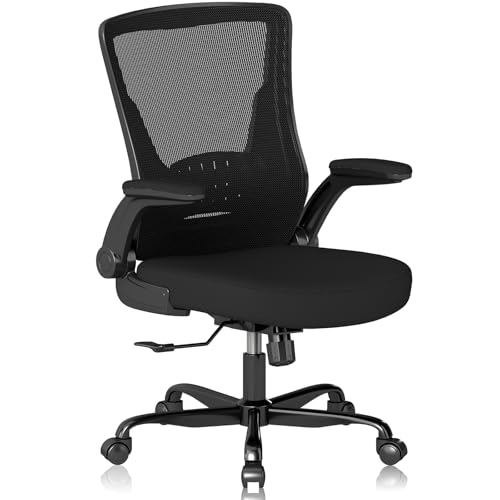
Vomena Mesh Desk Chair with Flip-up Armrests

SIHOO B300 Pro Ergonomic Office Chair

Solviva Mesh Office Chair with Headrest

TRALT Ergonomic Desk Chair with Lumbar Support

TRALT Ergonomic Desk Chair, Mesh Computer Chair (Black)

Humergo Ergonomic Office Chair with Footrest
The Details Behind The Selections
If your home office is really a corner of the bedroom or a converted dining nook, the Vomena mesh desk chair earns a spot on your shortlist. The flip-up armrests swing out of the way so you can slide the seat right under a shallow desk, which matters when every inch counts.
The breathable mesh back keeps air moving across your spine during warm afternoons, and the dense foam cushion holds its shape through long writing sessions. Compared with the SIHOO B300 Pro up next, this one keeps the spec list leaner, so it suits shoppers who want straightforward ergonomic support without a learning curve.
Useful Highlights
- Flip-up armrests free up lateral space, letting the chair tuck under desks that barely fit a keyboard tray.
- Mesh back panel keeps airflow steady, so you avoid the sweaty-back feeling common in all-foam chairs after hour three.
- Dense foam cushion distributes weight evenly, which helps during back-to-back video calls when you barely shift position.
- Five-point support structure targets shoulders, lumbar, hips, and hands, giving posture reinforcement across the full seating position.
Things To Consider
- Mesh upholstery can snag on zippers and rough fabric; a quick brush keeps the weave looking clean over time.
- Lumbar adjustment is more limited than what the SIHOO B300 Pro offers, so users with specific curvature needs may want to look elsewhere.
Who It Suits Best
Remote workers and students working in compact bedrooms, dorm rooms, or shared spaces where chair footprint matters more than deep customization.
Where Another Pick Suits Better
Anyone with chronic lower-back tension should consider the SIHOO B300 Pro, since its spring-assisted lumbar offers finer tuning.
Long days at a desk ask more from a chair than a quick sit-stand does, and the SIHOO B300 Pro answers with what the brand calls a 4D lumbar system. That is a support pad you can move up, down, forward, and back, while a spring mechanism keeps it pressed against your lower back as you shift positions.
Lean forward to type, sit upright through a standup meeting, or recline to think, and the lumbar tracks you rather than staying fixed. Compared with the Vomena chair, the B300 Pro trades simplicity for adjustability, so setup takes longer but the payoff shows up in how your back feels at 5 p.m.
The Upside
- Spring-loaded lumbar pad maintains contact as you lean, reducing the gap that causes slouching in cheaper chairs.
- Independent forward glide lets the support follow your torso during deep focus work, not just upright meetings.
- Adjustable height fits a wider range of body proportions, so the chair grows with your household rather than locking you in.
- Recline range supports both upright typing and mid-afternoon reading breaks without swapping chairs.
- Build quality leans toward heavier-duty cycles, suiting people who log eight-plus hours daily.
Points To Keep In Mind
- Assembly involves more parts than entry-level chairs, so budget 30 to 45 minutes for a careful build.
- The dense frame adds weight, which matters if you rearrange furniture often or store the chair between uses.
Feature Snapshot
Made For
Knowledge workers, programmers, and writers who log eight-hour shifts and need lumbar support that adapts in real time.
Skip It When
Folks furnishing a casual guest room should look at the Humergo recliner instead, since the B300 Pro is overkill for occasional use.
Not every chair fits every body, and the Solviva mesh office chair takes a different tack with a wide seat, 3D armrests, and a height-adjustable headrest. The headrest matters more than people expect, because neck strain builds slowly during video calls and quiet reading sessions.
The wide seat gives broader frames room to settle without the armrests pinching the hips. Where the Vomena keeps things simple, the Solviva layers in extra contact points for users who want more upper-body support. You may find the assembly slightly more involved, since the headrest adds an extra adjustment step.
Key Advantages
- Adjustable headrest supports the cervical spine, which reduces the neck ache that comes from monitor height mismatches.
- Wide seat accommodates broader frames without forcing the hips into a narrow channel.
- 3D armrests pivot and slide, so your forearms stay level whether you type, write, or hold a tablet.
- Mesh back construction keeps heat from building up, which matters in warm home offices without strong airflow.
Honest Caveats
- Wider seat means a slightly larger footprint, so measure your doorway if you move the chair between rooms.
- Headrest adjustment adds a step at setup that single-purpose chairs skip, so first-time builders should keep the manual handy.
- Mesh can trap dust in the weave, and occasional vacuuming keeps the surface looking fresh.
Best Suited To
Taller users, broader frames, and anyone who treats a headset-on Zoom call as a daily endurance test for the neck.
Reach For A Different Pick When
Gamers wanting a racing-inspired silhouette should check the TRALT ergonomic desk chair, which leans toward a sportier aesthetic.
For shoppers splitting time between spreadsheets and Steam, the TRALT ergonomic desk chair bridges both worlds. The molded foam seat uses high-density material that resists the flattening and sagging common in budget cushions after a year of daily use.
The adjustable lumbar keeps your spine aligned whether you are deep in a raid or finishing a Friday report. Where the Solviva leans into head and neck support, this TRALT focuses on the seat and lower back, which is where most posture complaints actually begin.
What Pays Off
- High-resilience molded foam bounces back, so the seat avoids the “bottoming out” feel typical of cheaper padding.
- Adjustable lumbar cradle, meaning the support sits where your spine needs it rather than at a fixed height.
- Hybrid work-and-play design fits gaming marathons and project deadlines without needing a second chair.
- Sturdy frame handles weight shifts during intense gameplay without wobbling.
Some Limits To Know
- Gaming-style silhouette may look out of place in a traditional executive setting.
- Recline range sits mid-pack, so deep lounging calls for a chair with a wider recline arc.
Quick Facts
Right Fit For
Hybrid professionals who game in the same room where they answer emails, and want one chair that handles both.
A Better Fit Elsewhere
If your workday ends with a full recline for a power nap, the Humergo reclining chair serves that pattern more directly.
The second TRALT on this list shares the brand’s molded foam seat technology but drops the gaming-race aesthetic in favor of a cleaner executive silhouette. The mesh back keeps airflow steady through long afternoons, while the adjustable lumbar anchors your lower back without forcing a rigid posture.
For standard home offices where the chair sits in front of a bookshelf rather than a battlestation, this option blends in without advertising itself. You may find the cushion a touch firmer than expected on day one, though the foam breaks in over the first couple of weeks of daily use.
Features That Help
- Mesh back prevents heat buildup during calls that run long, especially in rooms without cross-ventilation.
- Adjustable lumbar pad, so the support tracks your spine instead of sitting at one fixed curve.
- Executive-friendly profile fits a dining-room-turned-office better than overtly sporty alternatives.
- Molded foam seat retains its shape well into a second year of regular use.
Trade-Offs To Consider
- Headrest is not part of this build, so neck support falls to the chair back and your monitor height.
- Recline arc is moderate, so anyone wanting deep lounge angles should look at the Humergo.
Who Should Grab It
Home-office shoppers who want a quiet, professional-looking chair that still carries proper lumbar engineering.
Look Elsewhere When
Anyone needing active neck support throughout the day should pivot to the Solviva mesh chair, which includes a height-adjustable headrest.
Sometimes the workday calls for a 10-minute reset, and the Humergo ergonomic office chair leans into that pattern with a retractable footrest and a 90 to 145 degree recline arc. The movable crossbar behind the lumbar pad adjusts two centimeters forward or back to match your spine’s natural curve.
A height-adjustable, 45 degree rotating headrest adds a layer of neck support the earlier TRALT skips. The catch shows up in the footprint: the recline range and footrest need a bit more room behind the chair, so smaller rooms may feel cramped during full recline.
Strong Points
- Retractable footrest supports short breaks between tasks, taking pressure off the lower back during the workday.
- Recline arc from 90 to 145 degrees handles upright typing, mid-angle reading, and full lounge without a separate seat.
- Movable crossbar lumbar with two centimeters of depth adjustment dials in support more precisely than fixed pads.
- Rotating headrest adapts to reclined and upright positions, which most fixed headrests cannot do.
- Mesh upholstery keeps the chair breathable across seasons and use intensities.
Where It May Fall Short
- Recline function needs clearance behind the seat, so tight desk arrangements can feel constrained.
- Footrest mechanism adds a small step to the daily routine, since you flip it back in before standing up.
Technical Highlights
Perfect Match For
Remote workers who want break-friendly comfort built into the same chair that handles their heaviest typing sessions.
Not Your Match When
Shoppers furnishing a tight cubicle should consider the Vomena mesh chair, which tucks into smaller footprints more easily.
What Matters Most Before Choosing Computer Chairs For Posture
Posture support starts with the lumbar region, the natural inward curve of the lower spine. A chair that supports that curve keeps the pelvis upright and stops the upper back from rounding forward during long typing bursts. Look for adjustable lumbar pads that move up, down, forward, and back rather than fixed bolsters.
Seat depth and width matter more than people expect. A seat pan that is too shallow forces the thighs to dangle, cutting off circulation behind the knees. A pan that is too deep leaves the back unsupported because the user has to slide forward to bend the knees. Sit with two to four fingers of clearance behind the knees as a quick check.
Armrest adjustability reduces shoulder strain during long calls. Height, width, and pivot adjustments let your forearms rest at a neutral angle rather than dropping or hiking upward. Recline range matters too: a chair that locks at 90 degrees only locks you into one posture, while a 110 to 120 degree tilt spreads pressure across the back during reading or screen review.
Mesh versus foam comes down to climate and preference. Mesh breathes well in warm rooms and stays cooler against the back, while foam offers a softer initial feel that some users prefer for executive settings.
Key Considerations Across These Picks
Where Shoppers Go Wrong
The most common slip is choosing a chair based on how it looks in a product photo rather than how the adjustability maps to your body. A chair with a fixed lumbar pad leaves tall users unsupported, while a chair with too much recline arc can leave shorter users feeling unstable at upright settings.
Another trap is ignoring doorways and assembled dimensions. A wide seat like the Solviva’s fits broader frames beautifully, but the same width can make daily moves between rooms awkward. Measure the narrowest path before you settle on a chair.
What Separates Premium From Basic
Higher-tier models invest in dynamic lumbar systems, the kind that follow your torso through different postures. The SIHOO B300 Pro’s spring-assisted pad and the Humergo’s crossbar lumbar both track your movement, while entry-level chairs hold a single position that only matches one posture well.
Premium tiers also tend to use higher-density foam that resists the flattening common after a year of daily use. The molded foam in the TRALT chairs is a good example of a spec that pays off across years rather than months.
Frequently Asked Questions
How long should an ergonomic chair last?
A well-built ergonomic chair typically holds up across three to five years of daily use, with foam density and frame material being the main drivers of lifespan.
Is mesh better than foam for posture?
Both materials support good posture when paired with proper lumbar adjustment. Mesh tends to stay cooler, while foam often feels softer on first contact.
Do I really need a headrest?
A headrest helps if your monitor sits at eye level and you take frequent video calls. It matters less for users whose screens sit lower or whose work stays focused on typing.
How often should I adjust my chair?
Most people benefit from a quick weekly check, especially if the chair is shared or moved. Daily fine-tuning helps during long stretches when posture drifts.
Can one chair work for both gaming and office work?
Yes, hybrid designs like the TRALT ergonomic desk chair handle both, though dedicated gaming chairs often add bolder styling that may not suit a traditional office.
Wrap Up
The right chair depends on where you sit, how long you sit, and what your body needs at the end of a long shift. Match the adjustability to your specific pressure points, measure your space before ordering, and give yourself a week to break in the foam. A small upfront effort saves a lot of lower-back frustration down the road.