Running a small office, a busy household, or a hybrid workspace means juggling print jobs in the middle of everything else. The whole point of two paper trays is simple: one holds letterhead for clients, the other holds plain paper for drafts, so you stop feeding sheets by hand every five minutes. Below are eight monochrome laser models built for exactly that kind of routine, with trays that hold enough paper to last a workday without babysitting.
The Picks In Brief
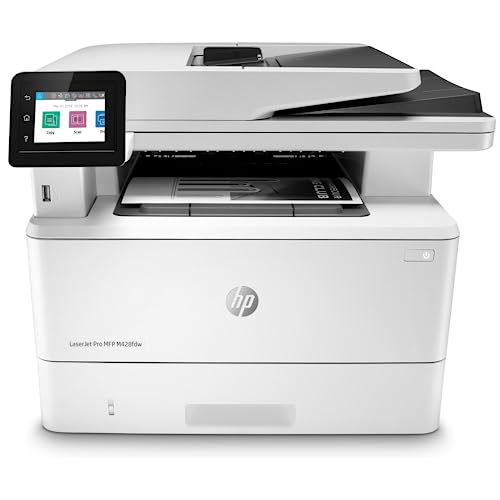
HP LaserJet Pro MFP M428fdw Wireless Monochrome All-in-One Printer

Brother HL-L6200DWT Monochrome Laser Printer with Dual Paper Trays

Lexmark Monochrome Dual Tray Laser Printer, 52 ppm
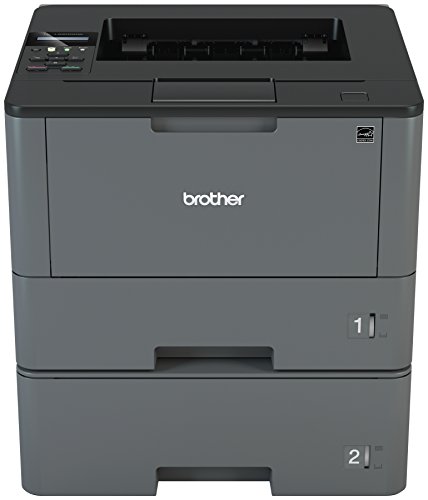
Brother HL-L5200DWT Monochrome Laser Printer with Dual Trays

HP LaserJet Pro M118dw Wireless Monochrome Laser Printer

KYOCERA ECOSYS PA5000x Monochrome Laser Printer

KYOCERA ECOSYS MA4500ix Multifunctional Monochrome Laser Printer

Brother MFC-L2750DW Monochrome All-in-One Wireless Laser Printer
Meet The Standout Selections
This is the model you choose when the office wants one machine that handles scanning contracts, faxing vendor paperwork, and spitting out double-sided reports without slowing down. The M428fdw pairs its dual-tray paper handling with built-in Ethernet and a customizable control panel, so a finance lead can save a multi-step scan-to-email workflow to a single button.
HP also layers in its Wolf Pro Security stack, which hardens the printer’s firmware and OS against common attack vectors. For an office that prints sensitive client data, that built-in protection tends to matter more than the raw ppm number on a spec sheet. You also get wireless convenience for laptop users who rarely sit still.
Where It Excels
- Customizable control panel turns repetitive multi-step scans into one-touch jobs
- Built-in Ethernet plus Wi-Fi keeps the printer reachable from wired desktops and roaming laptops
- Firmware-level security helps protect documents passing through shared networks
- Duplex printing saves paper on long reports and client proposals
- All-in-one design replaces a separate scanner, fax machine, and standalone printer
Things To Weigh
- Monochrome only, so color jobs require a separate workflow or second device
- Toner replacement cadence depends heavily on monthly volume
- Larger footprint than a single-function home printer
Key Specs
Who It Suits Best
Mid-size offices running a mix of print, scan, copy, and fax jobs each week benefit most, especially when security and workflow automation sit high on the priority list.
A Better Fit Elsewhere
The Brother HL-L6200DWT suits better for print-only environments that need heavier monthly throughput without paying for scanning hardware.
The L6200DWT is the kind of printer you park in a back office and forget about, in a good way. It is built for workgroups that churn through reams of paper daily, with dual trays that handle serious volume before anyone has to reload. Wireless networking plus mobile printing means a manager can pull a contract from a phone without walking back to a desktop.
Unlike the HP M428fdw above, this Brother is print-only, which keeps the cost trajectory focused on long-term toner economics rather than scanner hardware. That focus tends to appeal to operations already running a dedicated copier elsewhere and just needing reliable desktop output nearby.
A Favorable Mix
- Dual paper trays reduce reload interruptions during long print runs
- High-yield toner support keeps per-page costs manageable for heavy users
- Wireless networking fits open-floor and shared-workspace layouts
- Mobile printing support covers iOS and Android devices out of the box
Small Caveats
- No scanner or copier built in, so plan for a separate workflow
- Larger desktop footprint than compact home units
Made For
Print-heavy workgroups with steady daily volume, particularly those needing reliable output over multifunction extras, find their stride here.
Where Another Pick Suits Better
The HP LaserJet Pro MFP M428fdw fits better when scanning, faxing, and secure document workflows are part of the weekly routine.
If the rest of the list is jogging, this Lexmark is sprinting. With output up to 52 pages per minute and a 1090-sheet total capacity across its trays, it targets departments where a printer going down means a queue forming in the hallway. The 1.8-inch color touchscreen gives quick access to walk-up functions, which matters when multiple people share one machine.
Gigabit Ethernet plus Wi-Fi and NFC support means it slots into modern office networks without friction. NFC tap-to-print is a small luxury that still feels useful in shared environments, where pulling out a phone is faster than navigating a driver menu.
Strong Points
- 52 ppm output handles department-level print loads without queueing
- 1090-sheet total capacity reduces tray-fill stops during peak days
- Gigabit Ethernet plus Wi-Fi and NFC covers modern office connectivity
- 1200 x 1200 dpi resolution keeps text crisp on contracts and reports
- 1.8-inch color touchscreen simplifies walk-up job selection
Worth Noting
- Enterprise-class footprint needs a dedicated printer station
- Toner and maintenance supply costs trend higher than home-office units
Feature Snapshot
Perfect Match For
Large departments and shared floors running continuous print queues need the throughput and paper depth this model delivers.
Not Your Match When
The HP LaserJet Pro M118dw fits better for a quiet home office where enterprise throughput is overkill.
The HL-L5200DWT sits one rung below its sibling L6200DWT and trades some top-end speed for a friendlier price. It still delivers up to 42 ppm and ships with two paper trays (250-sheet plus 520-sheet) that keep reload interruptions to a minimum. For growing teams, that balance tends to land right.
Mobile compatibility covers AirPrint, Google Cloud Print, Brother iPrint and Scan, Mopria, and Wi-Fi Direct. The wide support matters in offices with mixed device fleets, where someone always has an older tablet that needs a different path to the printer.
Strengths Worth Knowing
- Combined 770-sheet capacity across the two trays covers most workdays
- Up to 42 ppm keeps mid-size teams productive
- Broad mobile compatibility supports mixed-device environments
- Wireless and Ethernet networking simplify shared placement
Honest Caveats
- Print-only design means no scan or copy built in
- Toner yields are solid but not as generous as the L6200DWT
Right Fit For
Growing small teams that print steadily but do not need a separate scanner benefit from the balance of capacity, speed, and connectivity.
Skip It When
The Brother MFC-L2750DW is a better match for hybrid workers who scan and copy alongside their daily print jobs.
The M118dw is the right size when the desk is small but the print queue is real. It hits up to 30 ppm with auto two-sided printing and fits comfortably in a home office or a single-user workstation. For 1 to 3 users printing under 2,000 pages a month, the capacity matches the workload without paying for enterprise overhead.
HP’s Smart app adds cloud printing from Dropbox and Google Drive, which is genuinely useful for anyone whose documents live in browser tabs rather than a desktop folder. The trade-off shows up in paper handling: this is one tray plus a priority feed, so it does not give you the dedicated dual-tray split of larger models.
Well-Handled Touches
- Compact footprint suits tight desks and small home offices
- Auto two-sided printing saves paper on long contracts
- HP Smart app enables cloud printing from common storage services
- Up to 30 ppm output handles daily light-to-moderate volume
Points To Note
- Single main tray rather than a true dual-tray split
- Best suited to lower monthly page volumes
At A Glance
Best Suited To
Home offices and tight desk setups printing under 2,000 pages per month get the right balance of size and speed here.
Look Elsewhere When
The Brother HL-L5200DWT is a smarter match for teams needing true dual-tray capacity and higher monthly throughput.
KYOCERA’s ECOSYS line is built around long-life components, and the PA5000x continues that approach. With a duty cycle up to 200,000 pages per month and the ECOSYS emphasis on durable drum technology, this model suits operations that think in years rather than toner cycles. A 5-line LCD with hard keys keeps navigation predictable for staff who just want to send a job and walk away.
Compare that to the Lexmark above, which targets similar raw speed: the KYOCERA leans harder into service-life engineering, while the Lexmark leans into touchscreen-driven walk-up use. For a back-office printer that rarely gets touched, the KYOCERA’s longer service intervals tend to win favor over time.
Notable Upsides
- 200,000-page monthly duty cycle supports demanding environments
- Up to 52 ppm matches enterprise-class print speed
- ECOSYS long-life drum technology reduces service interruptions
- 1200 dpi output keeps text sharp on detailed documents
Points To Keep In Mind
- Larger footprint requires a dedicated placement
- Print-only design lacks scanning and copying
Who Should Grab It
Operations needing reliable output with minimal service interruptions over multi-year horizons benefit most from this ECOSYS design.
Consider Something Else When
The KYOCERA ECOSYS MA4500ix is the better fit when scanning and copying belong in the same workflow.
The MA4500ix adds copy and scan to KYOCERA’s ECOSYS formula, then tops it off with a 7-inch touchscreen that feels closer to a tablet than a printer panel. At up to 47 ppm with 1200 x 1200 dpi output, it covers print quality and speed at once. The optional enhanced security features protect devices on shared networks where confidential documents pass through daily.
Gigabit Ethernet plus the larger RAM footprint (512 MB standard) help it handle batch scans without slowing the queue. For a mid-size office that wants one device anchoring print, copy, and scan workflows, this KYOCERA tends to deliver a more premium user experience than entry-level all-in-ones.
Positive Takeaways
- 7-inch touchscreen simplifies walk-up scan and copy workflows
- Optional K-Level security protects confidential scan traffic
- Up to 47 ppm output supports mixed print and scan workloads
- 512 MB memory helps process larger scan batches without stalling
- 1200 x 1200 dpi keeps copied and scanned documents legible
Trade-Offs To Consider
- Higher upfront investment than single-function printers
- Advanced security features may require setup for full benefit
Built With In Mind
Mid-size offices running mixed print, copy, and scan workflows that benefit from a premium touchscreen interface find their match here.
Reach For A Different Pick When
The HP LaserJet Pro MFP M428fdw suits better for teams needing HP’s specific firmware security stack and customizable control panel shortcuts.
The MFC-L2750DW is a compact all-in-one aimed at the small or home office, where space and quiet matter as much as throughput. Single-pass duplex copying and scanning through the up to 50-sheet automatic document feeder means a stack of pages gets handled in one motion rather than flipped manually. Wireless connectivity plus mobile printing support make it easy to share across a household or remote team.
Brother also bundles a Refresh subscription trial, so toner replenishment becomes a background task instead of an emergency trip to the store. Compared to the larger HP M428fdw earlier in the list, this one trades enterprise security and customization for a smaller footprint and friendlier home-office ergonomics.
The Case For It
- Single-pass duplex copy and scan saves time on multi-page stacks
- 50-sheet automatic document feeder handles batch jobs unattended
- Wireless and mobile printing fit hybrid and remote workflows
- Refresh toner subscription reduces supply-management effort
A Few Limitations
- Monochrome output only, so color jobs need a separate device
- Single-tray paper handling rather than a true dual-tray split
Whose Shelf It Belongs On
Remote and hybrid workers handling a steady mix of print, copy, scan, and occasional fax jobs from a home setup benefit most.
Swap It Out When
The Brother HL-L5200DWT is a better fit for shared workspaces that prioritize print-only throughput over scanning features.
Factors That Matter When Choosing Dual Tray Printers
Paper Capacity and Tray Configuration
The whole point of choosing a dual-tray model is reducing reload trips. Look at combined sheet count rather than just one tray, because two 250-sheet trays behave very differently from a 250-sheet plus a 520-sheet pairing. Workgroups printing 1,000 to 3,000 pages weekly need at least 750 sheets on hand. Smaller home offices can get by with less, but the convenience of having letterhead in one tray and plain paper in another still holds.
Print Speed vs. Actual Workflow
Raw ppm (pages per minute) tells only part of the story. A 52 ppm enterprise model sounds fast, but if your jobs are mostly short emails and invoices, the warm-up time matters more than peak throughput. For mixed-batch environments, prioritize first-page-out time alongside sustained speed.
Connectivity and Mobile Support
Modern offices rarely have just laptops on a single network. AirPrint, Mopria, and vendor apps like HP Smart or Brother iPrint and Scan cover the common paths, but NFC and Wi-Fi Direct fill gaps for visitors or older tablets. Verify the specific mobile standards your team uses before committing to a model.
Duty Cycle and Long-Term Service Life
The monthly duty cycle is the manufacturer’s recommended upper limit, not a target. Staying well below that ceiling extends component life, particularly for ECOSYS-style long-life drum designs. Heavy users benefit from higher-yield toner cartridges, which lower cost per page and reduce landfill trips over a printer’s lifetime.
Key Considerations Across These Picks
Where Shoppers Go Wrong
A common slip is buying for peak speed rather than typical volume. Many offices print under 1,500 pages monthly but pay for 50 ppm hardware they never push to its limit. The honest read is that a 30 to 42 ppm model with better paper handling often serves better than a speed champion sitting idle. Another trap is underestimating the value of a touchscreen and document feeder. Walk-up scan and copy jobs stack up fast, and a 50-sheet ADF with single-pass scanning is worth its weight when contracts pile up at the end of the quarter.
Where The Extra Money Goes
Spending up on a higher tier typically buys three things: longer-life components like ECOSYS drums, better security features at the firmware level, and more flexible paper handling with expandable tray options. For a small office running light volume, the premium rarely pays back. For a department or shared workspace where the printer runs all day, the lower total cost of ownership over three to five years makes the upgrade worth it. Choose premium only when your monthly volume or security needs genuinely demand it.
Frequently Asked Questions
Do dual tray printers actually save time?
Yes, mostly through reducing tray-fill stops and letting you keep two paper types loaded at once. For offices that print a mix of letterhead, legal, or colored paper, the time savings add up across a typical week.
Are monochrome laser printers cheaper to run than inkjet?
Generally yes, because laser toner cartridges print far more pages per unit than most inkjet cartridges. For high-volume text printing, the per-page cost difference is significant over the printer’s lifetime.
What is duplex printing and why does it matter?
Duplex printing means the printer can automatically print on both sides of a sheet. It cuts paper use roughly in half for multi-page documents and is a common feature across this category’s mid-range and higher models.
How important is the monthly duty cycle rating?
The duty cycle is a durability guideline, not a usage target. Staying well under it extends component life. Heavy users should pick a model with a duty cycle several times their actual monthly volume.
Can I print from my phone to these printers?
Most current models on this list support mobile printing through AirPrint, Mopria, or vendor apps. Verify the specific standard your phone uses before choosing a model with limited mobile compatibility.
The Takeaway
Dual tray printers earn their keep by removing small frustrations: the second tray stays loaded with the paper you reach for most, and the first tray holds the specialty stock. Match the model to your monthly volume, your need for scanning, and your tolerance for footprint, and any of the eight above will serve a busy workspace well. The right pick is the one that fits your actual routine, not the spec sheet’s loudest number.