A home DTF (direct-to-film) setup used to feel like a workshop commitment, oversized frames, finicky white ink, and clogs waiting to ruin your weekend. The current generation of desktop rigs tells a different story: compact A3 builds that slot beside a desk, bundled shakers and purifiers that handle the curing step, and auto-maintenance routines that keep the printhead alive between jobs. For hobbyists selling a few tees a week, Etsy hustlers, or anyone tired of the learning curve on older L1800-based kits, this category has matured in a useful way. These nine options cover a range of printheads, footprints, and feature bundles, so the right one comes down to your volume, your patience for upkeep, and how much counter space you can spare.
The Shortlist At A Glance

DSV A3 DTF Printer with i3200 Printhead, Shaker & Purifier

DSV A3 DTF Printer with Shaker & Air Purifier
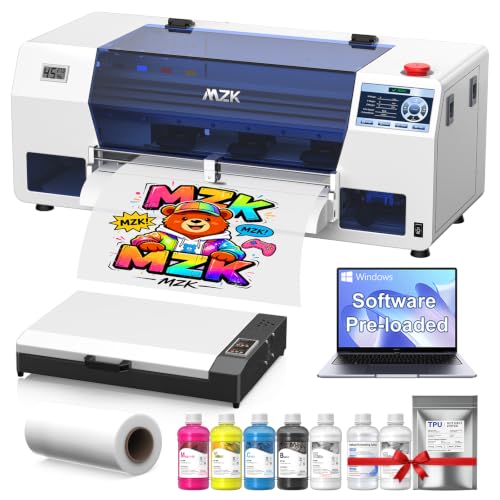
MZK A3 i3200 DTF Printer with Oven and Laptop
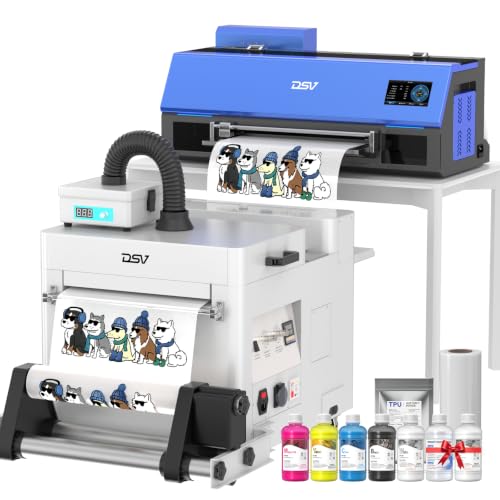
DSV DTF Printer with Shaker & Purifier

DSV A3 F1080 DTF Printer with Shaker and Purifier

DSV A3 DTF Printer with Shaker, Purifier & PC

DXZ 2026 A3 DTF Printer with F1080 Printhead

Lancelot M1630 Pro DTF Printer Bundle

DSV 24″ DTF Printer with Dual F1080 Printheads
What Each Pick Brings To The Table
The DSV A3 with the i3200 printhead is the rig built for the home studio that has outgrown hobbyist volume. The i3200 is an industrial-grade printhead (the component that lays down ink droplets) rather than a converted consumer unit, so it pushes through longer runs without the choking clogs that frustrate older L1800-based kits. The bundle includes the shaker (a heated unit that distributes adhesive powder across the film) and purifier (a fume extraction box that handles the powder melt residue), which means you skip the usual accessory shopping.
A preconfigured PC ships in the box, drivers installed, so the day-one learning curve mostly disappears. For anyone running a small apparel operation out of a converted garage or spare room, the throughput gain over entry-level machines pays off in weeks, not months. Where this lands short of a true commercial press is in film width: it tops out at A3, so larger transfers mean tiling.
Everyday Advantages
- i3200 printhead handles long print sessions with fewer mid-job interruptions
- Shaker and purifier included, no separate sourcing of curing accessories
- White ink stirring runs on a routine that prevents sediment from settling in the lines
- Preconfigured PC removes the driver and compatibility guesswork on day one
Points To Keep In Mind
- A3 maximum print size means larger designs require tiling or a second rig
- The full bundle footprint asks for a dedicated table and decent clearance around the purifier vents
Feature Snapshot
Who It Suits Best
Anyone running a steady home-based apparel line who needs industrial printhead stamina without leasing a warehouse.
Consider Something Else When
You mostly print single small transfers and want to skip the bulk: the DSV A3 DTF Printer with Shaker & Air Purifier (B0FCBTVSBN) is a lighter starting point.
This second DSV build trims the bundle down to the parts a small home studio actually uses, and drops the included PC in favor of working with your own machine. The result is a tighter footprint that still ships with both the heated powder shaker and the air purifier, the two accessories that make a DTF workflow tolerable indoors. Compared to the larger i3200 rig above, the choice here is about saving counter space, not chasing the highest daily output.
The air purifier is the underrated piece. DTF powder has a faint but persistent plastic-odor signature during the melt step, and pulling it through a filter makes a shared craft room far more livable. Owners commonly report the purifier running quietly enough to leave on while the printer sits idle. The trade-off versus the first pick is throughput: this setup is tuned for a few prints an evening, not for stacking 50 transfers in an afternoon.
Where It Excels
- Bundled purifier noticeably cuts the powder-melt odor in small rooms
- Smaller footprint suits a converted craft corner rather than a dedicated bay
- Heated shaker included, so post-print curing happens in one workflow
- Works with any modern Windows laptop you already own
Honest Caveats
- Throughput drops compared to the i3200 industrial-head kit
- You supply the computer, which adds a setup step the first DSV avoids
Who Should Grab It
Crafters and Etsy sellers printing a handful of garments a week who care more about air quality than maximum output.
Skip It When
You want the highest volume per square foot of table: the DSV A3 DTF Printer with i3200 Printhead, Shaker & Purifier (B0H5TXP584) is the better fit.
The MZK rig is the closest rival to the lead DSV in this roundup, swapping the shaker for a full curing oven and pairing the machine with a preconfigured laptop. If you’ve never owned a DTF press before, the oven matters: it melts the adhesive powder more uniformly than a flat heated tray, and it removes the manual “hover the heat gun and hope” step that frustrates newcomers.
The 720×3660 dpi resolution (dots per inch, a measure of print detail) lands well above standard DTF output, so small text and tight gradients on apparel transfers come through clearly. The laptop arrives with drivers preinstalled, so even first-time users skip the Windows compatibility scramble. For a DIY apparel business printing a few dozen pieces a week, this hits the practical sweet spot between hobbyist and full commercial, and the included ink supply covers the first stretch of operation.
Practical Pluses
- Built-in curing oven eliminates the manual heat-gun step entirely
- 720×3660 dpi resolution handles small text and gradients cleanly
- Bundled laptop is preconfigured with drivers and RIP software (raster image processor, the program that turns your design into printer instructions)
- Auto-timer cleaning with ink anti-clog filter extends printhead uptime
Trade-Offs
- The curing oven takes longer to heat up than a hand-held plate method
- Bundled laptop specs are modest, fine for printing but not for design-heavy workflows
Feature Rundown
Made For
First-time apparel business owners who want a complete starter system and would rather buy a turnkey rig than assemble the workflow piece by piece.
Look Elsewhere When
You already own a usable Windows machine and want a leaner bundle: the DSV A3 DTF Printer with Shaker & Purifier (B0FCBTVSBN) keeps the workflow tight without the second computer.
Stripped of its model-number clutter, this DSV is essentially the second pick on a simpler spec sheet, same shaker-plus-purifier concept, same all-in-one positioning, but aimed at first-time owners who don’t want to decode a long list of feature acronyms. For newcomers, that matters: DTF jargon (RIP software, white ink circulation, anti-clog filters) tends to scare off people who would otherwise thrive with the workflow.
The build simplifies the day-one experience with a touchscreen interface and bundled ink supply that covers the first stretch of use, so the learning curve stays on printing, not setup. Compared to the MZK above, you give up the curing oven, but most small studios start by melting powder with a heat press plate anyway, so the trade is reasonable. For a first rig in a craft room, this is a sensible anchor.
Why It Works Well
- Touchscreen interface flattens the learning curve for first-time owners
- Shaker and purifier cover the two most uncomfortable parts of the DTF workflow
- White ink circulation keeps the most temperamental channel moving between jobs
- Two-year ink supply removes the monthly reorder anxiety
Some Limits To Know
- No curing oven means manual heat-press powder melting, which varies by technique
- Stock printhead handles hobbyist volume but stretches on daily 100-transfer runs
Right Fit For
First-time DTF owners who want the basics handled without a feature wall to digest on day one.
Swap It Out When
You want the curing oven included: the MZK A3 i3200 DTF Printer with Oven and Laptop (B0H7RP6CHG) bundles that step.
Where this rig distinguishes itself is the F1080 printhead paired with 24/7 auto-maintenance and white ink circulation. F1080 heads sit in a useful middle ground: faster than the older L1800 generation that dominates entry-level kits, and meaningfully cheaper to maintain than the i3200 industrial tier above. The 5-inch LED touchscreen is genuinely useful for tweaking settings without leaving the printer to grab a laptop mid-job.
The auto-maintenance schedule is the quiet win. DTF printers fail most often because white ink sits idle in the lines, settles, and clogs the printhead. With circulation and timed cleaning runs on a 24-hour loop, the rig stays print-ready even through a long weekend away. For someone printing three or four evenings a week, that uptime difference shows up quickly in lost-film savings alone.
Well-Handled Touches
- White ink circulation prevents the most common DTF failure mode
- 5-inch touchscreen speeds up job setup without a connected computer
- F1080 head delivers roughly double the speed of L1800-era machines
- Auto-maintenance schedule runs in the background between sessions
Smaller Caveats
- F1080 head is no match for an i3200 if you push past 50 prints a day
- Heated shaker is included, but no separate curing oven for high-volume finishing
Quick Technical Notes
Whose Shelf It Belongs On
Mid-volume hobbyists who print several evenings a week and care about uptime between sessions.
Another Choice May Suit
You want true industrial-head stamina: the DSV A3 DTF Printer with i3200 Printhead, Shaker & Purifier (B0H5TXP584) is the heavier-duty option.
This DSV sits close to the previous F1080 build but layers in the preconfigured PC and one-click moisturizing routine, which together make the out-of-box experience almost friction-free. For a first DTF printer, that matters more than raw speed, because the first 30 days are when most owners either commit to the workflow or shelve the rig in frustration.
The moisturizing routine is the small but meaningful upgrade. Idle DTF heads dry out faster than most owners expect, especially in dry indoor air during winter. One-click moisturizing pushes a small amount of cleaning solution through the nozzles before each session, so the first print after a long pause usually comes out clean. Compared to the MZK oven bundle above, you trade a built-in curing oven for the included PC, and most home studios already own a heat press for finishing anyway.
Bright Spots
- One-click moisturizing routine rescues the first print after long idle pauses
- Preconfigured PC lets you skip driver installation entirely
- White ink circulation keeps the temperamental channel active between sessions
- F1080 head runs roughly twice the speed of legacy L1800 kits
Things To Weigh Up
- No curing oven, so powder melting relies on a heat press plate
- Bundled PC adds to the footprint in already-tight craft rooms
Perfect Match For
Anyone who has read enough DTF forum threads to feel nervous about day-one setup and wants the manufacturer to handle the wiring.
Reach For A Different Pick When
You want built-in curing and a laptop bundle in one package: the MZK A3 i3200 DTF Printer with Oven and Laptop (B0H7RP6CHG) covers both.
The DXZ 14-inch A3 DTF leans into one specific promise: speed. The F1080 head runs at higher throughput than older single-head kits, and the one-click print-to-bake workflow bundles the print and powder-melt steps into a single button press, so an entire transfer cycle completes without manual staging. For a small shop processing orders the same day they come in, that cycle-time compression matters.
Multi-fabric compatibility rounds out the practical appeal. Cotton, polyester, blends, and dark fabrics all sit within the printer’s supported range, so you don’t have to keep separate workflows for each garment type. The two-year ink supply keeps operating costs predictable through the early ramp-up. Where DXZ lags the more established DSV line is in long-term support depth: the brand is newer in this category, so troubleshooting communities are smaller.
A Favorable Mix
- One-click print-to-bake cycle compresses the transfer workflow into one step
- Multi-fabric compatibility covers cotton, poly, blends, and dark garments
- F1080 head keeps print times competitive with more expensive kits
- Two-year ink bundle smooths out the first stretch of operating costs
A Few Limitations
- Brand has a thinner troubleshooting community than the DSV ecosystem
- 24/7 auto-maintenance is useful but not as thorough as i3200-tier routines
Feature Overview
Best Suited To
Small shops handling same-day orders who want a fast cycle from design file to finished garment.
Where A Sibling Pick Shines
You prioritize long-term support and a thicker user community: the DSV A3 DTF Printer with Shaker, Purifier & PC (B0H5V2X55L) has the deeper installed base.
The Lancelot M1630 Pro is the bundle aimed at newcomers to clothing-studio work who want one box, one shipment, one setup. The auto-film-cut feature trims the printed transfer to size automatically, which saves the slow manual-cutting step that adds up over a stack of garments. The compatibility laptop arrives with drivers preloaded, so the first print happens the same evening the package opens.
For someone testing the DTF waters before committing serious budget, this is the lowest-friction entry on the list. The headline throughput runs roughly double the legacy L1800 kits, so the rig doesn’t bottleneck a growing order book. Compared to the all-in-one DSV builds above, the Lancelot skips the curing oven, so powder melting still happens on a heat press plate. That step is familiar to most apparel owners already, so the trade is reasonable.
Positive Points
- Auto-film-cut removes a slow manual step at the end of every print run
- Bundled laptop arrives with drivers installed, so setup time drops near zero
- Throughput roughly double the L1800 generation, useful as order volume grows
- Single-sheet and roll film both supported for flexible workflow
Where It May Fall Short
- No curing oven, so powder melting stays a manual heat-press step
- Printhead tier sits below the i3200 industrial options above
Who Will Love This
Clothing-studio newcomers who want a single shipment to cover everything and aren’t ready to piece together a workflow from separate components.
Not Your Match When
You want a built-in curing oven to skip the heat-press step: the MZK A3 i3200 DTF Printer with Oven and Laptop (B0H7RP6CHG) is the better bundle for that.
The 24-inch DSV is the wide-format step up, with dual F1080 printheads running in parallel across a much wider film path. This is the rig for a home studio that’s already outgrown the A3 ceiling and wants full-width transfers without tiling. The dual-head layout pushes throughput well beyond any single-head kit on this list, so it handles production schedules that would choke an entry-level machine.
The trade-off is space and cost discipline. A 24-inch film path needs a sturdy table, decent headroom for the shaker and purifier above it, and a willingness to commit counter space to a near-permanent fixture. For someone scaling from hobbyist to small commercial, that investment is justifiable, but it’s overkill for anyone still printing a few pieces a week. The two-year ink supply softens the operating-cost side, which matters when the printheads drink more ink than their smaller cousins.
What Pays Off
- Dual F1080 printheads run in parallel for high-volume throughput
- 24-inch wide film path covers full-width transfers without tiling
- Two-year ink supply softens the higher operating costs of dual-head printing
- DSV’s auto-cleaning routine is tuned for long production sessions
Practical Considerations
- 24-inch film path needs dedicated table space and headroom for the shaker
- Dual-head ink consumption runs higher than any single-head kit on this list
Built With In Mind
Home studios scaling into small-commercial production that need full-width transfers and daily output that would overwhelm an A3 machine.
A Better Fit Elsewhere
You mostly print standard adult tee fronts: the DSV A3 DTF Printer with i3200 Printhead, Shaker & Purifier (B0H5TXP584) covers the same volume at a smaller footprint.
Choosing A DTF Printer That Fits Your Studio
A few attributes decide more about your day-to-day experience than any spec sheet. Printhead tier is the first one: i3200 industrial heads outlast F1080 heads, which in turn beat the legacy L1800 generation that still anchors entry-level kits. If your print sessions stretch past an hour or happen most days, the printhead choice matters more than bundled accessories.
White ink handling is the second make-or-break feature. White ink carries the pigments that show on dark garments, but it also settles and clogs faster than color inks. Look for white ink circulation and timed cleaning cycles, both of which keep the channel active between sessions. Skipping that feature means manual cleanings every few days, which gets old fast.
Footprint and workflow accessories round out the practical checklist. A bundle that includes the heated shaker, purifier, and ideally a curing oven saves you weeks of accessory sourcing and a few hundred dollars in extra purchases. For tight craft rooms, the all-in-one DSV rigs make sense. For larger studios, a separate curing oven and a wider 24-inch format may justify the extra space.
For first-time owners, a turnkey bundle with a preconfigured PC removes the day-one setup risk. For experienced apparel makers scaling up, the wider 24-inch dual-head format opens throughput that no A3 machine can match.
Smart Tradeoffs To Weigh Before Buying
Mistakes Worth Dodging
The most common slip is underestimating the white ink problem. Pick a printer with circulation and auto-cleaning, even if it costs slightly more, because the alternative is hours of manual head cleaning every week. A close second is buying an A3 machine when you actually need wide-format output, since tiling on every print adds labor that erases any initial savings. Finally, don’t skip the heat press in your budget planning: even bundles with curing ovens rely on a quality press for the final transfer step.
When Paying More Pays Off
Higher-tier DTF printers earn their premium through uptime, not raw speed. Industrial printheads clog less, run longer between cleanings, and survive heavy weekly use that would wear out consumer-grade heads in months. The bundled two-year ink supplies across this roundup also flatten operating costs in a way that entry-level kits can’t match. For anyone printing more than a few pieces a week, the upgrade pays for itself in saved time and fewer wasted transfers.
Frequently Asked Questions
What does DTF actually mean for a home setup?
DTF stands for direct-to-film, a process where designs print onto a special film, get dusted with adhesive powder, then heat-transferred onto fabric. For home studios it replaces older methods like heat-transfer vinyl with something closer to a small apparel production line.
How much space does a home DTF printer really need?
Plan on a sturdy table that fits the printer plus its shaker and purifier, usually 4 to 6 feet of linear counter space. The wider 24-inch format DSV needs more headroom and a deeper table than the A3 rigs.
Do I still need a heat press with these bundles?
Yes. Even rigs with built-in curing ovens rely on a heat press for the final transfer step onto the garment. A quality press is the third essential piece of the home DTF workflow alongside the printer and the curing stage.
How long does white ink actually last in these machines?
With white ink circulation and auto-cleaning enabled, white ink stays usable for weeks between active print sessions. Without circulation, expect manual cleanings every few days to prevent clogs from settling into the printhead nozzles.
Can a beginner realistically run a DTF printer at home?
The current generation of turnkey bundles is more beginner-friendly than older L1800-based kits, especially when they include a preconfigured PC. The first month still involves a learning curve, but the auto-maintenance routines do most of the heavy lifting on upkeep.
Closing Remarks
For most home studios starting out, the DSV A3 DTF Printer with i3200 Printhead, Shaker & Purifier (B0H5TXP584) hits the practical sweet spot: industrial-grade stamina without a commercial footprint. First-timers who want less commitment to learn will appreciate the Lancelot M1630 Pro bundle (B0D3Q6MRS8). Whichever you pick, plan on giving the workflow a real month before judging the machine, because DTF rewards consistency over speed in the early days.