A graphing calculator is the kind of tool you forget about until an exam rolls around or a derivative refuses to simplify. Picking the right one matters more than most shoppers expect, because exam policies, programming features, and screen quality vary wildly across models.
You want a calculator that survives a full school year in a backpack, handles whatever your course throws at it, and doesn’t fight you during timed tests. This guide covers ten solid options across price tiers and use cases, from the colorful TI-84 Plus CE family to Casio’s Python-powered ClassWiz.
Skip the cheapest options you can find, and don’t assume older equals outdated. A well-matched graphing calculator pays for itself the first time it saves you from a messy polynomial at 9 p.m. the night before finals.
A Closer Look At The Lineup

Texas Instruments TI-84 Plus CE Blueberry Graphing Calculator

Casio fx-9750GIII Graphing Calculator, Python

TI-84 Plus CE Graphing Calculator (Mint)
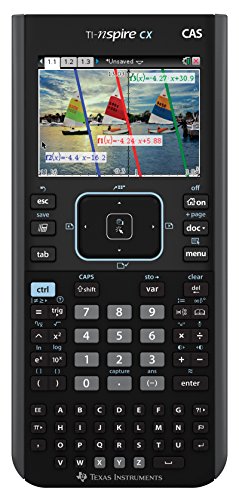
Texas Instruments Nspire CX CAS Graphing Calculator

Casio fx-CG100 ClassWiz Color Graphing Calculator

Texas Instruments TI-84 PLUS CE, Black (Frustration-Free Packaging)

TI-84 Plus CE Graphing Calculator (Crisp White)

Texas Instruments TI-Nspire CX II CAS Color Graphing Calculator
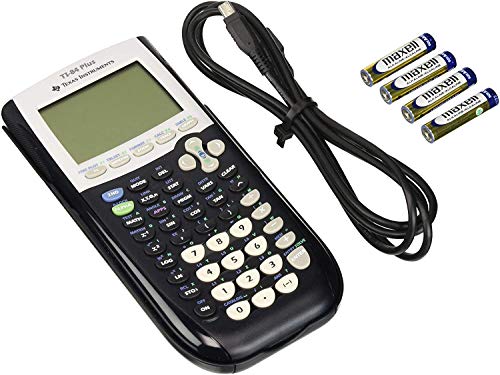
Texas Instruments TI-84 Plus Graphing Calculator, Black

TI-84 Plus CE Graphing Calculator (Rose Curve Gold)
A Breakdown Of The Leading Choices
The Blueberry TI-84 Plus CE is the calculator most U.S. high schoolers will recognize on day one of Algebra II, and for good reason. It’s noticeably slimmer and lighter than the older TI-84 Plus, which means it slides into a backpack sleeve without the bulk that older generations carried.
You get a sharp backlit color screen that makes plotting multiple equations far easier than squinting at a monochrome display. Compared to the entry-level Casio in this list, the TI-84 Plus CE trades a lower sticker for a more polished typing feel and broader teacher familiarity.
A Few Highlights
- High-resolution backlit color display makes overlapping graphs readable at a glance
- Color-coded equations and plots help separate stacked curves during homework review
- Slimmer and lighter chassis than earlier TI-84 generations, easier on backpack weight
- Optional grid lines add visual structure for students still learning to read plots
Points To Note
- No built-in CAS (computer algebra system) means you’ll still need to simplify derivatives by hand on some problems
- The rechargeable battery is a welcome upgrade, but a dead charger mid-week can leave you stuck if you don’t own a backup cable
- Priced noticeably above non-color graphing models, which may matter for tight budgets
Whose Shelf It Belongs On
The student who needs a color screen, broad exam acceptance, and a calculator that survives a daily backpack commute from middle school through AP Calculus.
Look Elsewhere When
The Texas Instruments Nspire CX CAS suits you better when symbolic algebra (letting the calculator simplify expressions for you) is essential for an engineering or college course load.
The Casio fx-9750GIII is the budget hero of the category, a graphing calculator that handles AP-level coursework without the typical TI price tag. It runs Python out of the box, which is unusual for a sub-$100 graphing tool.
For families buying a first graphing calculator, this model often makes more sense than a flagship. The screen is monochrome, so plotted curves blend together more than on the TI-84 Plus CE, but the keyboard and menus feel fast once you adjust to Casio’s layout.
Bright Spots
- Approved for major exams including AP Calculus, AP Statistics, and SAT
- Built-in Python support adds real programming utility beyond pure graphing
- USB connectivity makes file transfers painless for lab-based assignments
Trade-Offs To Consider
- Monochrome display is harder to read when three or more curves share one graph
- Casio’s menu system takes longer to learn if your teacher only demos TI shortcuts
Key Specs
Made For
Students prepping for AP or SAT exams on a budget, plus anyone who wants Python practice folded into a graphing calculator.
Not Your Match When
The TI-84 Plus CE Blueberry suits you better when color-coded graphs and broad teacher familiarity matter more than Python and price.
Same guts as the Blueberry TI-84 Plus CE, dressed in a Mint shell that stands out in a sea of black calculators. For students who want personality without sacrificing function, this color variant earns its keep.
The internals mirror the standard TI-84 Plus CE: color display, rechargeable battery, and full AP/SAT acceptance. The only meaningful differentiator here is aesthetic, which is more useful than it sounds when you’re hunting for your calculator between six others on a group table.
What It Does Well
- Full-color backlit display makes complex graphs easier to interpret
- Rechargeable battery removes the AAA-and-hope routine from your semester
- The Mint finish is easy to spot in shared classrooms or family charging stations
- Math Print feature shows stacked fractions the way they appear in textbooks
A Few Limitations
- Functionally identical to the Black and Blueberry editions, so you’re paying for color only
- Light plastic shell feels less rugged than the older TI-84 Plus line
Best Suited To
The student who wants the TI-84 Plus CE experience with a finish that doesn’t blend into the classroom standard.
A Better Fit Elsewhere
The Texas Instruments TI-84 Plus in Black suits you better when you want a more rugged shell and don’t need a color display for daily work.
The Nspire CX CAS is the closest thing to a portable CAS (computer algebra system) workstation in TI’s lineup. It handles symbolic algebra, symbolic calculus, and standard numeric calculations, which is why engineering and calculus students reach for it.
The catch: it isn’t approved on every exam. AP Calculus and most college courses allow CAS, but the SAT and many high-stakes standardized tests do not. You also transfer class files between the handheld and TI’s student software, which makes homework doable on a laptop at a coffee shop.
Useful Highlights
- Symbolic algebra and calculus support simplifies derivatives and integrals for verification
- Exact-value display shows answers as radicals and fractions rather than decimal approximations
- Color screen and document-based workflow mirror a small notebook layout
- Companion software expands problem-solving onto a laptop when screens get cramped
Where It May Fall Short
- Not approved for SAT or several state standardized tests, so check policy before relying on it
- Menu structure is denser than the TI-84 Plus CE and takes longer to master
- Priced notably above the TI-84 Plus CE family
Feature Snapshot
Right Fit For
Engineering, calculus, and physical-science students who need symbolic manipulation and don’t face SAT restrictions.
Skip It When
The Casio fx-CG100 ClassWiz suits you better when you want a newer color platform with 3D plotting and exam-friendly features at a lower price.
The ClassWiz fx-CG100 is Casio’s current flagship color graphing calculator, with a high-resolution panel that plots spheres, cylinders, and planes in 3D. It runs Python natively and supports courses from Pre-Algebra through college-level math.
For students stepping into multivariable calculus, the 3D graphing alone makes this model worth considering. The flush, gloss panel and high-contrast keys give it a more modern feel than older Casio models, though the keyboard layout still differs from TI conventions.
Positive Takeaways
- 3D graphing brings multivariable calculus concepts to life without a separate app
- Over 65,000-color display renders surfaces and intersections clearly
- Python onboard supports intro programming assignments on the same device
- Exam-approved status covers Pre-Algebra through most college math courses
Things To Consider
- Premium-tier pricing puts it above the budget Casio and most TI-84 Plus CE variants
- 3D graphing can feel slow when rendering complex surfaces at high resolution
Perfect Match For
Multivariable calculus and linear algebra students who want 3D plotting without committing to a CAS calculator like the Nspire CX CAS.
Reach For A Different Pick When
The TI-Nspire CX II CAS suits you better when symbolic manipulation matters more than 3D visualization and exam-day portability.
The black TI-84 Plus CE is the default version most classrooms are built around, packed in frustration-free packaging that opens cleanly without plastic frustration. It’s the safest bet for students who want a color TI without paying extra for a novelty color.
Compared to the Mint and Blueberry variants earlier in this list, this version offers the same internals at typically the lowest price. You give up the personality finish, but you gain a calculator that visually disappears into the classroom ecosystem.
Benefits That Matter
- Familiar 84 Plus family functionality means every TI tutorial and cheat sheet applies
- High-resolution color backlit display supports clear graphing and image import
- TI rechargeable battery keeps the unit powered for weeks between charges
- Math Print renders stacked fractions and symbols as they appear in textbooks
Worth Noting
- No CAS, so symbolic simplification still happens by hand or in companion software
- The black plastic shell is the most common finish in any given classroom, easy to mix up
Core Details
Who Will Love This
The student who wants a no-nonsense TI-84 Plus CE without paying for a novelty color finish.
Swap It Out When
The Casio fx-9750GIII suits you better when a lower price and Python matter more than color graphing.
The Crisp White TI-84 Plus CE is essentially the Python-enabled refresh of the standard color TI-84 Plus CE, with the same distraction-free design ethos. No Bluetooth, no Wi-Fi, no internet: just graphing.
For younger students or first-time graphing calculator users, that lock-down matters. The bundled 4-year subscription to TI’s online calculator adds extra utility for homework sessions away from the handheld.
Advantages To Know
- Distraction-free design keeps focus on math rather than notifications
- Rechargeable battery lasts up to a month on a single charge under typical use
- Python-enabled hardware supports coding exercises for newer STEM curricula
- 4-year online calculator subscription adds desktop practice flexibility
Smaller Limitations
- White finish shows scuffs and backpack grime more visibly than darker shells
- The Python edition of the TI-84 Plus CE is newer, so some older textbooks reference older menus
Who Should Grab It
The first-time graphing calculator user who benefits from a locked-down, classroom-friendly design.
Where A Sibling Pick Shines
The TI-84 Plus CE Blueberry suits you better when you want a more distinct color for identification and equally solid distraction-free design.
The TI-Nspire CX II CAS is the current-generation Nspire, refining the original CX CAS with faster performance, Python support, and improved Computer Algebra System behavior. It’s approved for AP, IB, and many college courses.
You get the symbolic math engine that distinguishes the Nspire line, plus a deeper dive into programming. Engineering and robotics students often use this calculator for code-adjacent problem solving alongside math.
Real-World Strengths
- CAS engine handles symbolic algebra, calculus, and equation manipulation
- Student software for PC and Mac extends workflow onto a laptop screen
- Color display with crisp rendering supports multiple overlapping plots
- Approved for major exams including AP and IB
Practical Considerations
- Not allowed on the SAT, so a backup non-CAS calculator is useful for test day
- Higher cost than the TI-84 Plus CE family, which matters for budget-conscious shoppers
At A Glance
Built With In Mind
STEM-track college and IB students who want CAS, Python, and a unified handheld-plus-laptop workflow.
Consider Something Else When
The TI-84 Plus CE Blueberry suits you better when SAT compatibility and broader high-school exam use matter more than symbolic algebra.
The original TI-84 Plus is the calculator a generation of parents used, and it’s still sold for good reason. No color screen, but a rugged shell, AAA battery flexibility, and more than a dozen preloaded apps covering inequality graphing and real-world data collection.
For families who already own TI-84 Plus accessories (slides cases, link cables), this model slots into the existing setup without learning curves. It’s heavier and chunkier than the CE line, but that weight translates to a sense of durability.
The Practical Payoff
- Rugged slide case design protects against daily backpack abuse
- Preloaded apps cover interactive geometry, inequality graphing, and data collection
- AAA battery operation means you can swap in fresh batteries anywhere
Honest Caveats
- Monochrome screen is harder to read when stacking multiple curves
- Heavier and bulkier than the TI-84 Plus CE family
- No rechargeable option means ongoing battery costs over a school year
Right Fit For
Long-time TI-84 Plus users who value ruggedness and don’t need a color screen for daily graphing.
Reach For A Different Pick When
The TI-84 Plus CE in any color variant suits you better when a backlit color display and lighter chassis matter for daily carry.
The Rose Curve Gold finish is the most visually distinct TI-84 Plus CE variant, named for the rose-curve mathematical shape. Same color screen, same rechargeable battery, same Python compatibility as the broader CE family.
For visual learners who appreciate a calculator that looks distinctive on a desk, this finish earns extra credit. Functionally, you’re getting the same proven platform, just wrapped in a more memorable shell.
The Upside
- Distinctive gold finish stands out from standard black or grey calculators
- Full-color backlit display supports clear multi-curve graphing
- Python compatibility supports newer STEM curriculum requirements
- 4-year online calculator subscription bundled with retail purchase
A Few Limitations
- Functionally identical to other CE variants, so the finish is the only real differentiator
- Limited inventory compared to standard black editions
Perfect Match For
Visual learners and style-conscious students who want the TI-84 Plus CE platform in a more distinctive finish.
Where Another Pick Suits Better
The Casio fx-CG100 ClassWiz suits you better when 3D graphing matters more than finish variety and you prefer Casio’s menu system.
What Matters Most Before Choosing Digital Graphing Calculators
Exam Approval Comes First
The single most important filter is whether the calculator is allowed on your specific exam. The SAT and ACT do not permit CAS calculators (devices that can simplify algebra symbolically), so a Nspire CX CAS or TI-Nspire CX II CAS can’t be your only device for those tests. AP Calculus, AP Statistics, IB, and most college courses allow CAS, but each institution sets its own policy. Check the current rules before committing to a CAS-only purchase.
Display and Ergonomics Shape Daily Use
A backlit color screen, like the one on every TI-84 Plus CE variant and the Casio ClassWiz, makes plotting multiple curves far easier than monochrome. Color coding helps separate overlapping functions, which matters during homework review even more than during exams. Keyboard layout is the other durable factor: TI’s grid of keys feels familiar to most U.S. students, while Casio’s layout takes adjustment if your teacher demos TI shortcuts.
Battery and Build Decide Long-Term Cost
Rechargeable batteries, found across the TI-84 Plus CE family and the Casio fx-CG100, save money and hassle over a multi-year school span. The older TI-84 Plus runs on AAA cells, which means ongoing battery purchases but also the ability to swap in fresh cells anywhere. Build quality matters too: the TI-84 Plus’s slide case is famously rugged, while the slimmer CE shells feel lighter but also more delicate if dropped.
Key Considerations Across These Picks
Pitfalls Shoppers Hit
Many families buy a CAS calculator assuming it’ll cover every exam, then discover it can’t be used on the SAT. Others grab the cheapest non-color model and find that stacking three or four functions on a monochrome screen gets tedious fast. The other common slip-up is skipping the bundled software and accessories, which can extend a calculator’s usefulness well beyond the handheld itself.
What The Higher Tier Buys
Spending more on a CAS-enabled Nspire or a 3D-capable ClassWiz buys symbolic math, advanced plotting, and broader college readiness. The upgrade is worth it for engineering, multivariable calculus, and physical-science tracks where the calculator becomes a verification tool, not just a number cruncher. For Algebra II and basic statistics, the TI-84 Plus CE family delivers enough function without the CAS price premium.
Frequently Asked Questions
Which graphing calculator works on the SAT?
The SAT only permits graphing calculators that don’t have CAS (computer algebra system) features. The TI-84 Plus CE family, the Casio fx-9750GIII, and the older TI-84 Plus are all approved. CAS models like the Nspire CX CAS and TI-Nspire CX II CAS are not.
Is a CAS calculator worth the extra cost?
CAS calculators simplify expressions symbolically, which is genuinely useful for calculus, engineering, and verifying homework. The trade-off is exam restrictions on the SAT and some state tests, plus a steeper learning curve. Worth it for college STEM, less essential for high school math through AP Statistics.
How long do rechargeable graphing calculators last per charge?
The TI-84 Plus CE family is rated for up to a month on a single charge under typical classroom use. The Casio fx-CG100 ClassWiz offers similar multi-week endurance, depending on screen brightness and Python usage. Heavy Python programming drains the battery noticeably faster than standard graphing work.
Can graphing calculators run Python?
Several current models, including the Casio fx-9750GIII, the Casio fx-CG100, the TI-84 Plus CE Python edition, and the TI-Nspire CX II CAS, support Python natively. Older monochrome TI-84 Plus models do not run Python without aftermarket shells.
Do teachers prefer a specific graphing calculator brand?
Most U.S. math teachers default to the TI-84 Plus CE because it’s the platform they learned and demo in class. Casio’s fx-9750GIII and ClassWiz models are widely accepted, but you’ll need to translate occasional Casio-specific shortcuts to TI conventions. The choice rarely hurts your grade as long as the calculator is exam-approved.
The Takeaway
Match the calculator to your course load and exam list, not to the highest specs on the spec sheet. For most high schoolers, a TI-84 Plus CE variant covers everything from Algebra II through AP Statistics with room to spare. College STEM students benefit from the symbolic reach of a CAS model, while budget-conscious shoppers get genuine capability out of the Casio fx-9750GIII. Pick the model that fits your tests, your classes, and your daily carry, and you’ll stop thinking about the calculator and start thinking about the math.