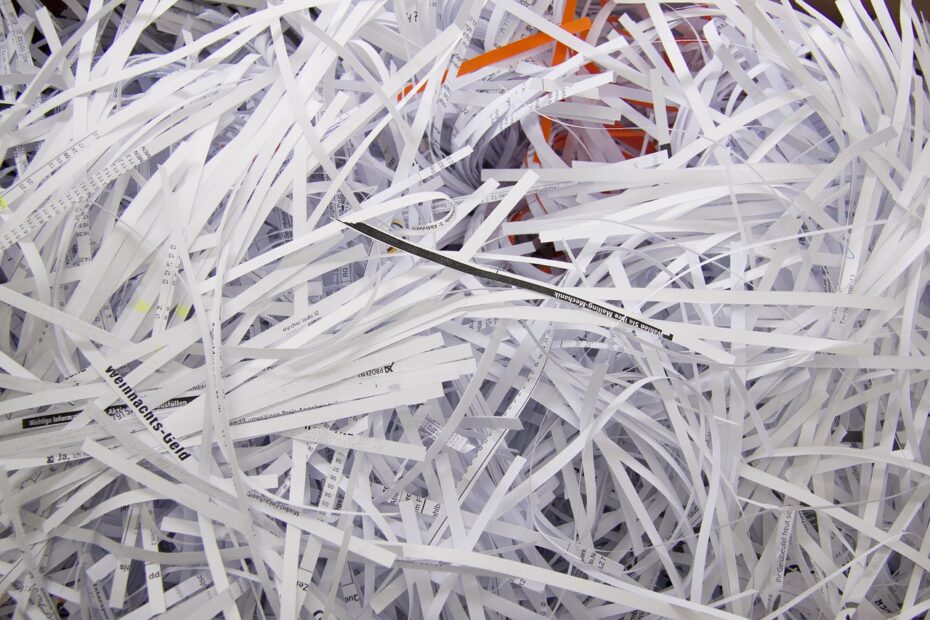
A single sheet becomes either long paper ribbons or dozens of smaller particles, depending on the cutting pattern. Strip-cut machines feed sheets faster, while cross-cut machines leave pieces that are harder to sort back into readable records, changing your privacy level, feed pace, and bin use.
This comparison covers cut shapes, DIN 66399 security levels, household records, and home office shredding needs. Your paper volume and record sensitivity point toward the right cut style.
Cut Styles Leave Different Paper Waste
Open a shredder bin and the cut pattern is clear. A strip-cut shredder uses parallel blades to slice each sheet into long ribbons, while a cross-cut shredder cuts in two directions and leaves short rectangular pieces.
Your waste shape affects more than appearance. Long strips lie loosely in the bin and preserve parts of printed lines, while smaller particles settle into a denser layer of paper bits.
| Cut style | Paper output | What appears in the bin | Practical result |
|---|---|---|---|
| Strip-cut | Long, narrow ribbons | Loose strands with visible text fragments | Fast shredding with lower reconstruction resistance |
| Cross-cut | Small rectangular particles | Dense paper pieces | Stronger privacy for personal paperwork |
| Micro-cut | Very small particles | Fine paper bits that pack tightly | Higher destruction for sensitive records |
The term particle-cut shredder refers to a cross-cut machine in many product listings. Check the stated paper shred size as well, because two machines carrying that label can leave very different particle sizes.
That difference between cross-cut and strip-cut shredders becomes visible before you empty the bin. Your next decision involves the cutter work needed to form those pieces.
The same cutting geometry that determines bin waste also governs how quickly sheets can pass through.
Blade Action Sets Feed Speed and Capacity
Long ribbons come from a direct blade path. A strip-cut shredder pushes paper through parallel cutters in one motion, so your machine can move sheets quickly and accept a larger stack per pass than a similar cross-cut unit.
Cross-cut models force paper through intersecting cutters. That extra cutting action turns each ribbon into rectangles, but it adds resistance, heat, and a lower sustained pace during a long shredding session.
| Operating factor | Strip-cut behavior | Cross-cut behavior |
|---|---|---|
| Blade action | Parallel slicing | Two-direction cutting |
| Feed speed | Faster on comparable machines | Slower because cutters do more work |
| Advertised sheet count | Higher on comparable machines | Lower on comparable machines |
| Heat buildup | Lower during heavy use | Higher during heavy use |
Sheet capacity describes an ideal stack of standard paper. Thick mailers, folded pages, staples, and uneven loading can trigger paper jams well below that number.
Your real workload matters more than a large number near the feeder. Check run time and cooldown limits, because a machine rated for 12 sheets may need a 30-minute rest after only a few minutes of continuous use.
Fast feeding does not settle the privacy question. The size of each final particle decides how much of a page remains available for document reconstruction.
Particle Size Controls Reconstruction Risk
A strip preserves a vertical slice of a document. Someone sorting enough ribbons can line up names, account numbers, or addresses with less effort than sorting hundreds of short cross-cut particles.
Cross-cut shredding does not make reconstruction impossible, yet it makes the task far harder. For bank statements, tax forms, medical records, pay stubs, and account details, your safer household choice uses smaller particles.
Identity theft protection starts with the information left on each piece. Your name, address, account reference, signature, and medical detail carry more exposure than a blank draft or routine flyer.
DIN Ratings Describe Paper Security
DIN 66399 is a German information-destruction standard found on many shredder labels. Its P-level ratings describe paper security through final particle dimensions rather than a broad cut-style label.
| P-level | Typical paper output | Suitable record type |
|---|---|---|
| P-2 security level | Long strips or large pieces | Low-risk internal drafts |
| P-3 security level | Smaller cross-cut pieces | Routine personal paperwork |
| P-4 security level | Fine cross-cut particles | Financial, medical, and identity records |
| P-5 security level | Very small particles | High-sensitivity business or legal files |
Your label check starts with the P-level and particle dimensions. A large-particle cross-cut machine can offer less protection than a fine-cut model, even though both carry the same broad cut-style name.
Smaller particles also change how paper occupies the bin. That physical difference affects emptying frequency, noise, and cutter care during normal use.
Daily Use Involves More Than Privacy
Small pieces pack closer together than long ribbons. Your shredder bin capacity stretches farther with cross-cut particles, while strip waste fills empty air space and reaches the bin line sooner.
| Daily-use factor | Strip-cut | Cross-cut |
|---|---|---|
| Privacy resistance | Lower | Higher |
| Shredding speed | Faster | Slower |
| Bin emptying | More frequent | Less frequent |
| Noise level | Varies by motor and housing | Varies by motor and housing |
| Cutter care | Less demanding | More demanding on many models |
| Purchase cost | Lower | Higher |
Purchase cost is only part of the ownership burden. A cross-cut unit has more cutter contact and benefits from shredder oil or lubricating sheets at the interval listed in its manual, especially after heavy paper loads.
Noise and jams do not follow cut style alone. Your motor strength, throat width, paper quality, bin fullness, and loading habits can matter more than whether the machine makes strips or particles.
Those day-to-day limits matter most after you sort your records by sensitivity. A school notice and a tax return do not call for the same level of paper destruction.
Record Sensitivity Points to the Right Cut
A duplicate school notice without a child’s address needs far less protection than a tax return. Low-risk items such as routine flyers, blank forms, nonprivate drafts, and duplicate notices can go into recycling or a strip-cut shredder.
Personal identifiers change the decision. Use cross-cut destruction for bank statements, tax papers, medical bills, insurance forms, pay stubs, credit offers, account details, and paperwork carrying your full name with an address.
- Low-risk paper. Use recycling or strip-cut shredding for blank forms, duplicate notices, and nonprivate drafts.
- Household records. Use P-3 or P-4 cross-cut particles for mail, bills, tax records, and insurance paperwork.
- Financial details. Use finer particles for account numbers, signed forms, payment details, and credit records.
- Health information. Use a cut style suited to medical bills, insurance forms, and records containing personal identifiers.
Business Files Need Separate Rules
Client files, personnel records, payroll data, legal materials, and regulated information can call for a stricter internal standard than a household machine provides. Your workplace policy, contract terms, and record-retention rules set that threshold.
Cross-cut is secure enough for ordinary household private records when your machine has an appropriate particle size and P-level. Higher consequences from exposure justify a P-5 micro-cut unit or a managed destruction service.
High-sensitivity files lead directly to the next choice. A micro-cut shredder uses much smaller particles, but that added protection comes with slower throughput and closer cutter care.
Micro-Cut Suits Higher-Risk Records
At the high-security end, paper fragments become far smaller than ordinary cross-cut pieces. A micro-cut shredder turns a page into dense particles, raising the labor and time needed for document reconstruction.
Your gain in destruction comes with trade-offs. Micro-cut machines can run slower, take fewer sheets, need closer attention to lubrication, and carry a higher purchase cost than a comparable cross-cut model.
| Feature | Cross-cut | Micro-cut |
|---|---|---|
| Particle size | Small rectangles | Finer particles |
| Reconstruction resistance | Strong for home paperwork | Higher for sensitive files |
| Throughput | Moderate | Lower on similar machines |
| Suitable use | Mail, bills, tax records | Client, legal, medical, and high-risk financial records |
A cross-cut vs micro-cut shredder choice should reflect the consequences of exposure, not anxiety. Your old grocery list does not need micro-cut destruction, while a file containing Social Security numbers and signed financial forms can justify it.
For home office shredding, P-3 or P-4 cross-cut output fits most mail and personal files. Your routine still needs enough run time, bin space, and feeder width for the paper stack in front of you.
Home and Small-Office Routines Set the Choice
For a household drawer full of mail, a P-3 or P-4 cross-cut machine fits the task well. It gives your personal records stronger destruction without forcing you into the slower operation of micro-cut equipment.
| Your routine | Suitable cut type | What to check |
|---|---|---|
| Rare shredding, low-risk paper, tight budget | Strip-cut | Accept lower reconstruction resistance |
| Home mail, bills, tax records, home office files | Cross-cut | P-3 or P-4, run time, bin size |
| Shared office with steady weekly volume | Cross-cut | Duty cycle, bin size, cutter care needs |
| Legal, financial, medical, or client-sensitive files | Micro-cut | P-5 level and sustained workload limits |
Your home-use answer is clear: cross-cut is the sensible default because ordinary mail carries more personal data than it appears to. A utility bill can reveal a name, address, account reference, and service history on one sheet.
- Check monthly volume. Count your normal mail and file-cleanout piles before choosing a small bin or short-duty motor.
- Check run time. Match a five-minute machine to light use, not a quarterly box of old files.
- Check feeder width. A narrow throat forces you to fold legal-size forms and raises jam pressure.
- Check cutter care. Your manual should list oiling intervals and permitted materials.
The best shredder type for home use is rarely the unit with the largest sheet count. Your practical choice comes from the records you destroy, the volume you handle, and the downtime you can accept.
Choose From Your Actual Shredding Routine
Start with the paper in your hands, not the largest sheet-count claim. Your routine sets the right machine more accurately than a single feature printed in large type.
- Classify each record. Separate low-risk drafts from papers containing your identifiers, account data, health details, or signatures.
- Estimate monthly volume. Count normal mail, home-office pages, and periodic file cleanouts so your duty cycle fits reality.
- Select a security level. Use particle dimensions and DIN P-level ratings to match your reconstruction risk.
- Check practical limits. Review sheet capacity, run time, bin size, noise level, purchase cost, and cutter care needs.
- Use the feeder carefully. Load within the stated limit, keep sheets square, and pause before a jam starts.
Three mistakes cause household complaints: choosing by sheet count alone, treating every cross-cut label as equal, and running page after page past the cooldown limit. Your machine’s published capacity assumes proper loading and a clear cutter path.
Remove plastic cards, binder clips, adhesive labels, and any material your manual prohibits. Empty your bin before compressed particles push upward into the cutters, then follow the manufacturer’s lubrication schedule.
That routine answers which is better strip-cut or cross-cut shredder for your situation. Strip-cut fits low-risk volume, while cross-cut fits personal records that reveal useful details about you.
Final Choice for Personal Records
Your choice should follow the exposure risk in the paper and the pace of your routine. Choose strip-cut for low-risk, high-volume destruction; choose cross-cut for personal home and office paperwork; move to micro-cut where reconstructed records could cause serious harm.
Paper shred size matters more than a broad label on the machine. Your final check should match the stated DIN level, feeder limits, and shredder bin capacity to the documents you plan to destroy.
FAQ
What is the difference between cross-cut and strip-cut shredders?
One pass through a basic shredder leaves long ribbons, whereas a cross-cut mechanism produces short rectangular particles. Your strip-cut output leaves more readable text fragments, while cross-cut output takes far more work to sort into a readable page.
Which is better, a strip-cut or cross-cut shredder?
Cross-cut is better for your personal bills, tax documents, medical paperwork, and account records because it leaves smaller pieces that take far more effort to sort. Strip-cut suits low-risk paper and faster, higher-volume destruction, but its long ribbons leave more readable fragments.
What type of shredder is best for home use?
For most homes, your practical choice is a P-3 or P-4 cross-cut shredder. Household mail can contain names, addresses, account references, insurance details, and payment information, so a basic strip-cut unit leaves more exposure than many homes need.
Is a cross-cut shredder secure enough for home use?
For ordinary household documents, a P-3 or higher unit with small particle dimensions provides suitable protection. Bank statements, pay stubs, tax forms, and medical bills fit this use, while high-risk legal or client files can call for micro-cut destruction.
Are strip-cut shredders easier or faster to use than cross-cut models?
Strip-cut shredders are faster on comparable machines because parallel cutters slice paper in one direction. Your machine can still jam from folded paper, thick mailers, staples, a full bin, or a stack above the stated sheet limit.
Why do cross-cut shredders need less frequent emptying?
Cross-cut particles pack closer together than long ribbons, so your bin holds more shredded paper before reaching capacity. Strip-cut ribbons trap more empty air space, causing the bin to fill sooner.