You sit for hours, and your lower back knows it. By the end of a long work session, slouching creeps in, your shoulders round forward, and that nagging ache settles right at the base of your spine. A chair with real lumbar support fixes the root of the problem: it holds the natural inward curve of your lower back instead of letting it collapse.
This roundup cuts through the marketing noise to highlight eight mesh and ergonomic picks that actually deliver structured back support. Whether you’re working from a corner desk or a full home office, there’s a match here for your body, your budget, and your workday length.
A Snapshot Of The Selections

Mesh Office Chair with Headrest and Lumbar Support

Ergonomic Mesh Office Chair with Headrest and Lumbar Support
Hbada E3 Air 2026 Ergonomic Office Chair (Black)
Hbada E3 Air 2026 Ergonomic Office Chair (Grey)
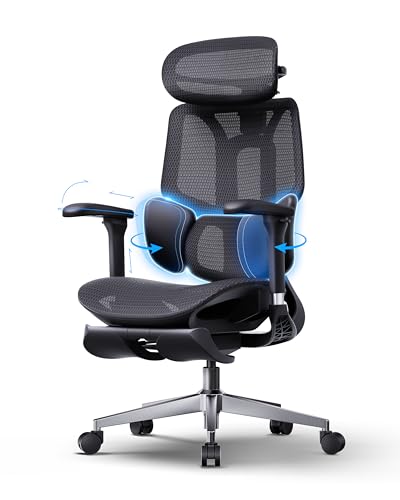
Hbada E3 Air 2026 with Footrest (Black)

330LBS Mesh Ergonomic Desk Chair with 3D Lumbar

Black Ergonomic Mesh Office Chair with Headrest and Lumbar

Ergonomic Office Chair with Footrest, 90-145° Recline
A Breakdown Of The Leading Choices
Solviva opens the list with a chair that prioritizes airflow and adjustability in equal measure. The breathable mesh backrest helps prevent the heat buildup that turns a midday work session into an uncomfortable sweat, while the high back design with integrated headrest lets taller users lean back without losing neck support.
The wide seat pan gives larger frames room to settle in without feeling pinched at the hips. Three-directional armrests (often called 3D arms, meaning height, pivot, and depth adjustments) make it easier to keep your elbows close to your body and your shoulders relaxed, which matters more than most people expect during long typing sessions.
Everyday Advantages
- Wide seat pan suits a broader range of body types
- Mesh back keeps airflow moving on warm days
- Headrest reduces neck strain during video calls
- 3D arms align forearms with desk height cleanly
- Lumbar curve supports the lower back through long shifts
Things To Consider
- Assembly typically takes 20 to 30 minutes out of the box
- Mesh cushioning feels firmer than padded foam alternatives
Quick Facts
Who It Suits Best
Remote workers and students who run multi-hour sessions and want a mesh chair that breathes.
Where Another Pick Suits Better
Shoppers who want a fold-out footrest should consider the Hbada E3 Air 2026 with Footrest (Black) for its retractable leg support.
Ergalithic’s mesh chair fits a wider range of body sizes, with the manufacturer noting a comfortable fit range of roughly 5’5″ to 6’2″. The flip-up armrests tuck away when you want to slide the chair closer to a desk or swing it under a tabletop, which is a small detail that makes a real difference in tighter home offices.
Adjustability hits the essentials: seat height, headrest, backrest recline, and arm position. That spread means two people sharing the same workstation can each dial in their own fit, which is why this lands as a balanced pick for couples or shared family setups.
Features That Help
- Flip-up arms save space when stowing under a desk
- Height range suits users from 5’5″ to 6’2″
- Reclining backrest supports casual reading and breaks
- Mesh build keeps the seat cooler through afternoon work
Worth Noting
- Headrest height is fixed once set, so shorter users may need to lean forward slightly
- Flip-up arm mechanism requires an occasional tightening to stay locked
Made For
Couples or roommates sharing a desk who each need their own ergonomic fit without buying two chairs.
Consider Something Else When
Anyone seeking a recline that goes past 135 degrees will find the wider range on the Humergo ergonomic chair more accommodating.
Hbada’s E3 Air 2026 is the chair that finally moves past the single-curve lumbar pad. Its 3-zone elastic lumbar system divides lower-back support into distinct regions that adjust independently, which means it can follow the shape of your spine instead of pressing flat against it. For programmers, writers, and analysts spending eight or more hours seated, that distinction translates into fewer end-of-day flare-ups.
The auto-recline and 140° tilt let you lean back without fiddling with levers, and the 4D headrest adjusts in four directions (height, angle, depth, and pivot) to keep your cervical spine aligned whether you’re reading code at noon or watching a screen at five.
The Practical Payoff
- Three-zone lumbar adapts to spine curvature more precisely
- Auto-recline engages without manual lever-pulling
- 4D headrest aligns neck through typing and screen viewing
- 140° tilt supports both work and break postures
- Build quality feels a step above basic mesh chairs
Trade Offs
- Premium tier comes at a higher price than basic mesh chairs
- Larger footprint requires a roomier corner of the office
Key Specs
Best Suited To
Full-time remote professionals who type for eight-plus hours daily and want structured, multi-zone lumbar support.
Skip It When
Tight-budget shoppers should consider the Solviva mesh chair, which covers the basics at a more accessible tier.
The grey colorway of the E3 Air 2026 swaps the standard black for a lighter, more office-friendly tone. Functionally, it’s the same chair as its black sibling, so the spec discussion above applies directly. The grey mesh tends to show dust and lint more visibly, so owners in pet-heavy households may find themselves wiping it down weekly.
For bright Scandinavian-style rooms or minimalist setups where a black chair would feel visually heavy, this color variant slips in without dominating the space. The 4D headrest and 4D armrests carry over unchanged, which means the ergonomic gains aren’t compromised.
What Pays Off
- Lighter colorway blends into bright, modern offices
- Same 3-zone lumbar system as the black variant
- 4D adjustments match across headrest and arms
Room For Improvement
- Light mesh shows pet hair and dust more visibly than black
- Color availability may shift by region and stock cycle
Whose Shelf It Belongs On
Design-conscious home office owners who want ergonomic depth without the visual weight of a black chair.
Look Elsewhere When
Pet households where lighter fabric means constant lint-rolling should consider the black Hbada E3 Air 2026 instead.
This footrest-equipped E3 Air 2026 keeps the same 3-zone lumbar system and 140° tilt, but adds a retractable footrest that pulls out from beneath the seat. That detail matters more than it sounds: shifting from seated work to a brief reclined rest becomes a single motion instead of a chair swap.
Users who take micro-breaks every hour to lean back and decompress will find the footrest turns the chair into a proper recovery surface. The 4D headrest and armrests remain, so the typing posture isn’t compromised when you return to upright mode.
Useful Touches
- Retractable footrest folds back under the seat when not in use
- 3-zone lumbar adapts to spine curvature precisely
- 140° tilt plus footrest supports brief reclined breaks
Honest Caveats
- Footrest mechanism adds a small amount of assembly time
- Footrest extension may be short for users over 6 feet
At A Glance
Right Fit For
Workers who alternate between focused typing and short reclined breaks throughout the day.
A Better Fit Elsewhere
Anyone who wants an even wider recline range should look at the Humergo chair, which extends to 145°.
Ergalithic’s higher-capacity chair supports up to 330 pounds, which sets it apart from most mesh chairs in this category. The 3D lumbar pillow adjusts 1.8 inches vertically and 1 inch in depth, letting you target the curve of your lower back rather than settling for a fixed position.
The 90 to 120° rocking range with a 90° lock gives you a stable upright mode for typing and a slight lean-back for reading. Combined with 4 inches of height adjustment, the fit range covers a broad spectrum of users without forcing compromises.
What Works In Its Favor
- 330-lb capacity suits a wider range of users
- 3D lumbar pillow dials into specific lower-back pressure points
- Rocking lock keeps typing posture stable when needed
Small Caveats
- Rocking range tops out at 120°, narrower than reclining alternatives
- Heavier frame is harder to move between rooms
Perfect Match For
Users who need a higher-capacity frame without sacrificing lumbar adjustability.
Reach For A Different Pick When
Anyone prioritizing recline depth should consider the Humergo chair, which reclines to 145°.
This black Ergalithic model targets first-time ergonomic chair shoppers with a fit range of roughly 4’9″ to 6’2″, which is unusually broad for the category. The adjustable lumbar pillow moves 1.8 inches vertically and 1 inch in depth, so shorter and taller users can both land on a comfortable curve.
The mesh backrest breathes well, and the headrest supports the cervical spine without forcing a fixed posture. For shoppers who have never owned an ergonomic chair before, this model covers the fundamentals without overcomplicating the setup.
A Favorable Mix
- Fit range covers 4’9″ to 6’2″, rare in this category
- Adjustable lumbar pillow targets pressure points precisely
- Mesh backrest keeps airflow moving on warm afternoons
Areas To Watch
- Adjustments require trial-and-error to find the right lumbar position
- Lacks the multi-zone lumbar system found on premium picks
Who Should Grab It
First-time ergonomic chair shoppers who want a forgiving fit range without learning a complex adjustment system.
Swap It Out When
Anyone wanting a 3-zone lumbar should consider the Hbada E3 Air 2026 (Black) for its multi-region support.
Humergo’s chair closes the list with the widest recline range here: 90-145°. A movable crossbar system adjusts the lumbar depth by 2 centimeters forward or backward, which lets you tune how firmly the lower back is held. The 45° rotating headrest adds another axis of fine-tuning for neck alignment.
For deep-focus workers who alternate between upright typing and long reclined reading sessions, the wide recline plus footrest combo turns the chair into a flexible recovery surface. Compared to the Hbada E3 Air 2026 with Footrest, this model offers a slightly wider recline range but a simpler lumbar system.
What Helps Most
- 90-145° recline range supports extended break postures
- Movable crossbar adjusts lumbar depth 2 cm
- 45° rotating headrest refines neck alignment
- Footrest adds leg support during reclined sessions
Some Limits To Know
- Crossbar lumbar adjustment takes some experimentation to dial in
- Footrest is best used fully reclined, not mid-recline
Feature Snapshot
Built With In Mind
Deep-focus workers who alternate between upright typing and long reclined reading or rest sessions.
Another Choice May Suit
Shoppers prioritizing a multi-zone lumbar system over recline depth should consider the Hbada E3 Air 2026 (Black).
What Matters Most Before Choosing Computer Chairs With Lumbar Support
Lumbar Support That Actually Fits Your Spine
The lumbar region is the inward curve at the base of your lower back, and a chair’s lumbar support should fill that curve without pushing you forward. Adjustable lumbar pillows and 3-zone systems both work, but the key question is whether you can fine-tune the depth and height. A fixed lumbar pad that doesn’t reach your curve is just dead space; an adjustable one that you can position precisely is the difference between real support and a marketing claim.
Recline Range And What It Means Day To Day
A recline range of 90-120° covers basic upright-to-lean-back transitions. Going wider, to 135° or 145°, opens up genuine rest postures where your torso isn’t fighting gravity. Workers who take micro-breaks every hour to decompress benefit more from a wider recline range than those who stay upright and walk away from the desk.
Headrest Adjustability Matters More Than It Sounds
A headrest that only moves up and down is fine for a fixed screen height. A 4D headrest (height, angle, depth, and pivot) lets you adjust for screen viewing, phone calls, and reclined reading without craning your neck. If you spend more than four hours daily in front of a screen, the extra axes pay off quickly.
Seat Depth, Width, And Frame Capacity
Seat pan dimensions affect how your weight distributes, while frame capacity affects who the chair can safely hold. The 330-lb Ergalithic model handles broader users; the Hbada E3 Air 2026 series fits standard frames but adds multi-zone lumbar precision. Match the chair to your body, not the other way around.
Key Considerations Across These Picks
Pitfalls Shoppers Hit
Many shoppers buy based on looks alone, then discover the lumbar support doesn’t reach their lower back curve. Measure the distance from the seat to your lower back before buying: if it’s under 16 inches, you need a chair with vertical lumbar adjustment. Another common mistake is ignoring armrest adjustability; fixed arms force your shoulders into a shrug that compounds neck tension by mid-afternoon.
Where The Extra Money Goes
Premium picks like the Hbada E3 Air 2026 series add multi-zone lumbar systems, 4D headrests, and auto-recline mechanisms that basic mesh chairs skip. The upgrade pays off most for full-time remote professionals who sit six or more hours daily. For part-time use or shorter sessions, a mid-tier mesh chair with solid lumbar adjustment covers the essentials without the higher cost.