Choosing the right interactive display changes how a room collaborates. Teachers lose less time to setup and more time to instruction, while meeting rooms finally feel like one shared workspace instead of a cable nest. This roundup covers full-panel interactive boards, mobile easel dry-erase boards, desktop mini boards, and a clever retrofit accessory, so you can match the right format to your space, your budget, and how often the board actually moves.
The Picks In Brief

Promethean ActivPanel LE 65″ Smart Board 4K UHD Android OS

Promethean ActivPanel 10 Premium 55″ Smart Board 4K UHD
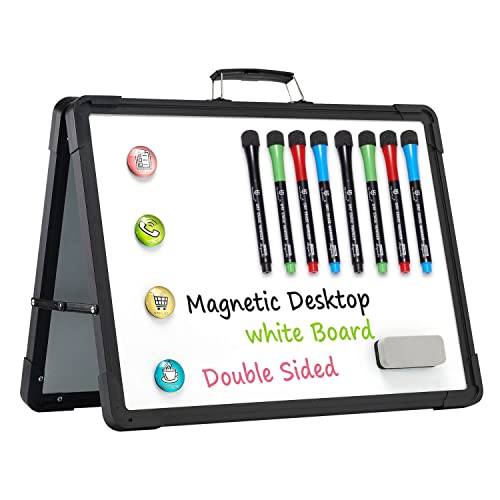
TSJ OFFICE 12″ x 16″ Mini Easel Desktop Whiteboard

Ryitss 16″ x 12″ Magnetic Portable Foldable Whiteboard
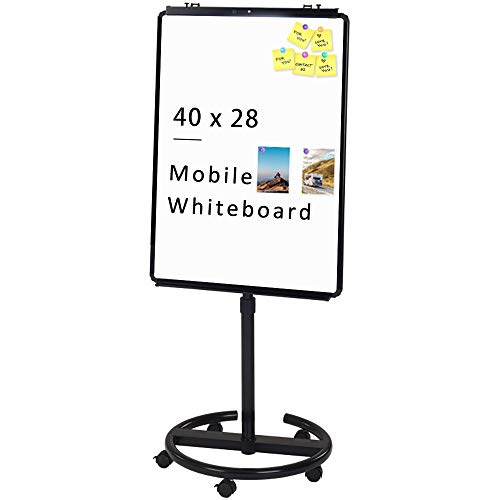
VIZ-PRO ECO Magnetic Mobile Whiteboard 28 x 40 Inches

VIZ-PRO Whiteboard Easel 36 x 24 Inches Tripod
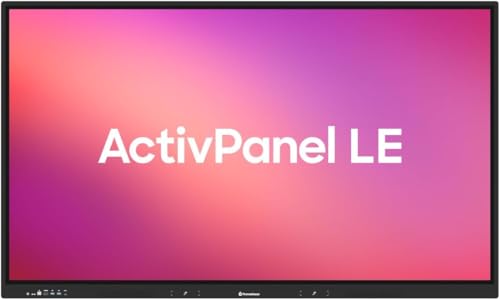
Promethean ActivPanel LE 65″ High Specification 4K UHD

Rocketbook Beacons Reusable Whiteboard Note Taker (4 Pack)

VIZ-PRO Double-Sided Magnetic Whiteboard on Wheels 48 x 36″
55″ Smart Board 4K UHD Android 14 8+128GB Touchscreen
What Each Pick Brings To The Table
The Promethean ActivPanel LE 65″ lands as a sensible anchor for classrooms that already live inside Google Workspace. With Android baked in plus an EDLA-certified build (meaning Google Mobile Services are officially licensed for the panel), students and teachers get a familiar toolbar, signed-in apps, and quick access to Drive, Docs, and Meet without juggling a separate compute stick.
Compared to smaller portable dry-erase picks later in this list, this is the wall-mounted workhorse: a 4K UHD touch panel that turns the front of the room into a single shared canvas. For districts standardizing on Chromebooks and Google Classroom, the platform fit removes a layer of friction that older interactive displays often leave behind.
Where It Delivers
- EDLA certification means Google Mobile Services run natively, so signed-in teachers see their bookmarks and extensions instead of a stripped-down shell.
- Built-in access to Promethean’s Annotate, Screen Share, Spinner, and Timer apps covers most lesson-day needs without third-party installs.
- The 4K UHD panel keeps text crisp from the back row, which matters in larger K-12 rooms where students sit 25 feet from the board.
- Includes a wall mount in the bundle, removing one of the most common install-day surprises.
Honest Caveats
- At 65 inches, this is a fixed installation, not something you wheel between rooms, so plan your wall placement before delivery.
- Android-based panels occasionally trail Windows OPS options (a swappable plug-in compute module) on niche desktop software that schools still run.
- Glare in sun-soaked classrooms can wash out the screen, so consider window treatments during install.
Quick Facts
Built With In Mind
Classrooms already standardized on Google Workspace, especially elementary and middle school rooms where teachers want minimal setup time and a familiar interface.
Swap It Out When
Your IT team runs Windows-only apps and needs an OPS-ready slot; the Promethean ActivPanel 10 Premium 55″ offers that flexibility in a smaller screen.
The ActivPanel 10 Premium is the answer when IT wants options. Instead of locking you into a single operating system, the panel accepts a swappable OPS compute module (Open Pluggable Specification, a slot-in mini-PC) so you can match Windows, Android, or ChromeOS to whatever your team already supports. For a district juggling both Mac and Windows labs, or a corporate office with mixed-platform meeting rooms, that flexibility removes a painful procurement conversation.
At 55 inches, the screen sits comfortably in mid-size conference rooms and smaller classrooms where a 65-inch panel would dominate the wall. Unlike the ActivPanel LE earlier, this one is built around Teams, Zoom, and Google Meet collaboration rather than just classroom delivery, so the built-in 8-array microphone and soundbar actually carry weight in real meetings.
What It Does Well
- Swappable OPS modules let you standardize the panel hardware while changing the operating system later, a real cost saver over a full panel replacement.
- Native support for Teams, Zoom, and Meet means fewer dongles and adapter headaches at the table.
- The 8-array microphone is built in, so you can drop the external conference mic in smaller huddle rooms.
- Mobile stand bundle option lets you roll it between training rooms without a wall mount.
Points To Keep In Mind
- You almost certainly need to buy the OPS module separately, so factor that into the total spend.
- 55 inches can feel snug in rooms built for 20-plus viewers, so measure before committing.
- More configuration choices mean a longer setup conversation with IT on day one.
Whose Shelf It Belongs On
IT-managed schools and corporate offices that need operating-system flexibility and built-in conferencing audio in one panel.
A Better Fit Elsewhere
Teachers who just want a plug-and-play Google-native experience without thinking about modules should consider the Promethean ActivPanel LE 65″ instead.
The TSJ OFFICE mini easel is the kind of unassuming tool that quietly improves a teacher’s day. Sitting at 12″ x 16″, it lives on a corner of a desk or a small table, ready to hold a quick example for a student who drifted behind during the lesson. The double-sided design means you flip it instead of erasing, which keeps the lesson moving and saves your markers.
It is also a friendly pickup for anyone sketching at home: a homework helper, a meal-plan board, a quick weekend to-do list. Compared to the wall-mount panels higher in this list, this is personal-scale, not room-scale, but that is exactly why it works where those big panels feel like overkill.
A Favorable Mix
- Double-sided design doubles your usable space without doubling the footprint on the desk.
- Built-in holder keeps markers from wandering off mid-explanation.
- Aluminum frame with ABS corners stays rigid in daily classroom handling.
- Top handle makes it easy to carry from one small-group station to the next.
Small Limitations
- At 12″ x 16″, it is built for short examples, not full lesson diagrams, so plan accordingly.
- Markers are not always included in the bundle, so double-check before day one.
- The aluminum frame can dent if dropped onto hard flooring, so treat the carry handle kindly.
Best Suited To
Teachers running small-group rotations and parents looking for a personal homework helper that does not take over the kitchen counter.
Not Your Match When
You need a full-room presentation surface; in that case, the VIZ-PRO ECO Magnetic Mobile Whiteboard is a better scale match.
The Ryitss foldable whiteboard is built for the “I have no wall space” crowd. At roughly 2.5 pounds and 16″ x 12″, it folds down flat enough to slide into a backpack or a desk drawer, then pops open on its built-in stand when you need it. The magnetic surface adds a small but useful hook for pinning notes or holding a paper handout during a tutoring session.
Think of it as the luggage-friendly cousin of the TSJ desktop easel reviewed earlier. That one stands rigid with a fixed easel stance, while this one prioritizes a slim folded profile. Dorm dwellers, remote workers at kitchen tables, and frequent travelers tend to gravitate toward this format.
Positive Points
- Folds flat, so it disappears behind a bookshelf or in a tote when not in use.
- Magnetic surface grips small magnets for pinning reminders or attaching a quick reference card.
- Lightweight at roughly 2.5 pounds, so most people carry it one-handed.
- Built-in stand sets up in seconds on any flat surface.
Where It Is Less Suited
- Folding hinges can loosen with heavy daily use, so treat the open-and-close motion gently.
- Smaller writing area than the TSJ easel when both sides are in play.
- Marker smudging tends to show more on the lighter-weight frame if you lean on the edge while writing.
Right Fit For
Dorm residents, remote workers at small desks, and tutors who need a board that travels between home visits without taking up trunk space.
Where Another Pick Suits Better
Classroom teachers who want a steady double-sided desktop easel should look at the TSJ OFFICE 12″ x 16″ Mini Easel instead.
The VIZ-PRO ECO mobile easel is the classic rolling dry-erase board that has anchored training rooms for years. At 28″ x 40″ with a height range from about 60 to 76 inches, it adjusts to standing presenters and seated workshoppers alike. The magnetic surface lets facilitators pin printed worksheets next to handwritten notes, which matters in hybrid sessions where half the room is following along digitally.
Compared to the small portable Ryitss and TSJ boards earlier, this is a totally different scale of tool: it owns the front of a room, not a corner of a desk. For agile coaches, trainers, and anyone running a real whiteboard session, that surface area is the whole point.
The Helpful Details
- Height adjustment from roughly 60 to 76 inches accommodates both seated and standing presenters.
- Magnetic surface holds printed handouts alongside handwritten notes, useful for hybrid sessions.
- Locking casters keep the board steady once you park it.
- The 28″ x 40″ footprint fits standard flipchart pads when you want a paper artifact of the session.
Trade-Offs To Consider
- Heavier and bulkier than tabletop easels, so plan your storage path before the first roll-out.
- Markers and erasers are typically sold separately, so budget for those on day one.
- Ghosting (faint leftover marks after erasing) tends to build up on whiteboards over months of heavy use, so monthly deep cleaning pays off.
Who Should Grab It
Trainers, agile coaches, and team leads running regular in-person workshops who want a real, mobile writing surface, not a sticky-note wall.
Consider Something Else When
You want a smaller tripod-format easel for pop-up workshops; the VIZ-PRO Whiteboard Easel 36 x 24 Inches is a lighter alternative.
The VIZ-PRO tripod easel is a quick-deploy option for facilitators who set up and tear down in the same afternoon. At 36″ x 24″ with a real tripod base (three-legged stand), it folds into a car trunk or a closet without drama. The non-magnetic surface keeps costs down, which is fair trade-off if you do not need to pin printouts to the board.
It also includes a small pen tray and a movable paper hook, which means you can flip it into flipchart mode for traditional pad-based sessions. Compared to the rolling VIZ-PRO ECO reviewed earlier, this tripod trades rolling ease for lower weight and a smaller storage footprint.
A Strong Showing
- Tripod base folds flat for car trips and closet storage, ideal for traveling trainers.
- Built-in pen tray keeps markers in reach during fast-paced sessions.
- Movable paper hook lets you run a flipchart pad on top of the dry-erase surface.
- Lower price point than magnetic mobile boards, which helps when buying for a department.
Possible Compromises
- Non-magnetic surface means you cannot pin printed handouts directly to the board.
- Tripod legs can wobble slightly on uneven floors, so check the room before starting.
- Flipchart pads are sold separately, which adds a small planning step.
Who It Suits Best
Traveling trainers, pop-up workshop hosts, and small-team facilitators who need a board that sets up in a borrowed conference room without a truck.
Look Elsewhere When
You want a magnetic surface or a heavier rolling format; the VIZ-PRO ECO Magnetic Mobile Whiteboard handles both.
The Promethean ActivPanel LE 65″ High Specification version is essentially the same 4K UHD EDLA-certified panel covered in pick one, bundled with three years of onsite support. For districts with thin IT benches, that onsite coverage turns a panel issue into a next-day service call rather than a freight shipment and a setup scramble.
It also covers accidental damage, drops, spills, and broken parts alongside standard breakdowns, which is the kind of coverage that pays for itself the first time a science-lab demo goes sideways. The trade-off is a higher total cost that smaller programs will need to weigh against simpler warranty options.
Practical Pluses
- Three-year onsite support means repairs happen in your building, not on a shipping dock.
- Accidental damage coverage absorbs the cost of the most common classroom panel incidents.
- Same Google-friendly EDLA Android experience as the standard ActivPanel LE, so no learning curve for teachers.
- 24/7 support access reduces the dreaded “the board is down before first period” call.
Worth Noting
- The onsite-support bundle adds to the upfront cost, which tightens smaller budgets.
- Coverage terms vary, so read the plan details before assuming every incident qualifies.
- Like the standard LE, this is a fixed wall installation, so room planning still applies.
Quick Facts
Made For
Schools and districts that want a turnkey panel with repair coverage baked in, especially those with limited in-house AV support.
Where A Sibling Pick Shines
Budget-conscious buyers without onsite-coverage needs should pick the standard Promethean ActivPanel LE 65″ and self-insure.
The Rocketbook Beacons are the clever middle path for shops that already own a whiteboard and want to capture its content without buying a full interactive panel. Four small reusable beacons stick to any dry-erase surface using micro-suction (tiny grippy cups that hold without adhesive), then sync with the Rocketbook app to push your writing into cloud services like Google Drive, Slack, and OneNote.
It is a different category from everything else in this roundup: instead of replacing your board, it digitizes the one you have. For retrofitted conference rooms and small offices that cannot justify a wall-mounted panel, the Beacons often deliver 80 percent of the “smart board” benefit at a fraction of the cost.
A Few Highlights
- Works with your existing dry-erase board, so there is no install, no wiring, and no wall commitment.
- Reusable micro-suction pads mean the beacons peel off cleanly and stick again without losing grip.
- Cloud integrations cover the common destinations most teams already use.
- Portable enough to move between meeting rooms or take home for the day.
Factors To Consider
- Capture quality depends on how cleanly the board is wiped, so smudges can confuse the scan.
- It captures the board, not the room’s audio, so pair it with a recording app for full meeting notes.
- Beacons require occasional repositioning, so a quick alignment step is part of the routine.
Perfect Match For
Hybrid teams and small offices that already have a dry-erase board and want digital captures without replacing it with a panel.
Reach For A Different Pick When
You want a true touch-interactive display rather than a capture tool; the 55″ Smart Board Android 14 touchscreen offers that experience.
The VIZ-PRO double-sided mobile whiteboard is the heavyweight of the dry-erase side of this list. At 48″ x 36″ with two magnetic writing surfaces, it doubles your working canvas without doubling your floor footprint. The horizontal pivot lets you flip between sides without dragging the board across the room, which matters when you have a packed agenda.
Four casters (two lockable) make it genuinely mobile for a board this size. For large training rooms, design studios, and product teams that sketch all day, this format covers more wall than the 28″ x 40″ VIZ-PRO ECO covered earlier.
Why It Works Well
- Double-sided design doubles your active canvas for back-to-back exercises without erasing.
- Magnetic surfaces hold printed diagrams and sticky notes during long working sessions.
- Horizontal pivot locks securely, so you can flip sides mid-session with confidence.
- Two of the four casters lock, which keeps the board steady once parked.
Trade-Offs To Consider
- At 48″ x 36″, it requires meaningful floor space and a clear rolling path between rooms.
- Heavier than the smaller VIZ-PRO tripod or ECO easels, so consider your team before assigning moves.
- Like all dry-erase boards, it benefits from a periodic deep clean to prevent ghosting.
Made For
Large training rooms, design studios, and product teams that sketch through full-day sessions and need two active canvases on one rolling unit.
Skip It When
You mainly need one canvas and want a lighter rolling format; the VIZ-PRO ECO Magnetic Mobile Whiteboard is the better scale match.
The 55″ Smart Board rounds out the list with a modern Android 14 platform (the most recent Android generation) paired with 8GB of RAM and 128GB of storage, generous specs for a panel that has to run apps, store lesson files, and handle wireless casting without lag. The 4K UHD touch surface keeps diagrams sharp and supports finger or stylus input for natural inking.
Where the Promethean ActivPanel 10 Premium earlier leans into multi-OS flexibility, this one commits fully to Android 14. For a studio, a content-creator workspace, or a home office that lives in the Google ecosystem, that focus actually plays well, since app compatibility stays simple.
The Upside
- Android 14 keeps app compatibility current, which extends the useful life of the panel.
- 8GB RAM and 128GB storage handle large media files and multitasking without obvious slowdown.
- 4K UHD touch surface supports both finger touch and stylus input for flexible inking.
- Wireless casting cuts the cable clutter that older panels tend to accumulate.
Some Limits To Know
- Android-only means niche Windows or macOS software needs a separate workaround.
- Brand familiarity is lighter than the Promethean line, so plan to test your must-have apps early.
- Sold by a third-party seller with non-returnable shipping terms, so verify specs before purchase.
Who Will Love This
Studios, creator workspaces, and home office owners who want a modern, app-friendly interactive panel without the bigger-brand price tag.
Consider Something Else When
Schools that need brand-name support and established training programs; the Promethean ActivPanel LE 65″ is the safer fit.
Picking The Right Format For Your Room
Choosing a digital whiteboard comes down to matching the format to the space and the workflow, not chasing the biggest screen.
Screen size and room depth matter first. A 55-inch panel suits a mid-size conference room or small classroom, while a 65-inch panel earns its space in larger rooms where the back row needs legible text. For dry-erase boards, the 28″ x 40″ or 48″ x 36″ formats work for training rooms, while 12″ x 16″ boards belong on desks, not walls.
Operating system fit is the next decision. EDLA-certified Android panels (like the ActivPanel LE) feel familiar in Google-centric schools, while OPS-ready panels (like the ActivPanel 10 Premium) let IT swap compute modules when the standard OS changes. Locking into one ecosystem without checking your must-have apps is the most common regret.
Mobility versus installation is the practical fork. Wall-mounted panels deliver a permanent, polished setup but require room planning. Mobile easels and rolling boards flex between rooms and roll into storage when not in use, which suits schools and offices that share space.
Surface type and accessories also influence daily use. Magnetic surfaces let you pin printed handouts alongside handwritten notes, which helps hybrid sessions. Non-magnetic boards cost less but limit that workflow. Bundled accessories like wall mounts, mobile stands, and onsite-support plans can quietly swing the total spend by hundreds.
Key Considerations Across These Picks
Mistakes Worth Dodging
Buying the largest panel without measuring the room. Oversized screens in small rooms create glare, awkward viewing angles, and a cramped front-of-room experience. Measure the longest viewer distance first and choose the size that keeps text readable from that spot.
Skipping the operating-system conversation. Districts and offices often buy on screen size alone, then discover their must-have software does not run on the panel’s native OS. A quick compatibility check with your IT team prevents a year-two regret.
Forgetting about accessories. Wall mounts, OPS modules, mobile stands, and protective warranty plans are sometimes sold separately. A panel that looks affordable at first glance can balloon once you add the install and support costs.
Where The Extra Money Goes
Higher-tier digital whiteboards typically invest in three places: panel brightness and touch fidelity, build quality of the frame and mount hardware, and bundled support like onsite service. For schools running all-day instruction, the support side often justifies the upgrade, because panel downtime is instructional downtime. For offices using a board weekly, the standard-tier screen may be the smarter spend.
Frequently Asked Questions
What size digital whiteboard do I need for a small classroom?
A 55-inch panel works for most classrooms seating around 20 to 25 students, while 65 inches fits larger rooms where viewers sit further back. For dry-erase boards, a 28″ x 40″ easel covers small-group work, and 48″ x 36″ boards handle full-class sessions.
Do interactive panels need Wi-Fi to work?
Wi-Fi is needed for cloud apps, casting, and software updates, but most panels run their built-in whiteboard and annotation tools offline. Plan for a stable network connection if your lesson depends on cloud storage or video calls.
What is the difference between EDLA and non-EDLA Android panels?
EDLA certification means Google officially licenses Google Mobile Services for the panel, so apps like Drive, Docs, and Meet run with full sign-in support. Non-EDLA Android panels may run a stripped-down interface that limits Google integration.
Can a portable dry-erase easel replace an interactive panel?
For traditional brainstorming and small-group work, yes. For capturing notes digitally, casting screens, or running video meetings, a portable easel falls short. The Rocketbook Beacons bridge that gap by digitizing an existing dry-erase surface.
How do I clean and maintain a dry-erase board?
Wipe with a standard dry-erase eraser after each session, and deep clean monthly with a dedicated whiteboard cleaner to prevent ghosting. Magnetic surfaces tolerate slightly more scrubbing than non-magnetic finishes, but avoid abrasive pads on either type.
Closing Remarks
The right digital whiteboard depends less on the spec sheet and more on your room, your team, and how often the board actually moves. Match the format to the space, confirm the operating system fits your software, and weigh the support bundle against your in-house repair capacity. With those three calls made, every pick on this list will serve its intended room well.