Running a small business means every shipping label matters, and printing them at home saves real time. The right printer handles 4×6 thermal labels, plays nicely with your shipping platform, and won’t jam right before a deadline. This lineup covers thermal workhorses, portable label makers, and keyboards that let you skip the app entirely.
The Picks In Brief

SUPVAN E10 Bluetooth Label Maker with 3 Tapes

Arkscan 2054K-USB Upgraded Shipping Label Printer
SUPVAN E12 Keyboard & Bluetooth Label Maker

SUPVAN G15M Mini Portable Label Maker

SUPVAN T50M Pro Bluetooth Label Maker, Black
Arkscan 2054A Shipping Label Printer 4×6 Thermal

SUPVAN E11 Keyboard & Bluetooth Label Maker

Rollo USB Shipping Label Printer Commercial Grade

NIIMBOT M2 Thermal Transfer Label Maker, Blue
Why These Options Stand Out
If your shipping operation lives on your phone, the SUPVAN E10 strips out the keyboard and keeps everything in a single app. The green bundle includes three starter tapes, which matters because jumping in without one means a frustrating first afternoon. The rechargeable battery and ink-free thermal design keep ongoing costs low, and for small businesses just starting to label inventory or storage bins, that combination is hard to beat.
Compared to the Arkscan units later in this list, the E10 is far less about throughput and more about casual, on-demand labeling. You won’t see FNSKU barcodes flying off this thing, but pantry jars, daycare containers, and cable runs are right in its wheelhouse.
Good Reasons To Consider
- No app fees or registration needed to start printing
- Ink-free thermal printing eliminates cartridge shopping
- Rechargeable battery covers roughly a month per charge
- Three included tapes cover most home and small office needs
- Compact body fits on a crowded desk or counter
Things To Consider
- Phone-only workflow feels limiting once label volume grows
- Tape width is narrow, so it won’t suit shipping label workflows
Whose Shelf It Belongs On
Home-based sellers and home organizers who want labels without ink or a learning curve.
Skip It When
You run actual outbound shipping, since the Arkscan 2054A handles 4×6 thermal labels far more effectively.
The Arkscan 2054K-USB earns its place at the top of any serious shipping lineup. Direct thermal means no ink or toner, and the 4×6 format matches what every major carrier uses. Windows, Mac, and Chromebook support out of the box means you don’t pick sides, and the roll-and-fanfold flexibility lets you load cheap labels from whichever source your business prefers.
Where the SUPVAN E10 is friendly for casual labeling, the 2054K-USB is built for the grind of merchant fulfillment. Etsy, Shopify, ShipStation, and Pirateship all talk to it without drama, and sellers running more than one channel will appreciate that compatibility without juggling drivers.
Useful Touches
- Direct thermal printing removes ink and toner from your budget
- Roll and fanfold media compatibility cuts label costs
- Works across Windows, Mac, and Chromebook without extra setup
- Plays nicely with the major shipping platforms and marketplaces
Trade Offs
- USB-only tethering limits placement flexibility
- Larger footprint demands a real desk spot
Feature Snapshot
Made For
Multi-channel online sellers printing 50 to 500 labels a week from a dedicated desk.
Consider Something Else When
You need wireless placement, since the Rollo USB also uses a wired connection but the SUPVAN T50M Pro offers Bluetooth freedom.
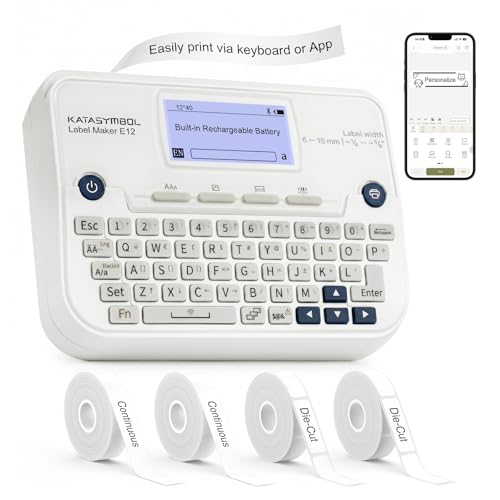
The SUPVAN E12 doubles down on input options, giving you both a built-in keyboard and Bluetooth app control. The backlit LCD screen helps in dim stockrooms, and four included tapes mean you’ll likely avoid a separate purchase on day one. For office managers labeling file folders, asset tags, and storage racks all in the same afternoon, that flexibility earns its keep.
Stacked against the SUPVAN E10 earlier in this list, the E12 trades a bit of portability for a faster typing workflow. You won’t reach for your phone quite as often, which matters during high-volume labeling sessions.
Reasons It Performs
- Two input paths let you choose keyboard or app per task
- Backlit LCD remains readable in low-light stockrooms
- Four tapes included, covering common label widths
- Bluetooth connection frees the device from a fixed desk
Worth Noting
- Heavier than app-only alternatives like the E10
- Not designed for 4×6 shipping label formats
Right Fit For
Office managers and small operations labeling files, bins, and supplies throughout the workday.
Look Elsewhere When
You need actual shipping labels printed in volume, since the Arkscan 2054K-USB handles that workload more efficiently.
The SUPVAN G15M is the smallest unit in this lineup, and the heat-shrink tube support sets it apart from the SUPVAN E10 and E12. At roughly 0.88 pounds and a footprint under 7 inches long, it slips into a tool bag or backpack. A 1200 mAh battery reportedly stretches to about three months between charges, assuming light use, which is unusual for this category.
For technicians labeling wire runs in the field or crafters marking storage bins at markets, the G15M earns its place. It’s not a shipping printer, and anyone expecting that will be disappointed.
A Favorable Mix
- Heat-shrink tube support covers electrical and craft projects
- Three-month battery life reduces charging frequency
- Under one pound for genuine portability
- Minimal-margin printing reduces wasted tape
Points To Note
- Not built for shipping label dimensions
- Smaller print area limits label text capacity
Feature Snapshot
Best Suited To
Field technicians, electricians, and crafters who need labels away from a desk.
Not Your Match When
You print outbound shipping labels, since the Arkscan 2054A is purpose-built for that workflow.
The T50M Pro is where SUPVAN pushes into actual small-business territory. Labels run from three-quarters of an inch up to 2 inches wide, which covers address labels, product tags, QR codes, and barcodes. Bluetooth app control means a phone or tablet drives everything, and adding images and brand logos becomes straightforward.
If you’ve outgrown the E10’s narrower tape and need something that doubles for branding, the T50M Pro closes the gap without jumping to a full shipping printer like the Arkscan units. Many home-based product businesses land here.
Practical Pluses
- Wide tape range fits shipping and product branding needs
- App supports images, QR codes, and barcodes
- Bluetooth cuts the cord for flexible placement
Points To Keep In Mind
- Lacks the keyboard input that the E12 offers
- Not optimized for high-volume shipping label runs
Perfect Match For
Product-based small businesses printing branded labels and packaging stickers.
A Better Fit Elsewhere
High-volume shipping days call for the Rollo USB Shipping Label Printer, which is built for sustained throughput.
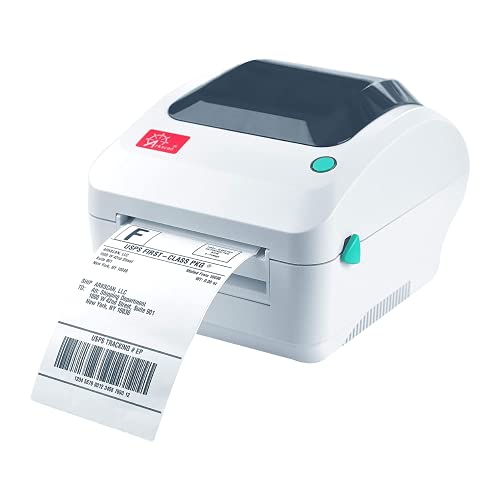
The Arkscan 2054A is the predecessor to the 2054K-USB reviewed earlier, and it remains a strong choice for sellers who don’t need the upgraded version. It adds Android compatibility to the Windows, Mac, and Chromebook support the newer unit already has, which matters for anyone running a phone-based shipping station.
Direct thermal 4×6 printing and broad marketplace compatibility keep this unit relevant. The 2054A handles roll and fanfold media, so sourcing cheap labels stays on the table. Compared to the SUPVAN T50M Pro, this is a true shipping workhorse rather than a branding tool.
Noteworthy Benefits
- Android compatibility expands your device options
- Roll and fanfold media lower ongoing label costs
- Compatible with major shipping platforms and carriers
Room For Improvement
- USB-tethered, limiting placement flexibility
- Older revision compared to the 2054K-USB upgrade
Feature Snapshot
Who It Suits Best
Sellers running Etsy or Shopify shops who print 4×6 labels from a fixed workstation.
Reach For A Different Pick When
You want the latest revision, since the Arkscan 2054K-USB reviewed earlier offers the upgraded build.
The SUPVAN E11 sits one tier below the E12 and offers the same keyboard-plus-Bluetooth formula at a slightly more approachable position. Four tapes ship in the box, the 1200 mAh battery reportedly handles about a month per charge, and the keyboard lets you skip the app when speed matters.
For first-time label printer owners, the E11 removes the anxiety of figuring out an app interface on day one. Compared to the SUPVAN E10, the keyboard adds a learning curve but speeds up repetitive tasks once you settle in.
Strengths Worth Knowing
- Keyboard speeds up repeated labeling tasks
- Bluetooth app offers design flexibility when needed
- Four included tapes cover common starter scenarios
Small Caveats
- Heavier than the app-only SUPVAN E10
- Narrow tapes don’t suit shipping label dimensions
Built With In Mind
First-time label printer owners who want flexibility without overwhelming features.
Where Another Pick Suits Better
Shipping-heavy workflows need the Rollo USB Shipping Label Printer, which is built for that daily grind.
Rollo built its name in the shipping label space, and this USB thermal printer remains a fixture in home warehouses everywhere. The commercial-grade framing means it’s designed for the kind of daily label volume that would choke lighter hardware. Setup is driver-based, and once configured, the connection stays stable.
Compared to the Arkscan 2054K-USB earlier in this list, the Rollo is similar in concept but built for heavier sustained use. If your operation runs hundreds of labels a week, this is a sensible upgrade over entry-level thermal printers.
Useful Strengths
- Commercial-grade build for daily heavy use
- Compatible with major Windows and Mac versions
- Direct thermal printing eliminates ink costs
- Prints warehouse, barcode, and shipping labels
Honest Caveats
- USB tethering limits where you can place it
- Driver download required before first use
- Reported jam sensitivity with off-brand label rolls
Who Should Grab It
Small businesses shipping hundreds of packages weekly from a dedicated packing station.
Swap It Out When
You print only a handful of labels each week, since the SUPVAN T50M Pro handles lighter volumes with more flexibility.
The NIIMBOT M2 uses thermal transfer technology rather than direct thermal, which is the meaningful difference here. Thermal transfer labels resist water, oil, alcohol, and scratching, and they hold up to temperature swings better than standard thermal output. The 300 DPI resolution keeps text and barcodes legible, and the 2-inch tape width covers most product labeling scenarios.
Compared to the SUPVAN T50M Pro, the M2 trades Bluetooth simplicity for label durability. If your products sit on shelves, in fridges, or in warehouses where standard thermal labels would fade, this is the upgrade path worth considering.
Real Benefits
- Thermal transfer labels resist water, oil, and abrasion
- 300 DPI resolution keeps barcodes and text crisp
- Labels hold up across temperature variations
Some Limits To Know
- Not designed for 4×6 shipping label workflows
- Requires thermal transfer ribbon, an extra consumable
Perfect Match For
Product sellers who need labels that survive shipping, storage, and handling without fading.
Look Elsewhere When
Your main job is shipping labels, since the Arkscan 2054K-USB handles that with broader platform support.
What Matters Most When Choosing Shipping Label Printers For Small Business
Match The Printer To Your Label Type
The first fork in the road is label purpose. Direct thermal printers like the Arkscan 2054K-USB and Rollo USB handle 4×6 shipping labels without ink, which keeps ongoing costs low. Thermal transfer units like the NIIMBOT M2 produce more durable output suited to product branding and longer-term storage. Portable label makers such as the SUPVAN G15M handle tape rolls for organization and field work. Each technology serves a different job, and mixing them up leads to buying the wrong tool.
Connection And Platform Compatibility
USB tethering keeps the connection rock-solid for steady shipping workflows, and that matters when you’re printing 50 labels in a row. Bluetooth and Wi-Fi options like the SUPVAN T50M Pro free the printer from a fixed desk. Check your shipping platform’s compatibility list before you commit: ShipStation, Shopify, Etsy, and marketplace seller central all have specific expectations, and driver setup varies by operating system.
Volume And Throughput Realities
A printer that handles 20 labels a week easily might struggle at 300. The Rollo USB and Arkscan units are built for sustained use, while lighter portable label makers suit intermittent tasks. For a growing small business, the safe move is sizing for where you expect to be in a year, not where you are today. Off-brand label rolls are reportedly more likely to cause jams, so stock quality matters alongside printer choice.
Key Considerations Across These Picks
Mistakes Worth Dodging
A common misstep is buying a label maker when you actually need a shipping printer. The SUPVAN E10 and E11 are great for organizing jars and cables, but they won’t print a 4×6 shipping label at carrier-required dimensions. Another trap is assuming every thermal printer handles the same media: some require specific roll cores, and others refuse fanfold stock entirely. Confirm label compatibility before you commit to a printer, because the cheapest listing often means label costs you didn’t plan for.
Where The Extra Money Goes
Higher-tier models like the Rollo USB and Arkscan 2054K-USB cost more because they’re built for daily, heavy use. The upgrades usually show up as faster print speeds, more reliable media feeding, and broader platform compatibility out of the box. For someone printing fewer than 50 labels weekly, that upgrade rarely pays for itself. For operations pushing past that threshold, the time savings and reduced frustration justify the spend.
Frequently Asked Questions
What Label Size Works For Most Shipping Carriers?
Four-by-six inches is the universal standard for outbound shipping labels across major US carriers. Most direct thermal printers in this lineup handle that size, but portable label makers typically max out at narrower tape widths.
Do Thermal Label Printers Need Ink Or Toner?
Direct thermal printers do not. They use heat-sensitive label stock that darkens when the print head applies heat. Thermal transfer printers like the NIIMBOT M2 do require a ribbon, but that ribbon lasts substantially longer than ink cartridges.
Can These Printers Connect To Multiple Marketplaces?
The Arkscan and Rollo units support multiple shipping platforms and carriers. Lighter portable label makers typically work through a single app and don’t integrate with shipping platforms directly, so confirm compatibility before committing.
How Long Does Thermal Printing Last On Labels?
Direct thermal labels can fade over months, especially with heat or sunlight exposure. Thermal transfer labels last years because the ribbon ink sits on top of the label surface. For short-term shipping, direct thermal is fine; for product branding, thermal transfer is the safer bet.
Are These Printers Hard To Set Up?
Most thermal shipping printers require a driver download on first use, after which printing becomes a one-click operation. Portable label makers are usually app-driven and start working within minutes of pairing.
The Takeaway
The right shipping label printer depends on what you’re actually labeling. Sellers pushing daily 4×6 packages through carriers will find the Arkscan and Rollo units earn their keep, while home organizers and small product shops often do better with the SUPVAN lineup. Pick the printer that fits your actual workflow, and the labels practically print themselves.