Printing at home runs the gamut from instant keepsake prints to full office output, and the right machine depends entirely on what your days actually look like. Scrapbookers, students decorating dorm walls, remote workers printing invoices, and families digitizing photo albums all need something different on the desk. This list leans into real-world use, weighing things like app quality, film cost, ink tank economics, and travel-friendly form factors. Several picks here are pocket-sized companions, one is a full-size office machine, and two are protective cases worth grabbing alongside your print purchase.
The Picks In Brief
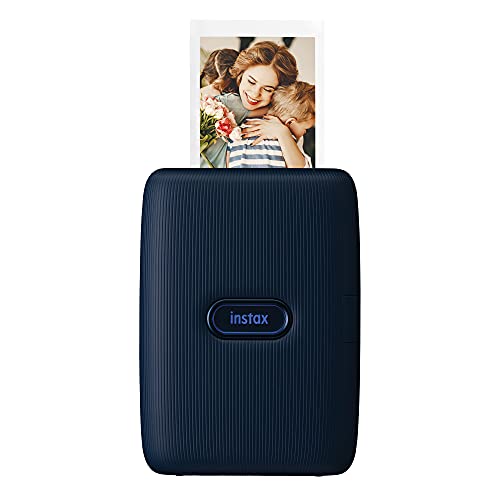
Fujifilm Instax Mini Link Smartphone Printer (Dark Denim)
Fujifilm Instax Mini Link 2 Smartphone Printer (Soft Pink)

Canon MegaTank G3270 All-in-One Wireless Color Printer

Canboc Case for Instax Mini Link Printers

Nelko PP01 Portable Photo Printer (White)

Nelko PP01 Portable Photo Printer (Purple)

Nelko PP01 Portable Photo Printer (Pink)

Canboc Hard Case for HP Sprocket (Grey)
Fujifilm Instax Mini Link 2 Smartphone Printer (Clay White)
Why These Options Stand Out
The Dark Denim Mini Link keeps a low profile on a craft desk, where most scrapbookers like to spread out scissors, washi tape, and pens. Bluetooth pairing with a smartphone (a wireless standard for short-range device links) is the whole workflow, and the companion app opens up roughly thirty filters and frames for quick personalization. Compared to the Mini Link 2 picks later in this list, this original model leans on a calmer color palette and a slightly more reserved app interface.
For most casual photo sessions, this is the printer you pull out at parties or weekend trips. It prints on credit-card-sized Instax Mini film, which is widely available but adds a real per-shot cost compared to a paper-based pocket printer like the Nelko PP01 picks further down.
Useful Strengths
- Bluetooth connection to phone keeps the setup truly wireless at the desk or on the couch.
- Compact body slides into a tote or backpack without crowding other supplies.
- App offers dozens of frames and filters for quick photo personalization before printing.
- Dark Denim finish hides minor scuffs better than the lighter color options later in this list.
Things To Consider
- Film cost adds up quickly for anyone printing dozens of shots in one sitting.
- Battery is built-in and not user-replaceable, so long-term replacement requires service.
Feature Snapshot
Who It Suits Best
Casual scrapbookers and party hosts who want quick, tangible prints without a full photo setup will find this an easy fit.
Look Elsewhere When
Anyone wanting AR-style on-screen drawing features should look at the Fujifilm Instax Mini Link 2 in Soft Pink reviewed next.
The Mini Link 2 in Soft Pink leans into fun, and the new INSTAXAiR app feature (augmented reality drawing effects layered over photos) lets you sketch bubbles, petals, and neon accents directly on the image before printing. You hold the printer and “draw” in the air with it like a stylus, and the app mirrors those gestures onto the photo in real time. That single feature separates it from the original Mini Link reviewed above, which uses standard taps and swipes.
For birthday party favors, dorm room decor, or journaling nights with friends, this is the playful pick. Setup is still Bluetooth with the same Mini Link app family, so anyone familiar with the original finds a smooth transition.
Key Advantages
- INSTAXAiR drawing feature adds animated effects that show up on the printed photo.
- Soft Pink finish stands out as a shelf-worthy design piece.
- Same Bluetooth workflow as the original Mini Link keeps onboarding simple.
- Prints onto widely available Instax Mini film for straightforward replacement.
Trade Offs
- Lighter color shows scuffs and dye marks more visibly than Dark Denim or Clay White.
- App feature set can feel overwhelming for users who only want a basic print.
- Same per-print film cost applies as any Instax Mini printer.
Made For
Gift recipients, teens, and playful adults who want a printer that doubles as a creative tool will enjoy the AR drawing tricks.
Skip It When
Anyone who just wants quick, no-frills photo prints should consider the Canon MegaTank G3270 covered in the next review.
The MegaTank G3270 is the only full-size inkjet printer in this list, and it shows up here because “printers for home” includes far more than pocket photo gear. This is a refillable ink tank printer (large built-in reservoirs you top up with ink bottles instead of cartridges), and Canon ships enough ink in the box to print thousands of pages before a refill. A small 1.35-inch square LCD on the front handles basic status checks, and wireless connectivity covers phone, laptop, and tablet printing.
For households printing schoolwork, shipping labels, and the occasional photo, this is the workhorse option. Compared to the portable picks above, it trades portability for capacity, and prints on plain paper instead of credit-card-sized film.
Bright Spots
- Refillable ink tanks cut long-term running costs well below cartridge printers.
- Prints, copies, and scans from one machine, saving desk space.
- Wireless setup works from phones and laptops without driver-heavy installs.
- Single-sided printing keeps the workflow simple for everyday documents.
Honest Caveats
- Takes up considerably more desk space than any pocket printer in this roundup.
- Photo print quality is acceptable but not comparable to dedicated photo printers.
- Ink refill bottles must be stored upright to avoid leaks, a minor ownership chore.
Best Suited To
Home offices, students, and households printing hundreds of pages per month will see the ink tank savings add up fast.
Not Your Match When
Anyone who mainly wants credit-card-sized keepsake prints should consider the Fujifilm Instax Mini Link in Dark Denim reviewed first.
The Canboc case is an accessory, not a printer, but it earns its place on this list because portable photo gear without protection quickly shows wear. The case fits the Fujifilm Instax Mini Link, Mini Link 2, Mini Link+, and Mini Link 3, so it stays useful across upgrades. A built-in mesh pocket holds an extra pack of film, a USB cable, and small accessories.
For anyone carrying one of the Mini Link printers to a coffee shop, a wedding venue, or a school event, this case is the practical add-on. It is not a printer on its own, so it makes sense as a bundle with one of the Mini Link picks above.
Standout Benefits
- Compatible across multiple Mini Link generations, so upgrades do not require a new case.
- Mesh pocket stores extra film and cables in one organized pouch.
- Padded shell guards the printer against drops and pressure during travel.
Practical Considerations
- Does not include the printer itself, so it must be paired with a Mini Link purchase.
- Exterior fabric attracts lint from canvas or felt tote bags.
Perfect Match For
Anyone owning a Fujifilm Mini Link printer who takes it out of the house regularly will appreciate the extra protection.
Reach For A Different Pick When
Shoppers who own an HP Sprocket, Kodak Step, or Lifeprint printer should grab the Canboc Hard Case reviewed later instead.
The Nelko PP01 in White weighs around 0.6 pounds and slips into a coat pocket or backpack side pouch. Prints come out at 2×3 inches on sticky-backed photo paper that is smudge-, water-, and tear-resistant, which makes the output useful for scrapbooks, planners, and fridge decor. This is the first of three PP01 color variants in this roundup, and the White finish fits a clean, minimal aesthetic.
For travelers, journalers, and parents making quick keepsakes for kids, the PP01 strikes a balance between portability and affordability. Compared to the Mini Link printers above, the print medium is paper-based rather than instant film, and each cartridge covers a set number of prints.
Good Reasons To Consider
- Sticky-back prints work directly in journals, planners, and on walls without extra adhesive.
- Sub-pound weight makes it the most travel-friendly printer in this lineup.
- Resistant paper finish holds up to handling better than standard photo paper.
- White color pairs well with neutral home decor and tech setups.
Points To Keep In Mind
- Cartridge replacements add up if you print heavily over a long weekend.
- Photo paper and ink come bundled, so running out of one means buying matched packs.
Right Fit For
Travelers and journal keepers who want light, sticky-backed prints on the go will appreciate the pocketable form factor.
Swap It Out When
Anyone preferring an instant film aesthetic with credit-card-sized prints should pick the Fujifilm Instax Mini Link 2 in Soft Pink reviewed second.
The Purple PP01 is functionally identical to the White PP01 covered above, with the same 2×3-inch print size, pocketable build, and sticky-backed resistant paper. The color is the only differentiator, and it gives the printer a personality that pops on a shelf or in a kid’s craft drawer. For anyone who has never owned a portable printer, the PP01 family is a low-friction starting point.
The phone-driven workflow keeps things straightforward: pair, choose a photo, edit if desired, and print. Compared to the Fujifilm Mini Link 2, the PP01 trades instant film aesthetics for paper prints that work better in standard scrapbooks and planners.
Everyday Advantages
- Same compact 0.6-pound body as other PP01 variants, easy to carry anywhere.
- Purple finish adds character without being too bold for a shared desk.
- Phone-based workflow means no driver installs or wired connections.
- Sticky-backed prints skip the tape and glue stage in craft projects.
Some Limits To Know
- Cartridge and paper bundles must be matched, limiting mixing brands.
- No LCD screen means edits happen in the phone app before printing.
Who Should Grab It
First-time printer owners and craft beginners who want a forgiving, phone-driven setup will find this easy to live with.
A Better Fit Elsewhere
Anyone needing a printer plus scanner in one machine should look at the Canon MegaTank G3270 reviewed earlier in this list.
The Pink PP01 closes out the Nelko trio with a finish aimed squarely at gift-giving. Mechanically identical to the White and Purple versions, it offers the same 2×3 sticky-backed prints on resistant paper. The Pink version lands well for teens, scrapbook hobbyists, and anyone whose shelf or desk has a brighter color palette.
For most users, the choice between the three PP01 colors comes down to aesthetic preference, since the printer, paper, and ink setup do not change. The Pink variant is also the closest visual match to the Mini Link 2 Soft Pink reviewed earlier, in case matching across devices matters.
What Helps Most
- Pink color reads as a fun gift without needing extra wrapping.
- Same lightweight body makes it easy to wrap and ship.
- Resistant paper holds up well to wear from handling and journal storage.
- Phone-based setup removes cables and keeps the box contents minimal.
Worth Noting
- Bundled ink and paper run out faster than expected with frequent printing sessions.
- Replacement cartridges are brand-specific, so third-party options are limited.
Whose Shelf It Belongs On
Teens, craft hobbyists, and anyone buying for a gift occasion will find the color and size combo appealing.
Consider Something Else When
Anyone who needs a protective travel case for a printer should grab the Canboc case reviewed earlier in this list.
This second Canboc case in the lineup fits the HP Sprocket 2nd Edition, Kodak Step, and Lifeprint 2×3 portable printers, so it serves shoppers who own or are about to own a different brand. The hard shell construction adds drop protection over the softer fabric Canboc case covered earlier, and the mesh pocket stores extra paper packs and a charging cable.
For anyone who already owns one of these mini printers, the case turns a loose gadget into something that fits in a bag without scratches. The Grey color hides dust and grime better than the lighter Mini Link case, which matters for daily-carry use.
The Upside
- Hard outer shell guards against drops more reliably than soft pouches.
- Compatible across HP, Kodak, and Lifeprint printers for cross-brand flexibility.
- Mesh pocket keeps paper and cables together in one tidy unit.
- Grey finish hides dust from frequent backpack use.
Where It Is Less Suited
- Does not fit Fujifilm Instax Mini Link printers, which use the Canboc case reviewed earlier.
- Hard shell adds bulk compared to soft fabric alternatives.
Built With In Mind
HP Sprocket, Kodak Step, or Lifeprint owners who carry their printer in a backpack or work bag will appreciate the hard shell.
Where A Sibling Pick Shines
Anyone with a Fujifilm Instax Mini Link printer should choose the Canboc case for Mini Link printers reviewed earlier.
The Clay White Mini Link 2 brings the same INSTAXAiR drawing features as the Soft Pink version covered earlier, wrapped in a more neutral, decor-friendly finish. For minimalist desks, Scandinavian-inspired shelves, and shared living spaces, Clay White reads as quieter than pastel options. The printer hardware, app experience, and Bluetooth workflow are identical to the Soft Pink model.
Choosing between Soft Pink and Clay White comes down to whether the printer should stand out as a colorful accessory or blend in as a neutral piece. Functionally, the two are interchangeable, and both share the same film cost and battery limitations as any Mini Link printer.
Where It Delivers
- Clay White finish blends into neutral-toned rooms and minimalist setups.
- INSTAXAiR drawing feature adds creative effects unique to the Mini Link 2 line.
- Bluetooth pairing keeps the printer cable-free on the desk.
- Uses widely available Instax Mini film for easy replacements.
Less Ideal Details
- Light finish shows dye transfer from denim pockets if carried loose.
- App feature set still feels busy for users who only want a basic print button.
The Right Fit
Minimalist home decorators and shared-space dwellers who want a printer that looks calm on a shelf will appreciate the neutral finish.
Not Your Match When
Anyone who prints primarily on standard paper rather than instant film should consider the Canon MegaTank G3270 covered earlier.
What Matters Most Before Choosing Printers For Home And Photos
Match The Print Medium To Your Use Case
Instant film printers like the Fujifilm Mini Link family produce credit-card-sized prints with a glossy, vintage feel, while paper-based pocket printers like the Nelko PP01 deliver 2×3 sticky-backed photos better suited for scrapbooks. Full-size inkjet machines handle plain documents alongside photos, but at a much larger footprint. Each medium has its own cost structure, so matching the format to how you actually use prints saves frustration down the line.
Weigh Per-Print Cost And Consumable Availability
Film packs for instant printers come in fixed shot counts and run higher per print than ink and paper bundles for pocket photo printers. Ink tank printers like the Canon MegaTank G3270 push per-page cost very low on plain paper but cost more upfront. Consumables matter more than the printer price for anyone printing more than a few times a month.
Decide On Portability Versus Capacity
Pocket printers weigh under a pound and travel easily, but they print one small photo at a time. Home office printers stay put and handle stacks of pages, plus scanning and copying in the Canon MegaTank’s case. Choosing between the two comes down to whether the printer leaves the house or lives on a desk full-time.
Check App Quality And Workflow
Every portable printer in this list pairs with a phone app, and the app experience varies from simple print buttons to filter-heavy editors with AR drawing features. Look at app screenshots and update history before committing, since a clunky app can ruin an otherwise solid printer.
Key Considerations Across These Picks
Pitfalls Shoppers Hit
A common mistake is buying a pocket printer for office tasks like shipping labels or school essays, where the per-print cost and tiny output size become a real obstacle. Another is overlooking consumable storage: instant film has shelf life and humidity sensitivity, and ink bottles need upright storage. Measure your space, count your monthly prints, and pick the format that matches before adding accessories like protective cases.
Where The Extra Money Goes
Stepping up from a basic pocket printer to a higher-tier model usually means a better app, faster print speeds, or longer battery life rather than dramatically different print quality. On the full-size side, ink tank printers cost more upfront but pay off over time for households printing hundreds of pages per month. The premium tier earns its place when reliability, app polish, or volume capacity are part of the daily routine.
Frequently Asked Questions
Are pocket printers worth it for home use?
Pocket printers earn their place for anyone who wants instant, tangible photos without scheduling a trip to a print shop. For most homes, they complement rather than replace a full-size printer.
How long does instant film last after printing?
Instant film prints last years when stored away from direct sunlight and humidity, much like traditional photo prints. Lamination or photo albums extend their lifespan further.
Can ink tank printers handle photo printing?
Ink tank printers handle everyday photo printing on plain or glossy paper, but dedicated photo printers deliver richer colors for serious photography. For most homes, ink tank quality is more than enough.
Do portable printers need ink cartridges?
Portable printers use either integrated ink cartridges or bundled ink-and-paper packs. Both are brand-specific, so third-party options are limited compared to full-size inkjet printers.
Is Bluetooth reliable for photo printing?
Bluetooth is the standard connection for pocket printers and works reliably for short-range use. For most homes, a direct phone-to-printer link without a router is the simplest setup.
Wrap Up
The right printer comes down to what your days actually look like. Pocket photo gear and a full-size office machine serve very different needs, and the best setup is often a mix. Pick the format that fits your habits, keep an eye on consumable cost, and grab a protective case if travel is part of the plan. A thoughtful match now saves frustration later, and the picks in this list cover most of the common scenarios.