Spending hours hunched at the same fixed desk chips away at posture, focus, and energy. A solid stands up desk converter lets you toggle between sitting and standing without buying a whole new desk, and the right one disappears into your routine instead of fighting it. The list below mixes motorized risers, spring-assisted platforms, and full L-shaped desks, so there’s a fit whether you run a single laptop or a triple-monitor command center.
A Closer Look At The Lineup

VERSADESK PowerPro 40 Inch Electric Standing Desk Converter

VERSADESK PowerPro 36 Inch Electric Standing Desk Converter

Vari VariDesk Pro Plus 36 Adjustable Desk Converter
Vari VariDesk Pro Plus 30 Standing Desk Converter

VERSADESK PowerPro 48 Inch Electric Standing Desk Converter

Mount-It! Electric Standing Desk Converter with Dual Monitor Arm

OffiGo 55 Inch U Shaped Electric Standing Desk (White)
OffiGo 55 Inch L Shaped Electric Standing Desk with Cabinet
Meet The Standout Selections
The 40-inch PowerPro anchors the middle of the VERSADESK electric line, sized for a triple-monitor array or a wide laptop-plus-screens setup. Push-button motorized adjustment means you don’t wrestle a spring mechanism every time you want to stand, which matters on busy mornings when you flip between seated deep work and standing calls.
Compared to the Vari Pro Plus 36 coming up, this is a different category: it trades the spring simplicity for powered convenience. You trade some weight and footprint for that, so plan for a deeper base table underneath.
Useful Strengths
- Push-button electric lift reduces wrist and shoulder strain versus manual pumping.
- 40-inch top deck fits three monitors side by side without crowding the keyboard tray.
- Wide lower tray keeps a full-size keyboard and mouse stable during height changes.
- Motorized movement is smooth and quiet enough for shared offices or recorded meetings.
Things To Consider
- Heavier than spring-only converters, so relocating it between rooms is a two-person task.
- Requires an outlet nearby for the motor, which can complicate cable management.
Who It Suits Best
Knowledge workers running three screens who want push-button height changes without spring resistance every morning.
Consider Something Else When
Small-desk dwellers should look at the Vari VariDesk Pro Plus 30, which trades a slimmer footprint for a manual lift.
The 36-inch PowerPro is the smaller sibling of the 40-inch, designed for two-monitor and laptop setups where desk depth runs short. The motorized lift takes the same push-button approach, but the trimmed width helps it sit on a standard 48-inch home office desk without overhanging the edge.
Where the Vari Pro Plus 36 leans on a hand-driven spring, this unit does the work for you. You pay for that convenience in weight and in needing a power outlet within reach, but the everyday comfort difference is real for anyone who switches positions five or six times a day.
Where It Delivers
- 36-inch top surface is wide enough for dual 27-inch monitors without feeling cramped.
- Motorized lift removes the daily arm workout of spring-loaded converters.
- Lower deck holds a full keyboard and leaves room for a notepad or trackpad.
Honest Caveats
- Outlet dependency means routing a power cord along the back of your desk.
- Not as deep as the 40-inch version, so ultrawide 34-inch monitors may sit close to the front edge.
- Owners commonly report a break-in period while the motor’s noise level settles.
Made For
Two-monitor home office users who prefer motorized height changes over spring tension and have a standard-depth desk.
A Better Fit Elsewhere
Anyone who wants a fully manual, no-outlet setup should consider the Vari VariDesk Pro Plus 36 with its spring-assisted lift.
The VariDesk Pro Plus 36 has been a fixture in the standing-desk converter space for years, and the design has earned its reputation through steady iteration rather than flashy gimmicks. Eleven height settings with a spring-loaded lift mechanism let you fine-tune your standing height with a simple squeeze of the handles.
Versus the powered VERSADESK above, this stays mechanical, which means no motor, no outlet, and almost nothing that can fail electronically. The trade-off is that you’ll exert a bit of force on the handles each time, though the spring assist does most of the work for you.
What Works In Its Favor
- Spring-loaded lift mechanism needs no power, so it works anywhere a desk can sit.
- 11 height settings give precise standing height tuning for users between 5’4″ and 6’4″.
- Two-tier design keeps monitors up top and keyboard below for ergonomic wrist alignment.
- Fully assembled out of the box, so there’s no afternoon lost to setup.
Points To Keep In Mind
- Manual lift means arm and shoulder effort every transition, which can add up across a workday.
- Thicker steel frame adds weight that you’ll feel when repositioning the whole unit.
Right Fit For
Anyone who values zero-maintenance mechanical operation and wants a converter that arrives ready to use without a power cord.
Skip It When
Triple-monitor owners should look at the VERSADESK PowerPro 40 Inch, which offers motorized lift and a wider surface.
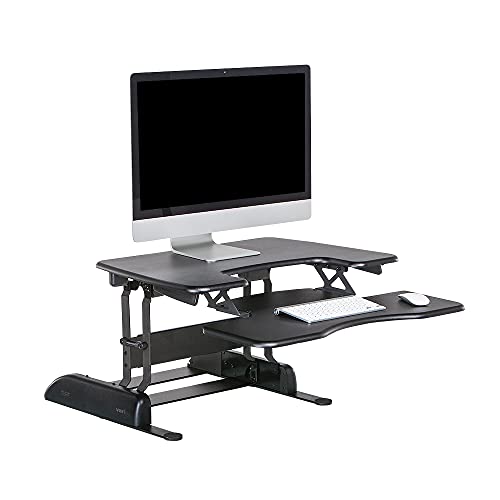
The Pro Plus 30 trims six inches off the Pro Plus 36’s width, which sounds small until you measure your desk and realize it means the difference between fitting on a 42-inch tabletop and overhanging the edge. It’s built for laptop-first or single-monitor users who still want the Vari spring lift and the 11 height settings.
Coming from the larger Pro Plus 36 above, the experience is identical except for surface area. Same handles, same lift feel, same fully-assembled delivery, just a tighter footprint that suits apartments and shared workspaces where real estate is tight.
Practical Pluses
- 30-inch width fits comfortably on smaller desks where 36-inch models overhang.
- Spring-assisted lift with 11 height stops gives the same ergonomic precision as the larger sibling.
- Weighted base keeps the unit planted even at full standing extension.
- Fully assembled delivery skips the tools-and-instructions phase entirely.
Trade Offs
- 30-inch deck rules out most dual-monitor setups, so single-screen users get the most from it.
- Spring mechanism still requires squeeze effort, so it isn’t ideal for very frequent transitions.
Best Suited To
Laptop users and single-monitor workers in small home offices who want Vari’s spring lift in a more compact package.
Where A Sibling Pick Shines
Dual-monitor shoppers should consider the Vari VariDesk Pro Plus 36, which adds six inches of usable top surface.
The 48-inch PowerPro sits at the top of the VERSADESK electric range, sized for trading-style multi-monitor layouts, editing bays, or anyone running a 49-inch ultrawide alongside a vertical secondary screen. Push-button motorized lift means the heavy load moves smoothly, which matters more as the surface area and weight climb.
Relative to the 40-inch PowerPro covered earlier, this is a step up in both footprint and load capacity, so plan for a deeper base desk to support it. The wider keyboard tray also gives you room for a number pad, drawing tablet, or hardware mixer without overlapping the monitor area.
The Case For It
- 48-inch deck accommodates three to four monitors or a single ultrawide with side screens.
- Motorized lift handles heavier multi-monitor loads without manual effort.
- Wide keyboard tray leaves space for a number pad or a graphics tablet alongside the keyboard.
Worth Noting
- Requires a deep base desk, ideally 30 inches or more, to avoid overhang.
- Higher load capacity means a heavier unit overall, which complicates room-to-room moves.
Who Will Love This
Multi-monitor power users, traders, and editors who need a wide motorized surface and have a deep base desk to host it.
Swap It Out When
Anyone working from a standard 24-inch-deep desk should pick the VERSADESK PowerPro 40 Inch instead for a better footprint match.
Mount-It! takes a different angle by integrating dual monitor arms directly into a 47.2-inch electric riser, so you’re not stacking a separate arm purchase on top of a converter. The motorized height range runs from roughly 6.3 inches up to 19.3 inches, which covers most sit-to-stand transitions for users between 5’2″ and 6’2″.
Compared to the VERSADESK PowerPro 48 reviewed above, this trades a fixed monitor surface for floating arms that adjust independently. The trade-off is a busher setup and slightly more visual clutter above the desk, but the ergonomic win from arm-mounted screens is real for people who tweak their monitor angle throughout the day.
Features That Help
- Integrated dual monitor arms cut the need to buy a separate arm mount.
- Electric height range from 6.3″ to 19.3″ covers most sit-to-stand transitions.
- USB ports built into the deck reduce cable clutter for charging phones and accessories.
- Keyboard tray stays level across the lift, so typing position remains ergonomic at any height.
Some Limits To Know
- Monitor arms add assembly complexity versus flat-surface converters.
- Arm movement can introduce a small wobble during fast typing until the monitors settle.
Perfect Match For
Creatives and analysts who want arm-mounted dual screens with motorized height changes in a single integrated package.
Not Your Match When
Users with a single ultrawide monitor should consider the VERSADESK PowerPro 48 Inch, which offers a flat surface better suited to one big screen.
The OffiGo U-shaped desk steps out of the riser category entirely: this is a full standing desk, not a converter, so you’re not placing it on top of existing furniture. The U-shape wraps the user with dual corner surfaces, giving you a primary work zone in front and return zones on either side for printers, references, or a second machine.
Versus the converter picks earlier, this delivers the most usable surface in the lineup, motorized height from 28.3 to 46.5 inches, and a built-in keyboard tray. You give up the “place it on your current desk” simplicity, but you gain a complete workstation that anchors a corner office or a serious gaming room.
Useful Highlights
- U-shape wraps the user for a wraparound command-center feel.
- Motorized height range from 28.3″ to 46.5″ covers seated and standing positions for most adults.
- Built-in keyboard tray keeps wrist position neutral at any height.
Practical Considerations
- Full-desk footprint means it isn’t a fit for small rooms or renters who can’t commit the floor space.
- White finish shows dust and smudges more readily than darker woodgrain surfaces.
Built With In Mind
Gamers, streamers, and corner-office workers who want a complete U-shaped workstation rather than a converter on top of a desk.
Look Elsewhere When
Anyone who wants to keep their existing desk should pick the VERSADESK PowerPro 40 Inch instead for a riser-based solution.
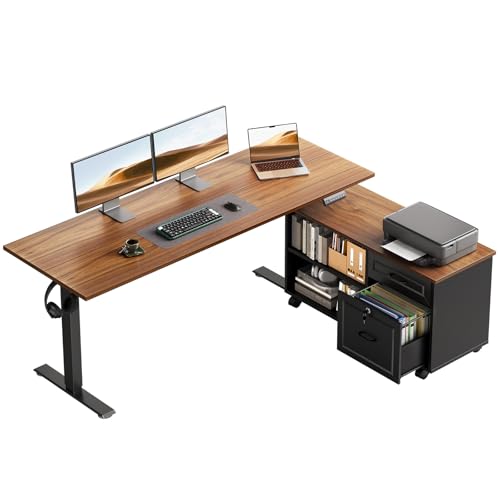
The OffiGo L-shaped desk takes the same full-standing-desk approach as the U-shaped model above but trades the wraparound surface for an L-corner footprint paired with a mobile cabinet. The cabinet adds practical file and supply storage, which most converters in this list don’t address at all.
Compared to the U-shaped white version, this one leans warmer with a walnut-and-black finish that hides scuffs better in shared offices. Motorized height from 28.4 to 47.2 inches covers seated and standing positions, and the 55.1-inch main desktop still has room for dual monitors or a single ultrawide.
Why It Works Well
- L-shape with mobile cabinet adds file storage that most risers and desks skip.
- Walnut-and-black finish hides daily wear better than lighter surfaces.
- Electric height range from 28.4″ to 47.2″ covers the full sit-to-stand span.
- Mobile cabinet can roll where you need it, then lock in place.
Less-Strong Areas
- Full L-shape footprint plus cabinet means the largest floor commitment in this list.
- Two-piece assembly takes more setup time than a single-surface converter.
Whose Shelf It Belongs On
Home office workers who need both a standing desk and built-in storage for files and supplies in a single footprint.
Reach For A Different Pick When
Anyone who wants a wraparound layout without cabinets should consider the OffiGo 55 Inch U Shaped Electric Standing Desk.
What Matters Most Before Choosing Stands Up Desk Converter
Footprint Versus Surface Area
Measure the host desk before anything else. A 40-inch converter on a 42-inch tabletop leaves little margin for error, and overhang at standing height is a real safety concern. Add two to four inches of clearance on each side, and remember that the keyboard tray extends forward, which eats into your chair clearance underneath.
Lift Mechanism: Spring, Gas, or Motor
Spring-assisted converters like the Vari Pro Plus line use a counterbalance plus handle squeeze, so you exert some force but no power is needed. Motorized units like the VERSADESK PowerPro line move at the press of a button, which adds weight, an outlet requirement, and one more thing that could need service. Match the mechanism to how often you actually plan to switch positions throughout the day.
Monitor Load And Screen Configuration
Single laptop users can run on a 30-inch deck, but dual 27-inch monitors need 36 inches minimum, and triple-screen or ultrawide-plus setups push into the 40 to 48-inch range. The Mount-It! converter sidesteps the surface question with floating arms, which trade flat-deck simplicity for screen-position flexibility.
Storage, Shape, And Long-Term Fit
If file and supply storage matter, a full L-shaped or U-shaped standing desk with cabinets covers needs a riser can’t. Riser converters keep your existing desk and stay portable between rooms, while full standing desks anchor a corner and ask for a long-term commitment to that layout.
Key Considerations Across These Picks
Pitfalls Shoppers Hit
The most common mistake is buying by width alone and ignoring depth, since a 36-inch-wide converter that’s only 12 inches deep feels cramped with a single 27-inch monitor and a laptop side by side. Another slip is underestimating the seated clearance: converters that are 6 inches tall at their lowest setting can leave a tall user staring down at their screen. Always check the minimum height against your seated eye level before committing.
The Upgrade Payoff
Higher-tier picks earn their keep through quieter motors, wider height ranges, and integrated extras like USB ports or monitor arms. The VERSADESK PowerPro 48 and Mount-It! converters cost more than the spring-assisted Vari Pro Plus 30, but you get push-button convenience, room for more screens, and less daily arm effort. The honest read is that the upgrade pays off if you stand more than three times a day; below that, the spring units cover the same ergonomic benefit for less.
Frequently Asked Questions
How Much Desk Depth Do I Need For A Standing Desk Converter?
Most converters need at least 24 inches of host desk depth to sit securely without tipping at standing height. Wider 40 to 48-inch models prefer 28 to 30 inches of depth for stability under multi-monitor loads.
Are Motorized Standing Desk Converters Reliable Long-Term?
Motorized units rely on a single lifting mechanism, so the motor and control board are the parts most likely to need service over years of daily use. Spring-assisted converters have fewer moving parts and tend to outlast motors, but they shift more effort to the user.
Can I Use A Standing Desk Converter On Any Desk?
The host desk needs to support the converter’s weight plus your monitor load, so particleboard desks under 30 pounds can flex or bow over time. Solid wood, engineered hardwood, or steel-frame desks handle the added load without complaint.
What’s The Ideal Monitor Height For Standing Work?
Your eye line should land roughly level with the top edge of the monitor when standing, which usually means the top of the screen sits two to three inches below your eyes. A converter that maxes out at 19 inches of lift works for most users, but taller individuals may need the full 20+ inch range.
Do Standing Desk Converters Help With Back Pain?
Switching between sitting and standing throughout the day reduces the static load on your lower back, which tends to ease discomfort for desk-bound workers. A converter alone won’t fix a poorly set chair or monitor, so pair the riser with an ergonomic chair and properly adjusted monitor height.
Wrap Up
The right stands up desk converter matches your monitor count, your desk depth, and how often you actually want to switch positions. Spring-assisted units like the Vari Pro Plus line keep things simple and outlet-free, while motorized picks like the VERSADESK PowerPro series trade weight and power needs for push-button convenience. Start with your screen setup, measure your desk, and the right pick usually surfaces on its own.