Every office manager, IT lead, shop owner, or facilities coordinator eventually hits the same wall: equipment walks off, warranty claims get messy, and audits turn into treasure hunts. Asset tag labels fix that pain quietly. The right label sticks through years of handling, scans cleanly in a busy warehouse, and stays readable after solvent spills or sunlight. Pick poorly and you’ll be peeling and reprinting within a season. The lineup below covers barcode and ID options for tools, IT gear, vehicles, and moving boxes, with sizes that fit everything from server racks to small hand tools.
The Lineup, Simplified
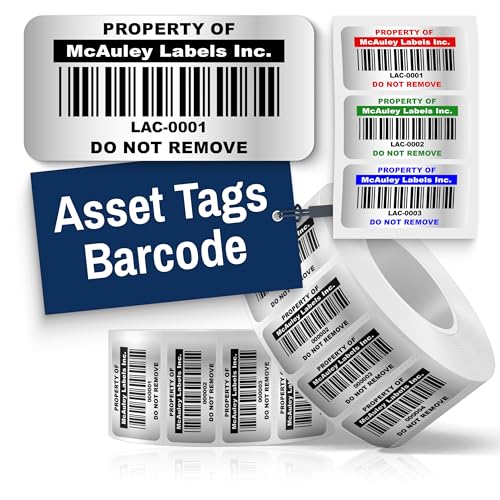
McAuley Custom Silver Asset Tags Barcode 2×1 in
McAuley Heavy Duty Silver Asset Tags Barcode 2×1 in

McAuley Silver Asset Tags ID Label 2×1 in
McAuley Silver Asset Tags ID Label 1.5×0.75 in
McAuley Heavy Duty Asset Tags Barcode 1.5×0.75 in
McAuley Silver Asset Tags Barcode 1.5×0.75 in
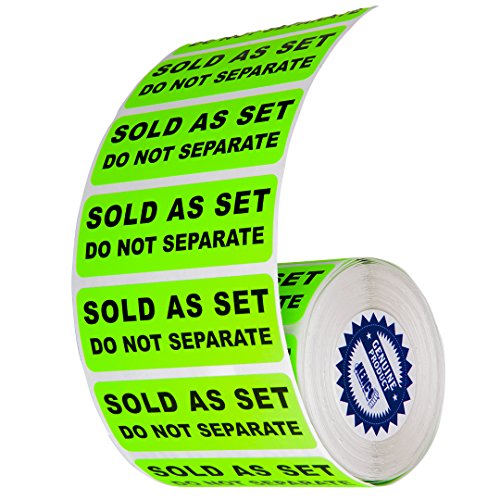
Kenco Fluorescent Green Shipping Labels 3×1 in 500-Pack

Orange Versa Tags 250 Key Tag Rings Self-Protecting
McAuley Heavy Duty Asset Tags ID Label 1.5×0.75 in

VOKOY 100 Plastic Tags with Wire 5 Colors
A Closer Look At Each Pick
Mid-size IT equipment tends to be the toughest test for any label: laptops, monitors, scanners, and the occasional desktop tower all need a tag that scans the first time, every time. The McAuley Custom Silver Asset Tags Barcode 2×1 in fills that slot well, pairing a 2-by-1 inch footprint with a metalized silver finish that holds high-contrast printing under typical office lighting. Barcode labels carry a simple promise: the scanner reads the code without you leaning over a sensor or tilting a tag.
For most offices rolling out a fresh tracking program, this size hits the sweet spot. It’s big enough for a readable human-readable serial number alongside the barcode, which matters when scanners fail or batteries die. The silver face catches light from a scanner beam without producing the kind of glare that washes out cheap paper labels. Depending on your inventory software, you may find the larger surface useful for adding a logo or department color band.
Useful Highlights
- 2×1 inch format gives breathing room for both barcode and human-readable serial
- High-contrast printing reportedly scans cleanly across varied lighting
- Metalized silver finish resists fading under office fluorescents and gentle cleaning solvents
- Customizable color and sizing options allow department-specific tag variants
Things To Consider
- Without the heavy-duty adhesive upgrade, the standard backing may struggle on powder-coated or curved surfaces
- The silver face can produce mild glare under direct overhead beams in some warehouses
Who It Suits Best
Mid-sized offices and IT departments tagging laptops, monitors, and shared peripherals benefit most from this size, since the readable area stays legible without dominating the device.
Consider Something Else When
Workshops with oily or rough surfaces should consider the McAuley Heavy Duty Silver Asset Tags Barcode 2×1 in instead, since the upgraded adhesive handles grittier equipment finishes.
The first pick handles clean offices just fine, but workshops and shop floors play rougher. The McAuley Heavy Duty Silver Asset Tags Barcode 2×1 in takes the same generous scanning area and pairs it with the heavy-duty 3M adhesive option, which grips powder-coated steel, painted machinery, and slightly oily surfaces that ordinary labels slide off. It’s a quietly tougher sibling to pick #1, built for environments where hand tools and shop rags are part of the daily routine.
Where this tag earns its keep is in real working spaces. Machine shops, automotive bays, and warehouse racks all punish labels with coolant mist, dust, and constant handling. The 2×1 footprint still leaves room for a clear barcode plus a readable serial number, which matters when a barcode label gets scuffed and you need to read it by hand. The metalized silver face holds print definition well, so you won’t be guessing at faded digits a year in.
Useful Strengths
- Heavy-duty 3M adhesive reportedly sticks where standard backings fail
- Same 2×1 inch readability as the standard version, so scanning routines stay consistent
- Metalized silver face resists scratching and solvent splashes better than paper labels
- Custom sizing keeps it usable on curved or unusually shaped housings
Worth Noting
- Strong adhesive can complicate removal if you need to relabel equipment mid-lifecycle
- For pure office use without grease or abrasion, the standard version may be enough
Built With In Mind
Workshops, fabrication shops, and maintenance teams tagging equipment exposed to oils, solvents, or heavy handling benefit most from the reinforced adhesive layer.
A Better Fit Elsewhere
Quiet office settings without heavy handling will do better with the standard McAuley Custom Silver Asset Tags Barcode 2×1 in, since the lighter adhesive is easier to reposition.
Not every operation runs on barcode scanners. Small businesses, church AV teams, school IT rooms, and makerspaces often keep things simple: a paper log, a clipboard, a printed spreadsheet. The McAuley Silver Asset Tags ID Label 2×1 in is built for that workflow, carrying a clear serial number or asset ID without the scanning barcode element. It’s a less common choice on the retail listing but fills a real gap when your tracking lives in a notebook.
The 2×1 inch surface is comfortable to read at arm’s length, which matters when volunteers or part-time staff are doing inventory during a weekend. The metalized silver background keeps high-contrast ink legible and resists fading better than basic paper. For most setups, this style works fine as a standalone solution or as a backup for barcode labels when a scanner goes down. The trade-off shows up if your tracking system later expects a code: there’s no machine-readable element baked in here.
A Few Highlights
- Spacious 2×1 surface is easy to read without a scanner or magnifier
- Metalized silver finish holds print definition under regular cleaning
- Customizable numbering supports simple handwritten or pre-printed IDs
- Pairs well with manual logbooks for low-tech environments
Trade Offs
- No barcode element means slower check-ins for any future scanner-based workflow
- Larger footprint may feel oversized on smaller electronics or handheld tools
Made For
Small organizations, volunteer-run programs, and home offices that track assets with pen and paper or basic spreadsheets benefit most from the human-readable format.
Reach For A Different Pick When
Operations planning to migrate to scanner-based inventory should consider the McAuley Silver Asset Tags Barcode 2×1 in instead, since it adds machine-readable tracking from day one.
Big tags have their place, but anything that needs to fit between the seams of a power tool, the back of a tablet, or the side of a small instrument calls for the compact McAuley Silver Asset Tags ID Label 1.5×0.75 in. The 1.5-by-0.75 inch footprint shrinks everything down without losing the metalized silver face that keeps print legible. It’s the size you reach for when the tag has to coexist with serial plates, regulatory markings, and warning stickers that already crowd the surface.
What it trades away is print real estate. A short numeric ID fits fine, but a longer code combined with a readable serial gets tight. For most compact devices where simplicity matters, the smaller label still scans cleanly and reads at a glance. Depending on your inventory records, the modest surface may push you toward shorter ID formats.
Where It Helps
- 1.5×0.75 inch footprint fits on tablets, hand tools, and small electronics
- Metalized silver face keeps small print legible under typical lighting
- Customizable sizing supports slight variations for unique gear shapes
- Reports of resistance to fading and surface scratching over multi-year use
Honest Caveats
- Limited print area restricts how much human-readable info fits alongside the ID
- Smaller size can be harder to spot during fast-paced inventory checks
Best Suited To
IT teams tagging tablets, small electronics, and handheld instruments where space is tight benefit most from the reduced footprint without sacrificing durability.
Not Your Match When
Settings where long serial numbers or visible logos are required should consider the McAuley Silver Asset Tags ID Label 2×1 in instead, since the larger surface accommodates more printed information.
The combination of compact size, barcode scanning, and a reinforced 3M adhesive makes the McAuley Heavy Duty Asset Tags Barcode 1.5×0.75 in a quiet workhorse. Compared to pick #4, which trades adhesive toughness for compact simplicity, this one refuses to give up either. It targets the gear that lives in the worst spots: shop tools, instrument cases, and field equipment that gets tossed into bins and dragged between job sites.
The barcode still scans cleanly despite the small footprint, since modern imagers handle compact codes reliably. The heavy-duty adhesive keeps the tag in place when the equipment gets knocked around, and the silver face holds print definition over repeated wipe-downs. The honest read is that fitting both barcode and serial onto a 1.5-by-0.75 surface requires careful numbering, so longer ID schemes may need trimming.
Everyday Advantages
- Combines compact 1.5×0.75 size with heavy-duty 3M adhesive
- High-contrast barcode reportedly stays readable on small hand tools and instruments
- Custom color options support visual sorting across departments
- Silver face resists scratches and common cleaning solvents
Minor Gripes
- Small surface leaves little room for long serial numbers plus a logo
- Strong adhesive complicates repositioning during initial placement
The Right Fit
Maintenance crews, field technicians, and small equipment handlers who need both compact tags and durable adhesion get the most value from this combination.
Swap It Out When
Offices with smooth surfaces and gentler handling should consider the McAuley Silver Asset Tags Barcode 1.5×0.75 in instead, since the standard adhesive is easier to work with on clean electronics.
Sometimes the most useful label is the one that quietly does its job without demanding attention. The McAuley Silver Asset Tags Barcode 1.5×0.75 in sits in that middle lane, with a standard backing and a compact barcode-friendly footprint. It’s the smaller cousin of pick #1, fitting neatly on devices that can’t host a 2×1 tag without crowding out other markings.
For typical office equipment, the size lands in the comfortable zone between visibility. The barcode stays machine-readable, the silver face resists everyday wear, and the label applies without drama. Where it falls short is on rougher surfaces, where the standard adhesive may need prep work to stick reliably. For most clean-surface offices, that’s a reasonable trade.
The Value In It
- Compact 1.5×0.75 inch size fits where larger labels feel bulky
- Standard barcode format integrates with typical inventory software
- Custom color options allow departmental sorting
- Metalized silver face keeps print contrast steady under office lighting
Points To Note
- Standard adhesive is less forgiving on dirty or textured surfaces
- Smaller label can get lost among other stickers on busy equipment
Who Will Love This
Office IT teams managing laptops, tablets, and compact electronics in clean environments get a balanced combination of compact size and scanning functionality.
Look Elsewhere When
Shops and warehouses with heavy handling should consider the McAuley Heavy Duty Asset Tags Barcode 1.5×0.75 in instead, since the upgraded adhesive survives harsher conditions.
Shipping and fulfillment rooms run on speed, and a label that blends into cardboard costs seconds that add up across a shift. The Kenco Fluorescent Green Shipping Labels arrive in a 500-count roll, sized at 3×1 inch and dressed in a fluorescent green that practically glows under warehouse lighting. The color is the feature: it lets staff sort, flag, and prioritize packages at a glance without slowing down.
Each roll is reportedly compatible with the Towa APN-100 applicator, which speeds up hand application for busy teams. For most fulfillment operations, the 500-label count covers several weeks of steady shipping. The trade-off is that fluorescent finishes may not photograph well in barcode scanning if your workflow expects barcode-grade reflectance, so this works best as a visibility tool rather than a scanning tag.
Reasons It Performs
- Bright fluorescent green color stays visible in cluttered shipping areas
- 500-count roll supports steady shipping volume
- 3×1 inch size offers space for routing or priority notes
- Compatible with the Towa APN-100 hand applicator for faster application
A Few Limitations
- Fluorescent finish may not provide the contrast needed for barcode scanning
- Paper-based construction may not suit rough long-term equipment labeling
Perfect Match For
Shipping rooms, fulfillment centers, and warehouse sorting stations that need quick visual sorting rather than long-term barcode tracking get strong value from the high-visibility color.
Skip It When
Operations needing durable barcode-readable tags for fixed assets should consider the McAuley Custom Silver Asset Tags Barcode 2×1 in instead, since metalized labels hold up better for equipment tracking.
Dealerships and rental fleets have a very particular kind of chaos. Hundreds of keys, all similar, all attached to cars and trucks in constant motion. The Orange Versa Tags Self-Protecting pack solves a very specific problem: 250 key tags paired with 250 chrome rings, ready to throw onto every vehicle on the lot. The self-protecting design means the tag folds over the key, keeping both the ID and the key face shielded from scratches.
The orange color also does real work here. On a key hook with hundreds of tags, an orange tab catches the eye faster than beige or gray alternatives, especially in dim back offices. The 1.5-pound total weight feels light enough to ship in bulk to multi-location dealerships. Compared to the McAuley silver adhesive tags, this is a different category entirely: it’s about key identification, not equipment mounting.
Real-World Strengths
- Self-protecting tag folds over the key to shield both surfaces
- Bright orange color improves visibility on crowded key boards
- 250-count pack suits dealership and rental fleet volumes
- Chrome rings included for immediate use out of the box
Room For Improvement
- Not designed for barcode scanning or computer-based asset tracking
- Limited to key identification rather than broader equipment labeling
Right Fit For
Car dealerships, RV lots, and rental fleets that need fast visual key sorting across many vehicles get a purpose-built solution here.
Another Choice May Suit
Organizations needing scanner-friendly equipment tracking should consider the McAuley Heavy Duty Silver Asset Tags Barcode 2×1 in instead, since adhesive barcode tags integrate with inventory software.
The McAuley Heavy Duty Asset Tags ID Label 1.5×0.75 in closes out the McAuley family with a niche worth knowing about: a small, rugged tag built for shops that don’t use barcode scanners. Like pick #3, it skips the barcode in favor of a clear human-readable ID, but pairs it with the reinforced 3M adhesive backing for rougher environments.
For small repair shops, school woodshop classrooms, or home workshops, the format works quietly. You mark a tool with a number, jot it in a notebook, and the tag survives years of dust and solvent wipes. The 1.5×0.75 inch footprint stays discreet on tool handles and small housings. The honest read is that combining the compact size with the heavy-duty adhesive limits your ability to fit long serial numbers, so shorter numeric IDs suit this format best.
A Favorable Mix
- Compact size combined with heavy-duty adhesive for rough conditions
- Human-readable format fits manual logbook workflows
- Customizable numbering and color options add sorting flexibility
- Metalized silver face reportedly holds up to multi-year shop use
Softer Spots
- Limited print space constrains ID length and any added branding
- Strong adhesive complicates tag swaps during equipment reassignment
Whose Shelf It Belongs On
Small repair shops, classroom woodshops, and home workshops that track tools by notebook get a rugged, compact label that doesn’t need a scanner to function.
Where A Sibling Pick Shines
Scanning-based operations should consider the McAuley Heavy Duty Asset Tags Barcode 1.5×0.75 in instead, since barcode capability pairs better with software-driven inventory tracking.
Plastic hang tags occupy a totally different lane from adhesive asset labels, but they earn their spot in any complete labeling kit. The VOKOY 100 Plastic Tags arrive pre-wired with metal eyelets, spread across five colors (red, yellow, blue, green, and white), with 20 tags per color. At roughly 4 3/4 by 2 3/8 inches, they have room for handwritten room names, box contents, or moving-day destinations.
The plastic construction handles rain and rough handling better than paper alternatives, and the reinforced metal eyelets keep the wire from tearing through during use. For most moving-day or garage-sorting scenarios, the color variety lets you sort by destination, owner, or priority at a glance. The trade-off shows up in fixed-asset applications, since these tags hang rather than stick, making them poorly suited to equipment that already has a mounting surface.
Features That Help
- 100 tags in five colors for visual sorting across categories
- Reinforced metal eyelets prevent tearing during use
- Waterproof plastic construction survives rain and rough handling
- Pre-wired with flexible iron wire for immediate application
Factors To Consider
- Hang-style format doesn’t suit flat equipment surfaces
- No barcode capability for software-driven tracking systems
Who Should Grab It
Movers, garage organizers, and anyone color-coding storage boxes, luggage, or seasonal gear gets a versatile, weather-resistant tagging option that requires no adhesive prep.
Not Your Match When
Fixed equipment tracking on laptops, tools, or machinery should reach for the McAuley Custom Silver Asset Tags Barcode 2×1 in instead, since adhesive mounting keeps tags secure on devices.
What To Weigh Before Choosing Asset Tag Labels
Match The Adhesive To The Surface
A label that peels off after a season solves nothing. Smooth, clean plastics in offices pair well with standard adhesive backing, while powder-coated steel, painted machinery, and slightly oily surfaces call for the heavy-duty 3M adhesive option. For most offices, standard backing suffices; for workshops and shop floors, the upgraded adhesive pays for itself quickly in avoided reprints.
Pick The Right Size First
A 2×1 inch tag gives breathing room for both a barcode and a readable serial, while a 1.5×0.75 inch tag fits where space is tight but limits how many characters fit. Measure the available flat area on the equipment before committing to a size. Cramming a tag beside existing serial plates or warning stickers leads to overlap and reduced readability.
Choose Barcode Or ID Based On Workflow
Operations running scanner-based inventory software need barcode-format tags from the start. Smaller programs tracking tools by clipboard or spreadsheet can use human-readable ID labels and save the cost of scanner hardware. The barcode capability is hard to add later, so plan the workflow before ordering.
Consider Customization Options
Department color bands, custom numbering schemes, and logos all reduce confusion during shared inventories. Metalized silver faces accept ink cleanly and resist fading better than basic white paper, keeping print definition steady over years of handling.
Key Considerations Across These Picks
Pitfalls Shoppers Hit
The most common mistake is ordering barcode tags when your team uses manual logs, or human-readable tags when your software expects scannable codes. Another frequent slip is choosing the smallest size to fit compact gear, only to discover the print is too small to read at arm’s length during audits. Always match the label format to your actual workflow rather than the cheapest option.
Where The Extra Money Goes
Higher-tier McAuley picks add the heavy-duty 3M adhesive layer and metalized silver face construction. The upgrade buys longer service life on rough surfaces and better resistance to solvents, scratches, and fading. For most offices with clean equipment surfaces, the standard tier is plenty; for shops, fabrication floors, and outdoor gear, the upgraded adhesive typically pays back the difference within a single tagging cycle.
Frequently Asked Questions
How Long Do Metalized Asset Tags Last?
Metalized silver polyester labels commonly last several years in office environments, withstanding regular cleaning and moderate handling. Lifespan varies based on surface prep and exposure to solvents, but the upgraded adhesive version extends service life further in rougher settings.
Can These Labels Survive Outdoor Use?
Metalized labels handle covered outdoor storage reasonably well, withstanding moisture and UV exposure better than paper alternatives. Direct, prolonged sun and rain may eventually degrade adhesive edges, so sheltered placement is recommended for multi-year outdoor tagging.
Do I Need A Special Printer For These Tags?
Standard barcode and ID labels from McAuley typically work with common thermal and inkjet label printers. For most offices, existing label printers handle the job without additional hardware investments.
What’s The Difference Between Barcode And ID Labels?
Barcode labels include a machine-readable code alongside any printed text, while ID labels carry only human-readable numbers or text. Choose barcode for scanner-based workflows and ID-only for manual logbook systems.
Are Custom Colors And Sizes Available?
Most McAuley options offer customization for color, sizing, and numbering schemes during the ordering process. Custom runs typically add lead time, so plan ahead if your tagging project has a deadline.
Wrap Up
The right asset tag labels fade into the background and quietly do their job for years, which is exactly what you want from any tracking system. Match the size to your equipment surface, the adhesive to your environment, and the format to your actual workflow. From there, the choice between picks becomes much easier.