Paper piles still creep into home offices, small businesses, and accounting corners. A reliable document feeder scanner turns that mess into searchable files without babysitting every page. The picks below cover everything from pocketable portables to workhorse refurbished units, so you can match throughput, footprint, and budget to your actual workload.
A Fast Comparison Of The Options

Fujitsu ScanSnap iX1500 Color Duplex Document Scanner

Canon imageFORMULA DR-C225 II Office Document Scanner
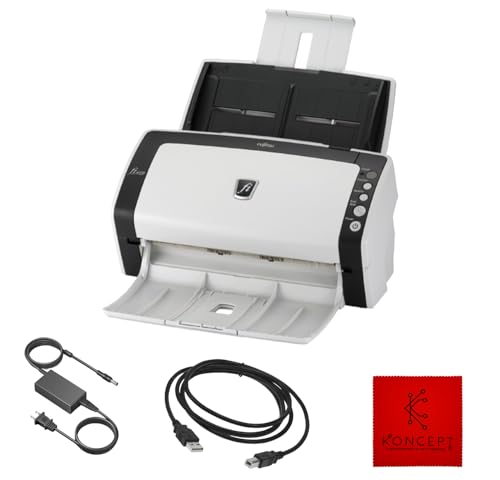
FI-6130Z Fujitsu Duplex Sheet-Fed Document Scanner

Fujitsu fi-6140Z Document Scanner (Renewed)
Canon imageFORMULA R10 Portable Document Scanner

Fujitsu ScanSnap iX500 Scanner for PC and Mac

FI-7160 Fujitsu Document Scanner Duplex 600 DPI

Fujitsu ScanSnap iX500 Deluxe Bundle Scanner
Canon imageFORMULA R40II Office Document Scanner
What Each Pick Brings To The Table
Color duplex scanning (meaning both sides of a page are captured in one pass) plus a built-in touch screen puts the ScanSnap iX1500 in a class above the rest. You tap a profile, drop a stack in the feeder, and the scanner sends files to a folder, email, or cloud destination without rerouting through a computer.
Small law offices, home-based accountants, and anyone tired of fighting finicky software will appreciate the visual shortcuts. Compared with the older ScanSnap iX500 reviewed later, the iX1500 adds that touch panel and more polished cloud hooks, which justifies the step up for households running two or three scan workflows in parallel.
Notable Gains
- 4.3-inch touch screen replaces button guessing with named profiles for receipts, tax docs, or photo batches.
- Duplex automatic document feeder (ADF) handles mixed page sizes in a single run, so you skip pre-sorting.
- Direct links to popular cloud services cut out the middle step of saving to a desktop first.
- Generous sheet capacity lets you walk away from a 30-page packet and return to a finished file.
Points To Keep In Mind
- Cloud features lean on ScanSnap software, so macOS updates occasionally delay driver refreshes.
- The footprint is wider than the compact Canon DR-C225 II, so tight desks may feel squeezed.
At A Glance
Made For
Solo professionals and small teams who want one-touch scanning into the cloud without managing driver settings.
Skip It When
The Canon imageFORMULA DR-C225 II suits shoppers with very limited desk space who only need light weekly scanning.
The DR-C225 II stands up vertically rather than sprawling across your desk, which makes it a relief for reception counters and small home offices. Page feeding happens at the top and exit happens straight through, so the device barely needs a footprint wider than a sheet of paper.
Unlike the ScanSnap iX1500 with its touch screen, this Canon leans on bundled CaptureOnTouch software and front-mounted buttons. That approach keeps the hardware slim and the learning curve gentle for anyone already comfortable with Canon’s imaging tools.
Strong Points
- Upright path saves roughly 60 percent of desk space versus flatbed-style scanners.
- Front-and-back capture in one pass handles invoices and two-sided contracts cleanly.
- Searchable PDF export (text you can highlight and search) helps when archiving tax paperwork.
- Solid build quality is what you would expect from Canon’s imageFORMULA line.
Trade Offs
- Throughput is modest compared with the FI-7160, so large backlogs take patience.
- Bundled software has a learning curve; first-time setup benefits from a quick read of the manual.
Best Suited To
Reception desks, real estate offices, and anyone scanning moderate document stacks where desk space is the priority.
Where Another Pick Suits Better
The FI-7160 Fujitsu handles high-volume billing days, which the DR-C225 II cannot match in raw speed.
This renewed FI-6130Z keeps Fujitsu’s professional scan engine within reach of small offices that cannot justify a brand-new unit. USB connectivity and 24-volt power keep cabling simple, and the duplex sheet-fed path handles day-to-day paperwork without complaint.
Compared with the newer ScanSnap iX1500, the trade-off is the operating system ceiling and lack of a touch panel. Windows XP through Windows 10 is the supported range, which makes the unit a deliberate fit for legacy environments rather than cutting-edge setups.
Well-Handled Touches
- Refurbished pricing opens access to a Fujitsu-grade scan engine.
- Duplex scanning handles receipts and two-page agreements in one feed.
- Sheet-fed design suits long, continuous document runs.
- Compact depth keeps it friendly to narrow shelves.
Small Caveats
- Windows 11 is not supported, so newer PCs need a compatibility check first.
- Renewed condition means cosmetic marks and older firmware may apply.
- No touch screen; workflow control relies on Fujitsu scanner software.
Who It Suits Best
Workshops and back offices running supported Windows builds that want Fujitsu reliability without the premium price.
Look Elsewhere When
The Canon imageFORMULA R10 fits remote workers who scan light paperwork on the road far better than this fixed-location unit.
The fi-6140Z earned its reputation in records rooms and government offices, and the renewed version brings that pedigree to anyone archiving older paperwork. Twenty-four-bit color depth captures subtle shading in maps, photos, and color-coded forms that cheaper scanners tend to flatten.
Unlike the slimmer Canon DR-C225 II, this Fujitsu prioritizes durability over desktop elegance. The wider chassis houses a sturdier feeder that owners commonly report handles stacks of mixed paper weight without frequent jams.
Useful Touches
- 24-bit color and 8-bit grayscale provide archival-grade fidelity.
- USB interface keeps connection straightforward on most office PCs.
- Refurbished cycle means basic cleaning, inspection, and a minimum 90-day warranty.
- Sheet-fed design supports steady document throughput for office backlogs.
Things To Consider
- Renewed units may show cosmetic wear and arrive in generic packaging.
- Footprint is larger than the upright Canon DR-C225 II, which dominates small desks.
Right Fit For
Archive projects, legal discovery, and historical document conversion where color accuracy matters.
Not Your Match When
Light household scanning suits the ScanSnap iX500 more, since the fi-6140Z is overkill for a few pages a week.
The R10 draws power from a single USB cable, which removes the hunt for outlets in hotel rooms and client offices. Slip it into a laptop bag and you have a portable document feeder scanner ready to capture signed contracts or receipts on the spot.
Compared with the bulkier FI-7160 reviewed later, this Canon trades raw speed for mobility. Setup is intentionally minimal, which is the right call for occasional travelers who would rather plug in and scan than fiddle with software.
Key Advantages
- USB-powered design means one cable handles both data and electricity.
- Duplex scanning keeps two-sided documents in order without flipping pages by hand.
- Compact body fits beside a laptop in a backpack or rolling carry-on.
- Mac and Windows compatibility covers most remote workers.
Practical Considerations
- Sheet capacity is smaller than desktop models, so long stacks need reloads.
- Speed is modest; heavy backlogs feel slow compared with the FI-7160.
Who Should Grab It
Consultants, traveling salespeople, and remote workers who need scan-on-the-go capability without carrying extra power bricks.
Consider Something Else When
The ScanSnap iX1500 fits home-office workers who stay put and want cloud routing plus a touch screen.
The iX500 has been a household name in home scanning for years, and 25 pages per minute duplex throughput still keeps it relevant. Wi-Fi support frees the scanner from a permanent USB tether, which is a small daily convenience that adds up.
Where the iX1500 adds a touch screen, the iX500 relies on one-button scanning through ScanSnap software. For shoppers who prioritize price-to-performance over flashy interfaces, this older sibling remains a steady workhorse.
Real-World Strengths
- 25 ppm color scanning finishes a typical mail pile in minutes.
- Two-sided capture keeps stacks moving without manual flipping.
- USB or Wi-Fi connection lets you place the unit away from the computer.
- Mature ScanSnap software supports a wide range of destinations.
A Few Limitations
- Mac OS does not support Twain or ISIS drivers (industry-standard scanner interfaces), which may limit specialized software.
- Older hardware means missing the touch panel that the iX1500 offers.
Perfect Match For
Families and freelancers who scan mail, receipts, and school paperwork a few times a week without specialized driver needs.
A Better Fit Elsewhere
The FI-7160 serves high-volume billing departments with greater daily duty cycles.
The FI-7160 is built for days when paper stacks up faster than you can blink. Sixty pages per minute in both mono and color, an 80-sheet automatic document feeder, and a 600 DPI optical resolution put this renewed unit in the same conversation as new enterprise scanners.
Unlike the portable Canon R10, the FI-7160 is anchored to a desk with a dedicated 24-volt power brick and USB 3.0 cable. That setup is deliberate: shared offices and billing teams prioritize sustained throughput over travel-friendliness.
Useful Highlights
- 60 ppm duplex throughput handles thousands of pages in a workday.
- 80-sheet ADF keeps feeding with rare reloads.
- 600 DPI resolution captures fine print on contracts and stamps.
- 4,000 scans per day duty cycle suits busy administrative teams.
Room For Improvement
- Renewed condition means inspecting the unit on arrival is wise.
- Footprint and weight rule out casual repositioning around an office.
Quick Facts
Built With In Mind
Offices that handle vendor invoices, patient files, or client onboarding packets on tight timelines.
Reach For A Different Pick When
Mobile consultants get more value from the Canon imageFORMULA R10, since the FI-7160 stays put.
The deluxe bundle takes the proven ScanSnap iX500 platform and adds accessories that streamline a paper-to-digital workflow out of the box. You get the same 25 ppm duplex engine plus extras that target photo scanning, business cards, and quick archiving tasks.
Against the standard iX500 reviewed earlier, this bundle is the right call if you want everything in one box rather than chasing add-ons later. The trade-off is bundle cost, so casual scanners may find the basic iX500 perfectly adequate.
Bright Spots
- Two-sided scanning at 25 ppm handles everyday paperwork with ease.
- Wi-Fi or USB connection gives placement flexibility around the home.
- Bundled accessories target photo and business-card workflows.
- Cross-platform ScanSnap software works on PC and Mac.
Honest Caveats
- Bundle pricing runs higher than the standalone iX500.
- Older interface lacks the touch screen that the iX1500 introduced.
Whose Shelf It Belongs On
Organizers and memory keepers who want a ready-to-go kit for paper, photos, and cards.
Swap It Out When
Shoppers on tighter budgets get nearly all the core scanning from the standard ScanSnap iX500 alone.
The R40II folds its paper feed tray down when not in use, reclaiming desk space for laptops and coffee mugs. Easy setup and direct cloud routing make it friendly for hybrid workers who bounce between home and a small office.
Compared with the more office-bound FI-7160, the R40II leans toward convenience over raw speed. It scans a wide variety of document sizes, which suits households juggling receipts, kid artwork, and medical statements in the same session.
A Few Strong Suits
- Foldable feed tray keeps the desktop tidy between scans.
- Two-sided capture simplifies multi-page contracts and school forms.
- Cloud-scan routing moves files without opening extra software.
- Compact body slides onto a shelf when not in use.
Points To Note
- Speed sits below the FI-7160, so very large backlogs take longer.
- Software features vary between Mac and Windows builds, depending on driver availability.
Who Will Love This
Hybrid workers and busy parents who want quick, occasional scans without a bulky machine on display.
Another Choice May Suit
The ScanSnap iX1500 suits anyone who wants touch-screen shortcuts and more polished cloud profiles.
Factors To Consider When Choosing Document Feeder Scanners
Throughput And Daily Volume
Pages per minute (ppm) tells you how fast a scanner chews through a stack. A household scanner rarely needs more than 25 to 30 ppm, while billing departments quickly outgrow anything below 40 ppm. Match the spec to your realistic daily count rather than chasing headline numbers.
Duplex, ADF, And Sheet Capacity
Duplex scanning captures both sides of a page in a single pass, which saves hours over manual flipping. The ADF, or automatic document feeder, holds a stack so you can walk away mid-scan. For office backlogs, aim for at least a 50-sheet ADF; lighter users can manage with 20 or 30.
Footprint And Placement
Upright scanners like the Canon DR-C225 II vanish into tight corners, while desktop workhorses like the FI-7160 demand a permanent home. Folding trays, like the one on the R40II, give you the option to reclaim desk space between uses. Measure your spot before you commit.
Software, Drivers, And Cloud Hooks
Driver support matters: some Fujitsu ScanSnap models do not support Twain or ISIS drivers on macOS, which limits specialized archiving software. Cloud routing is a daily convenience for anyone who wants files to land directly in Dropbox, Google Drive, or OneDrive without extra steps.
Smart Buying Advice For Document Feeder Scanners
Pitfalls Shoppers Hit
Choosing a scanner without checking operating system support is a common mistake; renewed Fujitsu units in particular often cap at Windows 10. Underestimating sheet capacity also hurts: a 20-sheet ADF forces constant reloads during tax season. Lastly, ignoring cloud routing leaves you shuffling files manually.
When Paying More Pays Off
Premium tiers typically add faster throughput, larger feeders, and stronger image processing for archival color. The step from a 25 ppm home scanner to a 60 ppm workhorse is worth it once daily volume climbs past a few hundred pages. Higher tiers also tend to bundle better OCR (optical character recognition, which converts scanned images into editable, searchable text) for searchable PDFs, which saves time later when you search through old records.
Frequently Asked Questions
What Is Duplex Scanning On A Document Feeder Scanner?
Duplex scanning means the scanner captures both sides of a page in a single pass through the feeder. It saves time compared with manually flipping pages and is standard on most modern sheet-fed scanners.
How Many Pages Per Minute Do I Really Need?
For personal and household scanning, 25 ppm is usually plenty. Small offices should look at 30 to 40 ppm, while high-volume teams benefit from 60 ppm units like the FI-7160.
Can Document Feeder Scanners Handle Receipts And Thin Paper?
Most accept a range of paper weights, though very thin thermal receipts can wrinkle or skew. Scanning receipts in small batches and using carrier sheets when needed helps keep pages straight.
Are Renewed Document Feeders Reliable?
Renewed units are cleaned, inspected, and tested before resale, often with a minimum 90-day warranty. They typically offer the same scan engine as new units at a lower entry cost, though cosmetic wear and older firmware may apply.
Do I Need Special Software For Cloud Scanning?
Most modern document feeder scanners include software that routes scans directly to popular cloud services. Setup usually requires a one-time sign-in through the bundled application.
Closing Verdict
The right scanner depends on where paper piles up most. Home offices and small teams tend to thrive with the ScanSnap iX1500 or R40II, while high-volume desks will find the FI-7160 hard to beat. Pick the unit that matches your daily volume, and the rest of the workflow tends to fall into place.