Living with paper means your desk eventually disappears under a slow avalanche of receipts, contracts, and printed PDFs. A good desktop scanner turns that backlog into searchable files you can email in minutes, and the picks below are tuned for macOS users who want something that just works without driver headaches.
The Picks In Brief

Fujitsu ScanSnap iX1500 Color Duplex Document Scanner (Black)

Epson Workforce ES-400 Color Duplex Document Scanner with ADF

Epson Workforce ES-500W Wireless Color Duplex Document Scanner with ADF

Epson Workforce ES-400 II High-Speed Color Duplex Desktop Scanner

Epson Workforce ES-580W Wireless Color Duplex Desktop Scanner

Epson Workforce ES-400 II Color Duplex Desktop Scanner (Renewed)

Doxie Pro Duplex Document and Receipt Scanner

ScanSnap iX1500 Color Duplex Document Scanner (Renewed, 2020)

ScanSnap iX1600 Receipt Edition Color Duplex Invoice Scanner
Fujitsu ScanSnap iX1500 Color Duplex Document Scanner (2018)
A Deeper Look At The Lineup
The ScanSnap iX1500 leans into the kind of day-to-day scanning most Mac users actually do: a stack of mixed paperwork that needs to become searchable PDFs before lunch. Its built-in touchscreen lets you create named profiles that map directly to destinations like a Mac folder, an email draft, or a cloud account, so the routine of “scan then drag files around” mostly disappears. Compared with the Epson Workforce ES-400 below, this model trades raw ADF (Automatic Document Feeder, the tray that pulls sheets through automatically) capacity for a more polished, app-driven workflow.
For a solo professional or a small studio that handles a mix of receipts, contracts, and the occasional plastic ID card, the iX1500 stays out of your way. The companion ScanSnap Home software indexes text inside scans, which makes finding last month’s invoice a search bar exercise instead of a folder crawl.
Benefits That Matter
- Touchscreen profiles cut repetitive clicking on your Mac by routing scans to preset destinations with one tap
- Duplex (two-sided) capture in a single pass saves time on double-sided contracts and statements
- OCR (Optical Character Recognition, the process of turning scanned images into searchable and editable text) built into ScanSnap Home makes PDF text searchable without extra apps
- Compact body fits on a small credenza next to a MacBook dock
- Handles ID cards and embossed plastic alongside standard paper
Worth Noting
- Cloud features sometimes depend on companion services staying available, which can complicate long-term archival
- Replacing the roller kit is a recurring ownership cost you should budget for if you scan heavily
Right Fit For
Mac-based professionals who batch-scan mixed paperwork daily and want presets instead of menus.
Where Another Pick Suits Better
Bookkeepers handling high receipt volumes should look at the ScanSnap iX1600 Receipt Edition, which is built around QuickBooks Online workflows.
The Epson Workforce ES-400 is the workhorse people buy once and forget about for years. A 50-sheet ADF and rated duplex throughput of 35 pages per minute (ppm) and 70 images per minute (ipm) cover the typical home office stack without drama. The USB connection keeps things simple on a Mac, which matters when you don’t want to troubleshoot a wireless handshake on a deadline day.
It pairs with Epson ScanSmart, a utility that bundles scan, preview, and export steps so you don’t have to bounce between apps. For most home offices, that software alone makes this a smarter pick than chasing a touch screen you rarely use.
A Few Strong Suits
- 50-page ADF handles weekly paperwork in one or two loads
- Single-pass duplex captures front and back simultaneously, doubling real-world speed
- ScanSmart software keeps the scan-and-send flow on one screen
- Solid Mac driver support through the Epson support site
Trade Offs
- USB-only design means you need to place it near your Mac, not across the room
- Bundled OCR can struggle on faded thermal receipts compared to ScanSnap’s pipeline
- Build feels more plastic than the ScanSnap iX1500 above
Quick Facts
Built With In Mind
Mac users with steady but moderate scan volume who prefer a wired, set-and-forget desktop.
A Better Fit Elsewhere
Roaming setups that need cable-free placement should consider the Epson Workforce ES-500W instead.
Where the ES-400 keeps you tethered, the ES-500W lets you put the scanner wherever the paper lives. Built-in Wi-Fi means a MacBook can pull scans from across the room, which matters in shared spaces where the printer lives in one corner and the workstation in another. Speed and ADF capacity match the wired sibling, so the trade-off is purely about placement freedom.
The TWAIN driver (a standard scanner-driver protocol that lets imaging apps talk to hardware directly) on macOS works well with common tools like Preview and Acrobat, and ScanSmart covers the basic scan-to-folder workflow. For households with multiple Macs, Wi-Fi connectivity removes the need to keep one machine parked near the scanner.
Notable Upsides
- Wireless connection frees you from cable runs along baseboards
- Same 35 ppm / 70 ipm rated speed as the wired ES-400
- 50-sheet ADF is generous for the category
- Routes scans straight to a phone or tablet when needed
Potential Drawbacks
- First-time Wi-Fi setup can be finicky on older Mac networks
- Software bundle is heavier than the iX1500’s lean ScanSnap Home app
Whose Shelf It Belongs On
Multi-device Mac households where the scanner has to serve a MacBook, a desktop, and a phone.
Not Your Match When
You want a polished touchscreen interface; the ScanSnap iX1500 above is the friendlier on-device experience.
The ES-400 II is the refresh that ironed out small annoyances from the original ES-400, and on macOS the experience feels noticeably tighter. Rated speeds hold at 35 ppm / 70 ipm with a 50-sheet ADF, so day-to-day paperwork stacks clear in roughly a minute and a half. Single-step duplex means a stack of two-sided contracts doesn’t require flipping pages by hand.
For a Mac-based freelancer or small team that scans most weekdays, the balance of speed, capacity, and price lands in a comfortable middle ground. Compared with the ES-580W below, this model is the pragmatic pick rather than the high-resolution one.
A Favorable Mix
- Mature ScanSmart software that handles preview, OCR, and export in one window
- 50-page ADF swallows a typical weekly stack without reloading
- Duplex in one pass cuts the time on two-sided originals roughly in half
- Broad macOS driver coverage through current Epson releases
Small Caveats
- Plastic construction feels less premium than the ScanSnap iX1500
- Replacing separation pads is a periodic ownership task in busy environments
Feature Snapshot
Who Should Grab It
Mac-based freelancers and small teams scanning daily batches who want reliable throughput without overpaying.
Consider Something Else When
You need Wi-Fi; the Epson Workforce ES-500W above is the wireless sibling.
The ES-580W is the upper-tier Epson in this lineup, pairing wireless placement with up to 1200 dpi resolution and a 30-bit input color depth for lifelike color capture. For Mac users scanning photos, magazine clippings, or color-heavy documentation, the extra detail is the difference between a usable archive and a pixelated PDF. It still handles everyday text paperwork quickly, so you don’t pay a speed penalty for the higher ceiling.
The wireless configuration makes sense in a studio or home office where the scanner lives near the paper, not the computer. Compared with the iX1500 above, this model leans toward resolution and color depth rather than a touchscreen-driven workflow.
The Practical Payoff
- Up to 1200 dpi resolution preserves fine detail on photos and color documents
- 30-bit input color depth handles subtle gradients better than lower-tier models
- Wireless connection means flexible placement away from the Mac
- Same reliable ScanSmart software for everyday text batches
Practical Considerations
- Higher-resolution scans inflate file sizes, so plan storage accordingly
- Wireless setup takes longer than USB plug-and-play on first install
- Less compelling if you only scan black-and-white receipts
Made For
Mac users with mixed text and photo archives who want sharper scans without giving up speed.
Skip It When
Your work is purely monochrome paperwork; the Epson Workforce ES-400 II above is the more sensible pick.
This is the same ES-400 II hardware that sits at position four, sold through Amazon Renewed with a quality-assurance review. Functionally it matches the new unit: 35 ppm / 70 ipm, 50-sheet ADF, single-pass duplex. For Mac shoppers who scan regularly but want to keep the receipt smaller, the renewed route is a reasonable middle path.
The honest read: you may find cosmetic marks or older packaging, but the scanning performance should match a fresh unit. Buying renewed also means paying attention to the seller’s return window, since refurbished gear varies more than retail units.
Features That Help
- Same proven 35 ppm / 70 ipm duplex performance as the new model
- 50-sheet ADF tackles typical weekly paperwork in one go
- Lower entry cost than a factory-sealed unit
Honest Caveats
- Renewed units may show cosmetic wear or come in plain packaging
- Return windows can differ from standard retail purchases
Best Suited To
Mac shoppers who want the ES-400 II’s proven speed at a lower starting cost.
Another Choice May Suit
If a factory-sealed experience matters more, the Epson Workforce ES-400 II at position four is the cleaner pick.
The Doxie Pro takes a different angle from the rest of this list: portability without sacrificing duplex capture. A collapsible feeder and a direct-feed slot for thick or delicate paper mean you can throw it in a bag for a client visit and still process two-sided contracts when you get back. The companion software is built with macOS users in mind, importing scans into searchable PDFs without a heavy driver install.
It won’t match the bulk-feed ADF of the Epson Workforce ES-400 II above, but for one-off stacks on the kitchen table, the trade-off is worth it. The compact footprint also earns its keep on tight desks where a full-size unit would dominate.
Useful Highlights
- Portable body lets you scan at client sites or co-working spaces
- Duplex capture on documents, receipts, and cards
- Direct-feed slot handles thick card stock and delicate originals
- Mac-friendly software that produces searchable PDFs without heavy drivers
Points To Keep In Mind
- Smaller feeder capacity than the ES-400 II’s 50-sheet tray
- Continuous high-volume scanning isn’t its strongest scenario
Perfect Match For
Mac-based consultants and hybrid workers who scan in multiple locations rather than at one fixed desk.
Reach For A Different Pick When
Daily 50-page batches are part of your routine; the Epson Workforce ES-400 II handles that load more comfortably.
This is the ScanSnap iX1500 from position one, but sourced through Amazon Renewed. The 2020 black model has been professionally inspected and tested, which means you get the same touchscreen workflow and ScanSnap Home software at a friendlier entry cost. For Mac users who want premium-tier ergonomics without the full premium price, the math often works out.
You give up the unopened-box experience, but the actual scanning hardware is the same. Buyers commonly check the seller’s return policy before pulling the trigger on refurbished electronics, and that’s a fair step to take here.
What It Does Well
- Premium iX1500 touchscreen workflow at a lower starting cost
- ScanSnap Home OCR for searchable PDFs
- Duplex capture in a single pass
Things To Consider
- Cosmetic condition varies because the unit is refurbished
- Packaging may not match retail unboxing
Feature Card
Who Will Love This
Mac shoppers who want the ScanSnap experience but are comfortable with refurbished packaging and minor cosmetic variation.
Swap It Out When
A factory-sealed unit is important to you; the ScanSnap iX1500 at position one is the retail option.
The iX1600 Receipt Edition is a purpose-built variant for bookkeepers and small business owners who live in QuickBooks Online. The headline feature is the integration that captures invoice and receipt data and pushes it into QuickBooks, which trims the manual entry step that usually eats the evening. The base hardware inherits the iX1600 platform, so duplex capture and ScanSnap Home indexing are part of the package.
For freelancers billing clients and reconciling monthly expenses, this turns a tedious chore into a faster routine. Outside of bookkeeping workflows, the receipt-specialized features matter less, so this is more of a niche pick than an all-rounder.
Standout Benefits
- QuickBooks Online integration cuts manual receipt entry
- Inherits the iX1600 platform’s duplex and touchscreen profile system
- Optimized data capture for invoices and receipts
- Searchable PDF output for archival
A Few Limitations
- Niche focus means it costs more than a general-purpose iX1500
- Value drops if you don’t use QuickBooks Online
Made For
Mac-using bookkeepers and small business owners who want receipts flowing into QuickBooks Online with minimal typing.
Look Elsewhere When
You don’t use QuickBooks Online; the ScanSnap iX1500 at position one is the more general-purpose alternative.
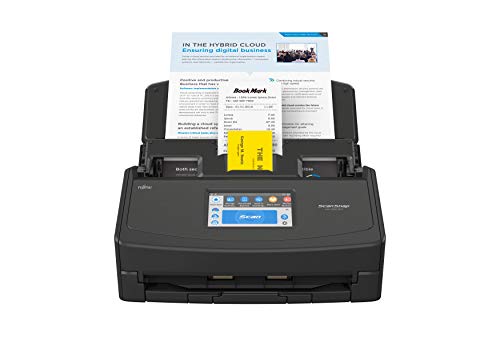
The 2018 release of the ScanSnap iX1500 introduced the touchscreen profile system that the line is known for, and it remains the reference point for that workflow. For Mac users running slightly older macOS versions where the latest drivers can be touchy, this release often plays more nicely with current ScanSnap Home software. The scanning engine is identical to position one, so the only real difference is the release year.
If you already own a Mac that’s been in service for a while and prefer stable driver behavior over chasing the newest firmware, this is a sensible alternative. Newer software tends to keep working with older iX1500 hardware, so longevity is rarely an issue.
Key Advantages
- Original iX1500 touchscreen profile workflow
- ScanSnap Home OCR for searchable PDFs
- Compatible with a wider range of macOS versions
Less Ideal Details
- Older release year means cosmetic or packaging wear in some listings
- Some very recent macOS updates may require updated ScanSnap Home
Who Will Love This
Mac users with slightly older systems who want the ScanSnap iX1500 experience with broader legacy compatibility.
Where Another Pick Suits Better
For the latest factory-sealed experience, the ScanSnap iX1500 at position one is the cleaner choice.
What To Weigh Before Choosing Document Scanners For Mac
Match The Scanner To Your Paper Reality
Start with the kind of paper that actually crosses your desk. A freelancer billing a few clients a week lives in a different world than a bookkeeper reconciling a shoebox of receipts, and the right ADF capacity and OCR pipeline follow from that. If your stack is mostly mixed-text contracts, a 50-sheet ADF and searchable PDF output cover nearly every job.
Connectivity And macOS Compatibility
macOS support has improved across the board, but driver quality still varies by vendor. USB models are the simplest path, while wireless units add placement freedom for shared Mac setups. Check the current driver notes for your macOS version before committing, especially if you keep your machines on the latest releases.
Throughput And Duplex Behavior
Duplex capture, which scans both sides of a page in a single pass, roughly halves the time on two-sided originals. Rated speeds of 35 ppm / 70 ipm are the practical sweet spot for most Mac shops. Higher resolutions are worth paying for only if you regularly scan photos or color-heavy originals.
Long-Term Ownership Costs
Roller kits, separation pads, and replacement consumables add up over years of heavy scanning. Refurbished units can offset the upfront cost but may arrive with cosmetic quirks. Either way, factor the consumable cycle into the total ownership picture rather than judging by the initial price alone.
Key Considerations Across These Picks
Common Slip Ups To Sidestep
The biggest mistake is choosing a scanner based on headline speed without checking macOS driver support. A fast unit with a flaky driver creates more friction than a slower unit that just works. Another trap is ignoring ADF capacity: a 20-sheet tray feels fine until you sit down with a real weekly stack and start reloading every few minutes.
What The Higher Tier Buys
The jump from mid-range to premium scanners usually buys touchscreen workflows, better OCR accuracy on faded receipts, and wireless flexibility. For bookkeepers, the iX1600 Receipt Edition’s QuickBooks Online integration is the kind of feature that pays back the price gap in recovered hours. The honest read is that the upgrade is worth it when your scanning volume is steady enough to feel the friction of the cheaper alternative.
Frequently Asked Questions
Do these scanners support current macOS versions?
Each unit on this list works with current ScanSnap Home or Epson ScanSmart releases for macOS, though some older models may need updated companion apps.
What does duplex actually do?
Duplex (two-sided) scanning captures both sides of a page in one pass, which roughly halves the time on two-sided contracts and statements.
How important is OCR for everyday use?
OCR matters most if you want searchable PDFs and easy filing; it matters less if you only need visual archives of receipts and contracts.
Are refurbished document scanners a safe bet?
Refurbished units from qualified sellers are inspected and tested before resale, and many Mac users find them reliable for everyday scanning.
Can I scan directly to cloud storage on a Mac?
Yes, both ScanSnap Home and Epson ScanSmart support scan-to-cloud destinations, so a Mac can route files to common cloud services without extra steps.
The Takeaway
The right scanner is the one that matches the paper on your desk and the macOS setup already in place. Spend a minute thinking through volume, connectivity, and how often you wish your scans were searchable, then pick the model that lines up with that reality.