A tired wrist at 3 p.m. tells you everything about your desk setup. The right keyboard and mouse combo changes how the second half of your workday feels, whether you’re deep in spreadsheets, hopping between Slack threads, or grinding through code. Seven combos stand out this year, each solving a slightly different pain point. Heavy typists want mechanical feedback. Hot-deskers need portability. Anyone chasing ergonomics cares more about wave layouts than RGB. This list walks through what each one does well and where it falls short, so the choice fits the way you actually work.
An Overview Of The Picks

Logitech G502 Hero and G213 RGB Gaming Combo

Sablute KM81 Wireless Mechanical Combo, RGB

Sablute MA41 30dB Quiet Ergonomic Wave Set

seenda COE64-3 Pro Wireless Bluetooth Combo

Sablute Ergonomic Wireless 4000mAh Rechargeable Combo
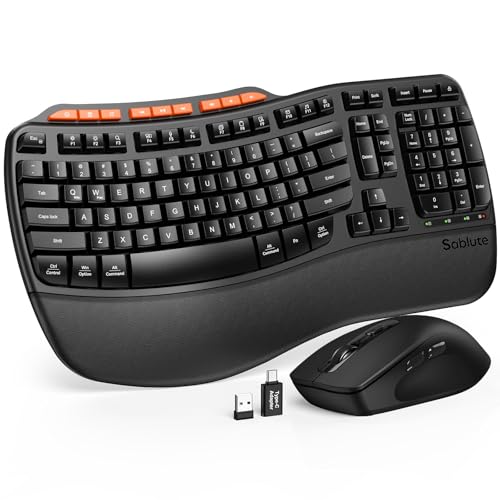
Sablute Full-Size Wave Ergonomic Combo

Razer Huntsman Optical Clicky Keyboard (Quartz)
The Strengths Of Each Pick
Wired setups still have a place in a work-from-home office, and the Logitech G502 Hero plus G213 pairing makes a strong case for staying tethered. The G502 runs a HERO 25K sensor (a high-resolution optical tracker) capable of tracking from 100 up to 25,600 dpi, which matters less for spreadsheets than for pixel-precise design work. Eleven programmable buttons give you shortcuts for app switching or macro work without alt-tabbing all afternoon.
The G213 keyboard is built for everyday typing, with a slim spill-resistant body and tactile keys that don’t feel hollow. LIGHTSYNC RGB lighting (a system that syncs color effects across compatible Logitech gear) ties the two peripherals together visually, which makes a multi-monitor setup feel intentional. Owners of a more design-focused alternative like the Sablute KM81 may find this combo heavier on gamer energy and lighter on the desk-aesthetic side.
A Favorable Mix
- 11 programmable mouse buttons cut down on app-switching during heavy multitasking.
- Tunable weights let you dial in the mouse feel for long sessions.
- Tactile, spill-resistant keys hold up to accidental coffee disasters.
- RGB lighting syncs the keyboard and mouse as a matched set.
Points To Note
- Wired-only connectivity means cable management becomes part of the desk plan.
- Gaming styling may clash with a minimalist home office.
Quick Facts
Who It Suits Best
Power users, designers, and gamers who want tactile feedback, programmable shortcuts, and a wired setup that never worries about battery life.
Look Elsewhere When
The Sablute KM81 is a better match for shoppers who want wireless freedom and a more design-led look at the desk.
The KM81 leans into a modern-retro look with round ABS keycaps (hard plastic key tops) and an electroplated trim that catches the light without being loud. For a desk where Instagram and Zoom both happen, the aesthetic pulls as much weight as the typing feel. It runs linear red mechanical switches, which deliver a smooth, low-resistance keystroke that suits long email and report sessions.
Wireless connectivity keeps the desk clean, and 17 backlight modes with up to 108 lighting effects let you tune the look to your room. Compared with the Logitech G502 and G213 setup above, the KM81 trades sensor precision and macro buttons for a more lifestyle-driven design. It works best as a typing-first combo for someone who values the visual layer as much as the workday function.
Everyday Wins
- Linear red switches keep typing smooth and quiet over long sessions.
- Up to 108 lighting effects make the keyboard the desk centerpiece.
- Round keycaps and electroplated trim give it a distinctive retro feel.
- Wireless setup removes cable clutter from a small workspace.
Trade Offs
- Mouse sensor details are not specified, so power users may want a stronger tracking system.
- The retro look won’t blend into a corporate or conservative office.
Feature Snapshot
Made For
Style-conscious home office workers, students, and content creators who type all day and want a keyboard that doubles as desk decor.
Consider Something Else When
The Sablute MA41 is the better fit for shared offices where silent keys and an ergonomic wave layout matter more than visual flair.
The MA41 is built for the open-plan office, the late-night kitchen table, and anywhere shared walls make keyboard noise a real complaint. Marketed at 30dB, the typing volume sits in the same range as a quiet library, which is a real shift from clicky mechanical boards. The wave-shaped key layout follows the natural curve of your fingers, reducing the sideways reach that flat keyboards force on long sessions.
A soft leather palm rest adds a layer of cushioning under the wrists, and the combo supports dual-system switching between Windows and Mac. For hybrid workers who bounce between a work laptop and a personal machine, that cross-OS flexibility is a quiet win. The MA41 fits a different profile from the gaming-leaning Logitech set above, and it leans harder into long-day comfort than competitive performance.
Why It Works Well
- 30dB quiet keys make it safe for shared workspaces and late hours.
- Wave key layout supports a more natural finger reach over long sessions.
- Leather palm rest cushions wrists better than hard plastic.
- Dual-system switch works with both Windows and Mac machines.
Honest Caveats
- The wave shape takes a few days to adapt to if you are used to flat layouts.
- Leather-style palm rest needs occasional wiping to stay clean.
Best Suited To
Business teams, hybrid professionals, and shared-office workers who need quiet keys, ergonomic support, and cross-platform flexibility.
Not Your Match When
The Razer Huntsman suits shoppers who actually want loud, clicky feedback and a gaming-grade typing experience instead.
Mobile work needs a combo that disappears into a backpack, and the COE64-3 Pro answers with a 0.18-inch slim metal frame that takes up barely more room than a paperback. Seven backlight colors and three brightness levels help on overnight flights or dim hotel desks, and the full-size QWERTY layout keeps a dedicated number pad for spreadsheet-heavy roles like finance and ops.
Multi-device Bluetooth pairing (a feature that lets one keyboard or mouse connect to several devices and switch between them) means the same combo can hop between a phone, a tablet, and a laptop without re-pairing. Two typing angles (5.5° and 9°) let you tune the slope to your wrist position. The COE64-3 Pro won’t deliver the mechanical feedback of the Sablute KM81, but it trades that for portability that fits a true travel workflow.
What Makes Sense
- Slim metal frame fits a laptop bag without taking over the carry-on.
- Three-device Bluetooth switching streamlines mobile work setups.
- Full-size layout preserves a number pad for data entry.
- Seven backlight colors help in low-light travel environments.
Where It May Fall Short
- Membrane-style typing may feel soft for users who prefer mechanical feedback.
- Smaller desk presence means fewer dedicated media or macro keys.
Quick Facts
Perfect Match For
Traveling professionals, remote contractors, and students who work from cafes, airports, and co-working spaces and want one combo across all of them.
Skip It When
The Logitech G502 and G213 set makes more sense for desk-bound users who care more about sensor precision and macro buttons than portability.
Battery anxiety is real when your keyboard dies mid-report. This Sablute ergonomic combo addresses that with a 4000mAh rechargeable battery, roughly double the capacity of many backlit keyboards in this category. For heavy daily typists, that means longer stretches between charges and fewer interruptions when deadlines are tight.
The wave-shaped key layout keeps the fingers in a more natural curve, and the faux lambskin palm rest adds a soft, leather-like surface that wipes clean. Compatibility covers Windows, Mac, and Chrome OS, which makes it a flexible pick for households or workforces mixing platforms. If you spend more time on the couch or in a hot desk than at a fixed workstation, the long-life battery alone makes this worth a look.
What Stands Out
- 4000mAh battery extends time between charges for daily typists.
- Faux lambskin palm rest is softer and easier to wipe than fabric pads.
- Wave keys reduce sideways wrist reach during long sessions.
- Cross-OS compatibility supports Windows, Mac, and Chrome OS.
Things To Weigh
- Rechargeable design means you still need a charging cable within reach.
- Backlit keyboards can drain faster when brightness stays on high all day.
Who Should Grab It
Heavy daily typists, remote workers, and anyone who forgets to charge peripherals until the keyboard starts blinking at them.
Another Choice May Suit
The seenda COE64-3 Pro is a smarter pick for travelers who value slim metal portability over a larger battery cell.
Wave-shaped keyboards take a little getting used to, and this full-size Sablute model makes that transition as painless as possible. The keys follow the natural curve of your fingers, which trims the awkward sideways reach that builds up over a full workday. Front and rear tilt adjustments let you angle the board to match your chair height and desk depth.
A leatherette wrist rest gives the palms a cushioned, sweat-resistant surface that wipes clean after a long day. The full-size layout keeps the number pad intact for accounting, data entry, and finance work. If the Sablute MA41 above already caught your eye but you want the same wave feel with a slightly different ergonomic layout, this one sits right next to it as a near sibling.
Notable Gains
- Wave keys reduce hand strain during multi-hour typing sessions.
- Leatherette wrist rest wipes clean and resists sweat buildup.
- Full-size layout keeps the number pad for spreadsheet work.
- Front and rear tilt options adapt to different chair and desk heights.
Less-Strong Areas
- Wave shape can feel unfamiliar during the first week of use.
- Mouse details are not specified, so the mouse may be a basic sidekick rather than a feature standout.
Feature Card
Whose Shelf It Belongs On
All-day typists, accountants, and writers who want a wave layout and a cleanable wrist rest for daily office use.
Swap It Out When
The Sablute KM81 fits better if you want a wireless mechanical feel and a more design-forward look at the desk.
The Razer Huntsman uses optical switches, which register key presses with a light beam rather than a physical metal contact. That design gives the keyboard a 1.5mm actuation distance (the depth a key must travel before the keystroke is registered), noticeably shorter than many clicky mechanical switches, and the result is fast, responsive typing that competitive typists tend to love. The Quartz pink colorway adds personality to a desk without going over the top.
A matte aluminum top frame gives the board a solid, no-flex feel under heavy hands, and the clicky feedback makes each keystroke unmistakable. Razer Chroma RGB lighting (a per-key backlight system with 16.8 million color options) syncs with compatible games and accessories. This is the only standalone keyboard on the list, so it suits shoppers who already have a mouse they love and just want a serious typing upgrade.
Standout Benefits
- Optical switches register at the speed of light with satisfying clicky feedback.
- Matte aluminum top frame keeps the board rigid under heavy typing.
- Per-key Chroma RGB syncs with games and other Razer gear.
- Quartz pink colorway stands out without clashing with neutral desks.
Where It Is Less Suited
- Clicky feedback is loud and will draw attention in shared offices.
- Keyboard only, so you supply your own mouse for a full combo.
The Right Fit
Competitive gamers, fast typists, and anyone who wants a premium mechanical keyboard with a distinct look and a rigid build.
Reach For A Different Pick When
The Sablute MA41 is the smarter choice for shared offices where loud clicky keys would clash with the people around you.
What Matters Before Choosing Keyboard And Mouse Comboes For Work
Match The Combo To The Workload
Typing-heavy roles, like writing, coding, and customer support, benefit from mechanical or scissor-switch keyboards with a satisfying key travel. Spreadsheet-heavy roles need a number pad, so a tenkeyless layout (a keyboard without the dedicated number pad) is the wrong move. Design and creative work rewards a high-dpi mouse with programmable buttons for app shortcuts.
Decide Between Wired And Wireless
Wired combos never need charging and tend to cost less, which is why the Logitech set above leans into that. Wireless combos free up the desk and make hot-desking easier, but they require charging and depend on a stable wireless receiver or Bluetooth connection. For fixed desks, wired remains a stress-free choice. For flexible spaces, wireless wins on convenience.
Prioritize Ergonomics For Long Days
Anyone logging more than four hours a day at the keyboard should look at wave-shaped layouts and palm rests, like the Sablute MA41 and Full-Size Wave models. Mouse shape matters too: a contoured body supports the hand, and a soft-touch finish reduces grip fatigue. Skipping ergonomics is the most common reason people replace a combo after six months.
Consider Noise And Shared Spaces
Open-plan offices, shared apartments, and late-night work sessions all call for quieter keys. Membrane or scissor-switch boards tend to be quieter than clicky mechanicals. The Sablute MA41 at 30dB sits at the quiet end of the spectrum, while the Razer Huntsman sits firmly at the loud end.
Key Considerations Across These Picks
Mistakes Worth Dodging
Buying on looks alone is a fast track to wrist pain. A flashy keyboard with a flat layout still forces your hands into the same awkward reach. Skipping a palm rest to save space on a small desk also tends to backfire, because the lack of cushioning shows up as soreness within weeks. Another common slip is matching a high-end mouse to a bargain keyboard, or vice versa, which leaves one half of the combo feeling underbuilt.
Where The Extra Money Goes
Premium combos invest in better switch mechanisms, longer battery life, stronger materials like aluminum frames, and more reliable wireless connections. The jump from a basic membrane board to a mechanical or optical-switch model is the most noticeable upgrade for daily typing. Higher-tier picks also tend to include features like multi-device Bluetooth pairing, on-board memory for custom profiles, and software support for macro programming, all of which pay off over years of use rather than months.
Frequently Asked Questions
What Is The Difference Between A Mechanical And A Membrane Keyboard?
Mechanical keyboards use individual physical switches under each key, giving more tactile feedback, longer lifespan, and louder typing. Membrane keyboards use a single pressure pad under all keys, which feels softer, sounds quieter, and typically costs less. For typing-heavy work, mechanical switches usually feel better over time.
Do Wireless Keyboard And Mouse Combos Lag For Office Work?
Modern wireless combos using 2.4GHz receivers (a dedicated USB plug that talks to the peripherals on a low-latency radio band) or Bluetooth 5.0 and up have effectively no noticeable lag for typing, scrolling, and standard productivity tasks. Competitive gamers still lean toward wired for absolute lowest latency, but office users rarely notice a difference.
How Long Do Rechargeable Combos Typically Last On A Single Charge?
Rechargeable combos with backlighting off often run several weeks on a single charge. With backlighting on at full brightness, runtime drops to a few days. The 4000mAh model on this list runs longer than typical backlit combos because of its larger battery cell.
Are Ergonomic Wave Keyboards Hard To Adjust To?
Most people adapt within a week of regular use. The wave layout shifts finger reach into a more natural curve, but the first few days can feel slower as muscle memory recalibrates. Sticking with the layout through that initial period is the difference between giving up too soon and landing on a more comfortable long-term setup.
Can One Combo Work With Both Windows And Mac?
Many of the picks above, including the Sablute MA41 and the 4000mAh ergonomic model, support cross-platform compatibility. Some keys, like Windows and Command, may swap positions when switching operating systems, so a quick reference card or sticker helps during the first few days of use.
Closing Remarks
The best combo for your desk depends less on the brand and more on the way you actually work. Heavy typists should look at mechanical or optical switches, open-office workers should focus on quiet keys and ergonomics, and travelers should prioritize slim wireless builds. Compare the strengths against your real daily tasks, and the right pick becomes clearer. Your hands will thank you long before the next refresh cycle rolls around.