Finding the right keyboard changes how writing feels. Long essays, late-night emails, and deadline-driven drafts all benefit from keys that match your hands, your space, and the way you think on the page. After sorting through the noise, eight keyboards stand out for 2026, ranging from feature-packed mechanical builds to large-print layouts for tired eyes. You’ll find compact wireless picks for travel, full-size boards for serious word counts, and a couple of specialty options for niche needs. Each pick below solves a specific problem, and the buying guide that follows explains which features actually matter for getting words onto a screen.
The Choices Worth Comparing

GravaStar Mercury K1 Lite 75% Wireless Mechanical Keyboard

Nuklz N Wireless Large Print Full Size Keyboard

BTXETUEL SayoDevice OSU O3C Hall Switch Keypad

Nuklz N Large Print Computer Keyboard

MechLands Aula S102 Full Size Membrane Keyboard
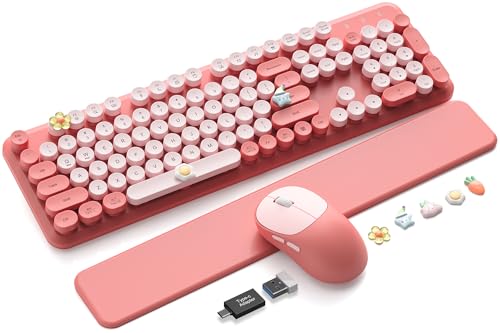
Trueque CK23Pro Typewriter Keyboard and Mouse Combo

Trueque Wireless Typewriter Keyboard and Mouse Combo

Surface Pro Signature Keyboard with Fingerprint Reader
More On The Choices That Made The List
The GravaStar Mercury K1 Lite sits in a category of its own: a 75% layout wireless mechanical keyboard that doubles as desk decor. Translucent keycaps and a sculpted chassis give it the kind of visual presence most plastic productivity boards can’t touch, and the RGB lighting bleeds through the housing rather than sitting flat under each key.
For writers, the 75% layout strikes a useful balance. You keep dedicated arrow keys and a function row, but you reclaim the desk space a full-size board hogs. Mechanical switches deliver tactile feedback that makes long sessions feel less like typing into a void, and the wireless setup means your desk stays clean.
Useful Strengths
- 75% layout retains arrows and function keys without claiming full-size desk territory
- Translucent housing turns RGB into ambient lighting for the whole workspace
- Mechanical switches give each keypress a defined bottom-out, helping maintain rhythm during long drafts
- Wireless connection removes cable clutter from your writing nook
- Compact footprint works well on narrow desks or shared tables
Things To Consider
- The bold aesthetic may feel out of place in a minimalist or corporate environment
- Translucent keycaps tend to show fingerprint oils more readily than opaque caps
At A Glance
Right Fit For
Writers who treat their keyboard as part of the workspace aesthetic, especially those working from home setups where the board is always on display.
Look Elsewhere When
You share an office or library where a quieter, less flashy board like the MechLands Aula S102 will draw less attention.
The Nuklz N wireless large-print keyboard solves a problem most spec sheets ignore: legible labels. High-contrast black keys with oversized white lettering make every character readable at a glance, which removes a surprising amount of friction from long writing sessions.
Soft, quieter key presses help too. Whether you’re typing in a shared living space or working late while someone sleeps nearby, the reduced noise makes the board feel considerate. Wireless setup means you can position it wherever your wrists and shoulders feel most relaxed.
Bright Spots
- Oversized high-contrast lettering reduces eye strain during extended reading-and-typing work
- Soft key presses keep typing volume low enough for shared rooms
- Full-size layout includes a dedicated number pad for data entry and formatting shortcuts
- Wireless connection lets you reposition freely for ergonomic comfort
Worth Noting
- Soft keys lack the tactile bump some touch typists prefer for fast prose
- Large print layout prioritizes visibility over compact desktop footprint
Made For
Seniors, beginners still building muscle memory, and anyone with visual fatigue who needs each key to read clearly without squinting.
Skip It When
You want the satisfying click of mechanical switches, in which case the GravaStar Mercury K1 Lite offers a more responsive typing experience.
The BTXETUEL SayoDevice O3C isn’t a writing keyboard in the traditional sense. It’s a compact macro keypad built around Hall-effect magnetic switches, a knob, and a small IPS color screen. Hall-effect switches detect keypresses via magnetism rather than physical contact, which means they register based on how far you press, not just whether you bottom out.
For writers who rely on shortcuts, copy-paste chains, or custom macros, this mini keypad slots in beside a main keyboard and handles the repetitive work. The screen shows button counts and configurable text, and the rotary knob gives you a tactile way to scrub through timelines or adjust volume without breaking flow.
A Strong Showing
- Hall-effect switches allow adjustable actuation points for fine-tuned responsiveness
- IPS color screen displays key ranges, button counts, and customizable text
- Rotary knob offers precise analog control for scrubbing, zooming, or volume
- Hotswap design accepts other Hall-effect switches with simple calibration
- Compact form factor fits beside a full-size keyboard without crowding the desk
Trade Offs
- This is a supplemental keypad, not a standalone replacement for a typing keyboard
- Magnetic switch behavior takes a short adjustment period for users coming from standard mechanicals
- Owners commonly report the learning curve for configuring macros and screen layouts is steeper than plug-and-play alternatives
Best Suited To
Writers and editors who want to offload repetitive shortcuts, text expansion, or media control to a dedicated surface that lives next to their main board.
Swap It Out When
You just need one reliable board for essays and emails, in which case the MechLands Aula S102 full-size membrane keyboard covers the basics without the macro layer.
The wired Nuklz N large-print keyboard takes the same accessibility-first approach as its wireless sibling and strips out the extras. You plug it in, it works, and you can see every character without leaning in. There’s a quiet satisfaction in gear that just does its job.
The full key count with a number pad makes it well suited to spreadsheet work, accounting, or any writing flow that leans on numeric shortcuts. Wired reliability means no battery anxiety mid-paragraph, and the high-contrast keys stay readable in dim rooms and bright offices alike.
The Case For It
- Bold, oversized lettering reduces visual fatigue across long work sessions
- Wired connection means zero pairing or charging overhead
- Full-size layout with number pad suits mixed writing and data tasks
- Plug-and-play setup works on most computers without driver installs
Points To Note
- The cable limits repositioning compared to wireless options like the Trueque CK23Pro combo
- Visible wear on high-contrast lettering can occur with heavy daily use over time
Who Should Grab It
First-time typists, seniors, and anyone who values a no-fuss wired board that stays put and reads clearly from any angle.
Where Another Pick Suits Better
You prefer a wireless desk and magnetic wrist support, in which case the Trueque CK23Pro typewriter-style combo offers both comfort and freedom from cables.
The MechLands Aula S102 is a full-size membrane keyboard, which means it uses rubber-dome switches under each keycap rather than mechanical switches. For writers, that translates to a softer, quieter keystroke, especially welcome in shared apartments, dorm rooms, and late-night writing sprints.
The 100% layout includes a dedicated number pad, full function row, and arrow cluster, so you never get to sacrifice real estate. Membrane keyboards like this one tend to be lighter and easier to slip into a bag than mechanical alternatives, which makes them a sensible companion for writers who move between locations.
The Practical Payoff
- Membrane keys deliver whisper-quiet operation for shared spaces and late-night sessions
- Full-size layout covers every key you’d expect, including a number pad
- Lightweight chassis makes it portable between rooms or offices
- Softer key presses reduce finger fatigue during multi-hour writing sessions
Honest Caveats
- Membrane keys lack the tactile bump that touch typists use for rhythm
- Wired design means another cable to manage on your desk
Quick Facts
Perfect Match For
Writers who share living or working spaces and need a quiet, full-featured board that won’t disturb anyone nearby.
Consider Something Else When
You crave the responsive feel of mechanical switches, in which case the GravaStar Mercury K1 Lite delivers tactile feedback and a more compact footprint.
The Trueque CK23Pro leans into a typewriter aesthetic with round, retro-style keycaps and a soft pink colorway. Beyond looks, it pairs with a magnetic wrist rest that snaps into place, giving your palms something solid to lean on during long sessions.
The 2.4G wireless connection handles both keyboard and mouse through a single USB receiver, so your desk stays clean. Sleep mode preserves battery when you’re away, and the combo format means you don’t have to source a matching mouse separately.
Everyday Perks
- Magnetic wrist rest supports neutral wrist posture during extended writing
- Round typewriter-style keycaps give the board personality without sacrificing function
- 2.4G wireless combo reduces cable clutter with one shared USB receiver
- Sleep mode helps preserve battery across idle days
- Full-size layout covers the number pad and function row you’d expect
Small Caveats
- The pink-and-round aesthetic isn’t for everyone, especially in professional settings
- Round keycaps have a learning curve for touch typists used to flat profiles
Whose Shelf It Belongs On
Writers who log long daily word counts, students building a desk setup that feels personal, and anyone whose wrists ache after a few hours of flat keyboards.
A Better Fit Elsewhere
You need a board that disappears into a serious office environment, in which case the wired Nuklz N large-print keyboard looks more understated.
The Trueque wireless combo trims a few features from its CK23Pro sibling and lands at a friendlier price. You still get the typewriter-style round keycaps, the magnetic wrist rest, and the wireless convenience, but the build focuses on everyday practicality rather than premium extras.
One practical highlight: the round keycaps detach for easier cleaning. Crumbs, dust, and the slow accumulation of desk grime lift off without disassembly, which matters if you eat at your writing desk or share the space with kids and pets.
Positive Takeaways
- Detachable round keycaps simplify routine cleaning
- Magnetic wrist rest supports long typing without slipping
- Wireless combo means one receiver for both keyboard and mouse
- Typewriter-style design adds character without overcomplicating the layout
Less Ideal Details
- Construction feels lighter than the CK23Pro, which may matter for heavy daily travel
- The aesthetic stays quirky, so it won’t blend into corporate environments
Built With In Mind
Students, casual home offices, and writers who want personality plus easy cleanup, especially those who snack while they draft.
Reach For A Different Pick When
You want quieter keys for shared rooms, in which case the MechLands Aula S102 membrane keyboard keeps noise down without the round-cap cleaning routine.
The Surface Pro Signature Keyboard is a magnetic cover keyboard built specifically for Surface Pro tablets. The mechanical keyset sits beneath an Alcantara-covered palm rest, and backlit keys adjust for dimly lit cafes or red-eye flights. A fingerprint reader baked into the deck handles sign-in without a password prompt.
For writers who travel light, this board turns a Surface Pro into something close to a laptop. The large glass touchpad handles precise cursor work, and the keyboard stores and recharges the Surface Slim Pen in a built-in tray, so your stylus stays charged and accessible between sessions.
Where It Delivers
- Mechanical keyset gives real key travel despite the slim cover form factor
- Backlit keys adapt to low-light environments on planes or in dim rooms
- Integrated fingerprint reader speeds up secure sign-in
- Large glass touchpad supports precise navigation without an external mouse
- Built-in pen storage keeps the Surface Slim Pen charged between sessions
Practical Considerations
- Only fits specific Surface Pro models, so verify compatibility before buying
- Alcantara material tends to show wear over years of heavy palm contact
- Cover-style design offers less wrist support than a desk-bound board like the Trueque CK23Pro
Feature Card
Who Will Love This
Surface Pro owners who travel often and want their tablet to double as a writing workstation without carrying a separate laptop.
Not Your Match When
You write at a fixed desk and want a full-size layout, in which case the MechLands Aula S102 gives you more keys and quieter operation.
What Matters Most Before Choosing Keyboards For Writing
Switch Type And Typing Feel
The switch is the part of the key that registers a press, and it shapes how typing actually feels. Mechanical switches give each key a defined bump or click, which helps some writers maintain rhythm during long sessions. Membrane switches, like those in the MechLands Aula S102, feel softer and quieter, ideal for shared rooms and late-night work. Hall-effect switches, found in the BTXETUEL SayoDevice O3C, detect press depth magnetically and can be tuned to register at different points. Match the switch to your noise tolerance, hand strength, and the kind of feedback that keeps you typing accurately.
Layout Size And Desk Footprint
Keyboards come in roughly three shapes: full-size (100%) with a number pad, tenkeyless (TKL, around 87%) without one, and compact (75% or smaller) that trims the function row and sometimes the arrows. Writers who never touch the number pad save desk space by going compact, while anyone doing spreadsheet or formatting work benefits from the full layout. The GravaStar Mercury K1 Lite shows how a 75% board keeps essential keys without the bulk.
Key Legends And Visibility
For writers who glance at keys rather than touch-type, key legends matter. Large-print boards like the Nuklz N models feature oversized high-contrast lettering that’s easier on aging eyes or dim lighting. Backlit keys, like those on the Surface Pro Signature Keyboard, help in cafes, planes, and evening writing sessions where overhead light is limited.
Connectivity And Daily Routine
Wired boards never need charging but tether you to a desk. Wireless boards free you to position the keyboard for ergonomic comfort, and combos like the Trueque models use a single 2.4G receiver for both keyboard and mouse. Decide whether you value freedom of placement or zero battery management more.
Key Considerations Across These Picks
Mistakes Worth Dodging
Buying on aesthetics alone leads to boards you stop using after the novelty fades. Skipping a hands-on check at a local store (when possible) means you miss out on how switch type, key spacing, and wrist angle actually feel together. Many shoppers also forget to confirm their computer has the right ports for a wired board, or that wireless dongles are included, before checking out.
Where The Extra Money Goes
Premium pricing in this category usually buys better switch quality, sturdier chassis materials, and thoughtful extras like magnetic wrist rests or fingerprint readers. The Surface Pro Signature Keyboard commands a higher price because it integrates pen storage and a precision touchpad into a slim cover form factor. For writers logging thousands of words weekly, those upgrades often translate to less fatigue and fewer distractions, which is worth weighing against budget constraints.
Frequently Asked Questions
What switch type is best for long writing sessions?
Membrane and soft mechanical switches tend to reduce finger fatigue during multi-hour sessions, while tactile mechanical switches help maintain typing rhythm. Match the switch to your hand strength, noise tolerance, and whether you share the space with others.
Do I need a number pad for writing?
Most pure prose work doesn’t require a number pad, but if you format data, edit spreadsheets, or use numeric shortcuts regularly, a full-size board saves time. Compact 75% layouts reclaim desk space without losing arrow keys.
Are large-print keyboards only for visually impaired users?
Not at all. Oversized high-contrast keys help anyone working in low light, anyone with tired eyes after a long day, and beginners still learning key positions. Visibility is useful beyond accessibility contexts.
How important is a wrist rest?
A wrist rest keeps your wrists in a neutral position during long sessions and reduces strain. Detachable or magnetic rests on boards like the Trueque models add comfort without permanent bulk on your desk.
Can a wireless keyboard keep up with serious writing?
Modern 2.4G wireless connections handle fast typing without noticeable lag for prose work. Bluetooth versions may show a tiny delay, so check the connection type if you type at high speed or rely on precise key timing.
The Takeaway
The right board for writing depends on where you write, how long you write, and what your hands and eyes need to stay comfortable. Match the switch type to your noise environment, the layout to your desk and workflow, and the legend style to your lighting conditions. Any of the eight picks above will serve you well, so focus on the one that fits your real daily routine.