Spending eight hours a day typing on a cramped, clacky keyboard makes workdays feel longer than they need to be. The right combo turns those hours into something that doesn’t punish your wrists, distract your colleagues, or force you to wrestle with a tangle of cables. This guide looks at eight keyboard and mouse sets built for office life, with a few that double nicely for gaming sessions after hours.
A Side-By-Side Look

Logitech G502 Hero and G213 RGB Gaming Combo

SABLUTE MA41 Quiet Ergonomic Wave Combo

SABLUTE Backlit Scissor Keys Combo with Wrist Rest
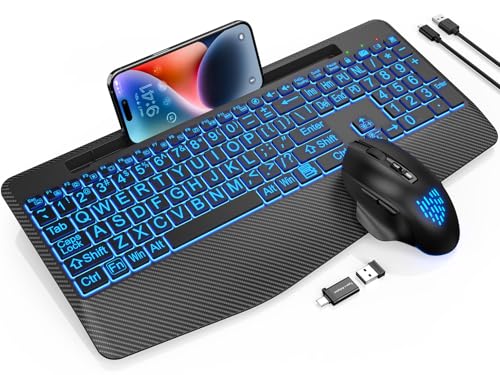
SABLUTE Large Print Backlit Scissor Keys Combo

SABLUTE Compact Backlit Scissor Keys Combo

seenda COE64-3 Pro Multi-Device Bluetooth Combo

SABLUTE MA31 Ergonomic Full-Size Wave Combo

Razer Huntsman Clicky Optical Keyboard
A Closer Look At Each Pick
This pairing skips the wireless angle entirely and trades that freedom for pure, unfiltered responsiveness. The G502 mouse carries the HERO 25K sensor, a piece of hardware that tracks movement one-to-one up to 25,600 DPI (dots per inch, the unit that measures how sensitive a mouse is to motion), which matters most when you’re whipping across a wide monitor. You also get eleven programmable buttons and five removable 3.6-gram weights, so you can tune the heft to whatever feels natural in your grip.
The G213 keyboard complements the mouse with LIGHTSYNC RGB, Logitech’s system for syncing colors across compatible gear. Where the mouse leans competitive, the keyboard plays a more relaxed role. Compare that to the wireless options further down this list, and you’ll notice the trade-off is clear: no battery anxiety, but a USB cable on each end to manage.
What Pays Off
- Tunable weight system lets heavier-handed users lighten the load
- Eleven programmable mouse buttons cut down on keyboard shortcuts during spreadsheet work
- 1:1 sensor tracking means smooth cursor movement at any DPI setting
- LIGHTSYNC RGB syncs both pieces so your desk looks pulled together
Things To Consider
- Wired design adds desk clutter, which may bother minimalists
- The G213’s tactile keys feel stiffer than the scissor-switch options elsewhere
- Customization software requires a download, adding setup time
Key Specs
Built With In Mind
Competitive gamers and power users who want wired reliability and full customization across both devices.
Swap It Out When
The SABLUTE MA41 Quiet Ergonomic Wave Combo suits open-office workers who need silence over sensor precision.
The MA41 is built around a single promise: keep your typing under 30dB, the volume of a soft whisper. For cube dwellers and shared offices, that number matters more than RGB lighting or DPI counts. The wave-shaped key layout angles your hands outward, which promotes a more relaxed wrist position during long sessions. A soft leather palm rest sits where hard plastic usually does, and the cushioning makes a real difference on day five of a long project sprint.
Dual-system switching between Windows and Mac means you can unplug the dongle (a small USB receiver that plugs into your computer) from your work laptop and pair it with a personal MacBook without re-pairing headaches. The trade-off, in our view, is that wave layouts take a few days to get used to if you’ve spent your career on flat keyboards.
Strengths Worth Knowing
- 30dB typing volume keeps shared offices quiet
- Leather palm rest cushions wrists far better than hard plastic
- Two adjustable tilt angles fit different desk heights and postures
- Dual-system switch handles Windows and Mac on the same set
Trade-Offs To Consider
- Wave-shaped keys require an adjustment period for flat-keyboard veterans
- Lacks backlighting, so dim rooms may force you to retype often
Made For
Open-office professionals and remote workers who need quiet, ergonomic comfort during multi-hour typing stretches.
A Better Fit Elsewhere
The SABLUTE Backlit Scissor Keys Combo with Wrist Rest fits people who want palm support plus visible keys for late-evening work.
Scissor-switch keys sit low and feel close to a laptop’s, which makes the SABLUTE Backlit Scissor Keys Combo a smooth transition for anyone moving between desk and travel. Seven switchable backlight colors and an RGB mouse that cycles on its own mean you can type in dim rooms without squinting. The keys themselves use a low-profile scissor mechanism, which is a rubber-domed design that delivers a quiet, springy press without the bulk of a mechanical switch.
A full-size layout with a wrist rest and foldable stand rounds out the ergonomics. Where the SABLUTE MA41 leans ergonomic-first, this pick trades the wave shape for a more familiar feel, but adds visibility after sundown. For most evening workers, that’s a worthy swap.
What Stands Out
- Seven switchable backlight colors for any room mood
- Wrist rest and foldable stand reduce strain during long sessions
- Low-profile scissor keys feel familiar to laptop users
- RGB mouse cycles colors automatically for visual variety
Honest Caveats
- Scissor switches feel shallower than mechanical, which some typists dislike
- Battery life on backlit mode drains faster than with lighting off
Key Specs
Right Fit For
Late-shift professionals and home-office workers who type after dark and want visible keys plus palm support.
Consider Something Else When
The Razer Huntsman Clicky Optical Keyboard serves competitive players who want tactile feedback over wireless backlighting.
Large-print legends make this combo a thoughtful pick for anyone whose eyesight struggles in low light or with smaller key labels. Seven backlight colors light the oversized characters from below, and a wireless RGB mouse rounds out the set. Scissor-switch keys keep the typing quiet, which is a quiet hero for shared offices where clack adds up over a day.
Unlike the SABLUTE MA41’s wave shape, this layout stays flat and traditional, easing the learning curve. You may find the bigger font helps if you regularly switch between an external display and a laptop screen, where key reference matters more than usual.
A Few Highlights
- Large-print legends reduce squinting and lookup time
- Seven switchable backlight colors suit any lighting condition
- Quiet scissor switches stay polite in shared spaces
- Wireless RGB mouse matches the keyboard’s color cycling
Points To Note
- Big-font labels take longer to scan visually for touch typists
- No dedicated ergonomic shape, unlike the MA41 wave layout
Best Suited To
Users with vision needs or anyone who types in low-light environments where backlit key legends matter.
Reach For A Different Pick When
The SABLUTE Compact Backlit Scissor Keys Combo works better for those with smaller desks who don’t need large-print labels.
Tight desk space calls for a tighter keyboard, and this SABLUTE option keeps things minimal. Seven backlight colors and four brightness levels handle everything from a sunny home office to a dim bedroom corner. The compact body leaves room for a coffee cup, notebook, or that second monitor you’ve been meaning to add, which is honestly the underrated perk.
The RGB mouse cycles through colors automatically and pairs via the same wireless receiver, so you’re using one USB port for both devices. The honest read is that compact boards sacrifice the number pad, so heavy spreadsheet work gets harder. For most everyday typing, though, the tradeoff is well worth the reclaimed desk real estate.
Real-World Strengths
- Compact layout frees up desk space for notebooks and accessories
- Four brightness levels cover any room lighting
- Single USB receiver for both keyboard and mouse
- Scissor switches keep typing quiet
Small Caveats
- No dedicated number pad slows down data entry
- Lacks a wrist rest that larger SABLUTE models include
Feature Snapshot
Who Should Grab It
Small-desk professionals, minimalists, and anyone who wants a tidy workspace without sacrificing backlit visibility.
Look Elsewhere When
The seenda COE64-3 Pro Multi-Device Bluetooth Combo fits people who jump between laptop, desktop, and tablet regularly.
Switching between a work laptop, personal desktop, and a tablet means juggling multiple keyboards, and that’s exactly what the COE64-3 Pro aims to end. It pairs across three devices via Bluetooth, and the included mouse follows the same multi-device switching. Seven backlight colors and three brightness levels give you options when moving between dim living rooms and well-lit offices.
The slim metal body adds a refined feel that the plastic SABLUTE options don’t quite match. Two typing angles (5.5° and 9°) keep wrist posture flexible across longer stretches. Where most combos on this list lean on a single 2.4GHz USB receiver (a wireless dongle that plugs into a USB port), this seenda option runs on Bluetooth, so it saves your USB ports for other accessories.
Positive Takeaways
- Three-device Bluetooth pairing eliminates keyboard swaps
- Metal body feels sturdier than plastic competitors
- Seven backlight colors with three brightness levels
- Full-size layout keeps the number pad for spreadsheets
Where It May Fall Short
- Bluetooth can introduce slight input lag versus a wired or 2.4GHz receiver setup
- Metal body weighs more for travel than compact plastic sets
Quick Facts
Whose Shelf It Belongs On
Multi-device professionals who manage a laptop, desktop, and tablet in the same workflow.
Not Your Match When
The SABLUTE Compact Backlit Scissor Keys Combo fits those who want a compact single-device setup over multi-device flexibility.
The MA31 swaps the flat key surface for a wave-shaped arrangement that cradles your fingertips, which is the difference between typing with your hands splayed versus angled outward. A leather palm rest sits beneath your wrists, and the cushioning makes long sessions feel less punishing. The purple chassis adds a bit of personality to a desk, which is a nice break from the standard black or gray.
Compared to the SABLUTE MA41 earlier in the list, this model sticks with a more familiar full-size layout, including the number pad, while adding the same ergonomic philosophy. For most home offices, the combination of wave keys, palm support, and dedicated number pad covers the daily workload without compromises.
A Favorable Mix
- Wave-shaped keys reduce wrist deviation during long sessions
- Leather palm rest cushions more than hard plastic alternatives
- Full-size layout includes a number pad for data entry
- Purple colorway stands out on neutral-toned desks
Practical Considerations
- Wave layout takes a few days of retraining for flat-keyboard users
- No backlighting for dim environments
- Larger footprint than compact options on this list
Perfect Match For
Full-time writers, editors, and data-entry professionals who log serious typing hours each day.
Where Another Pick Suits Better
The SABLUTE MA41 Quiet Ergonomic Wave Combo fits professionals who need quiet 30dB typing in shared spaces over the MA31’s louder wave keys.
The Huntsman rounds out the list with optical switches, which register key presses using light-based actuation rather than physical contact. The result is a 1.5mm actuation distance (the depth a key must travel before the keyboard recognizes the press) and crisp clicky feedback. A matte aluminum top frame keeps the chassis rigid, which matters when you’re hammering keys at speed.
Chroma RGB lights up each key individually, with 16.8 million color options, and syncs with popular games plus a wide range of partner gear. This is a standalone keyboard rather than a combo, so it leaves mouse choice up to you. For competitive gamers, it deserves serious consideration; for quiet office use, the clicky switches may test your coworkers’ patience.
Notable Upsides
- Optical switches register faster than legacy mechanical switches
- Aluminum top frame resists flex during intense sessions
- Per-key Chroma lighting syncs with games and partner hardware
- 1.5mm actuation distance speeds up rapid key sequences
Points To Keep In Mind
- Clicky switches are too loud for shared offices and libraries
- Keyboard only, so you’ll need to choose a mouse separately
Feature Rundown
Who Will Love This
Competitive gamers and enthusiasts who want responsive, tactile typing and customizable RGB.
Skip It When
The Logitech G502 Hero and G213 RGB Gaming Combo fits those who want a matched keyboard-mouse set rather than a standalone board.
What To Weigh Before Choosing Your Combo
Picking the right keyboard and mouse starts with where you’ll use them most. In a quiet home office, a wave-key layout with palm support turns into a daily comfort upgrade. In a shared workspace, switch type and click volume matter more than DPI, and you’ll want scissor or membrane keys that stay polite throughout the day. For gamers, sensor accuracy and actuation distance replace ergonomics at the top of the priority list.
Connection style is the next fork. Wireless combos free your desk of cable clutter and let you shift positions, but Bluetooth can introduce input lag (the small delay between a key press and the on-screen response). Wired setups like the Logitech G502 Hero and G213 RGB Gaming Combo trade flexibility for zero-latency reliability. Multi-device pairing, as the seenda COE64-3 Pro offers, suits anyone juggling a laptop and a desktop across the same workday.
Finally, think about lighting and visibility. Backlit keys make after-hours typing painless, while matte finishes resist the fingerprints that glossy boards collect over months of use. If your desk sits near a window or under a lamp, brightness levels and anti-glare legends prevent the constant squinting that wears down a workday.
Key Considerations Across These Picks
Where Shoppers Go Wrong
The biggest mistake is buying on RGB flash alone, when the switches and layout do the real work for typing comfort. Another common slip is skipping the desk-size check: full-size combos swallow space that some workstations simply don’t have. Match the layout to your desk and your dominant tasks before falling for the most colorful option.
What Separates Premium From Basic
The jump in price between budget and premium combos usually comes down to switch quality, sensor precision, and chassis materials. A higher tier gives you optical or improved mechanical switches, a sturdier aluminum or metal-reinforced frame, and more reliable wireless pairing. For casual daily office work, mid-tier covers most needs. For competitive gaming or multi-device professionals, premium features earn their keep across long ownership.
Frequently Asked Questions
Should I get a wired or wireless keyboard and mouse combo? Wired combos like the Logitech G502 Hero and G213 RGB Gaming Combo deliver zero-latency input for gaming, while wireless sets free your desk and cut cable clutter for office use.
What does DPI mean on a mouse? DPI (dots per inch) measures how sensitive a mouse is to movement. Higher DPI numbers mean the cursor travels farther with less physical motion, while lower DPI gives you finer control for precise tasks like photo editing.
Are scissor-switch keyboards quieter than mechanical ones? Yes, scissor switches use a rubber-domed mechanism that produces a softer press than mechanical switches, which is why most low-profile laptop-style keyboards stay quieter in shared spaces.
Do ergonomic wave keyboards really help with wrist pain? Wave-shaped layouts angle the keys outward to keep wrists in a more neutral position, which many typists find reduces strain over long sessions, though adjustment time varies by user.
How do I clean a keyboard and mouse combo safely? A can of compressed air, a lightly damp microfiber cloth, and a soft brush handle most dust and grime, while removable keycaps on mechanical boards allow deeper cleaning when needed.
Wrap Up
The right combo depends on your workspace and your habits. Open-office workers benefit most from quiet switches and palm support, while competitive gamers need sensor precision and fast actuation. Measure your desk, count your daily typing hours, and pick the set that matches how you actually work.