Pocket photo printers, label-makers, and travel cases all sit under the “mini-printer” umbrella these days, and the right pick depends entirely on what you want to print, where you plan to use it, and how often you’ll actually carry it around. After sorting through nine options, from Fujifilm’s Instax Mini Link line to dedicated sticker printers and protective travel shells, this roundup focuses on real ownership trade-offs: film costs, app dependency, portability, and print longevity. Whether you’re a scrapbooker, a parent building fridge-art galleries, or a frequent flyer who wants a case that won’t crack under backpack pressure, there’s a match waiting below.
An Overview Of The Picks
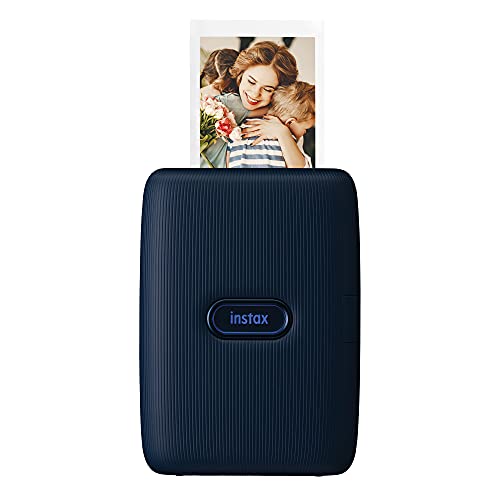
Fujifilm Instax Mini Link Smartphone Printer (Dark Denim)

Canboc Carrying Case for HP Sprocket 2×3
Fujifilm Instax Mini Link 2 (Soft Pink)
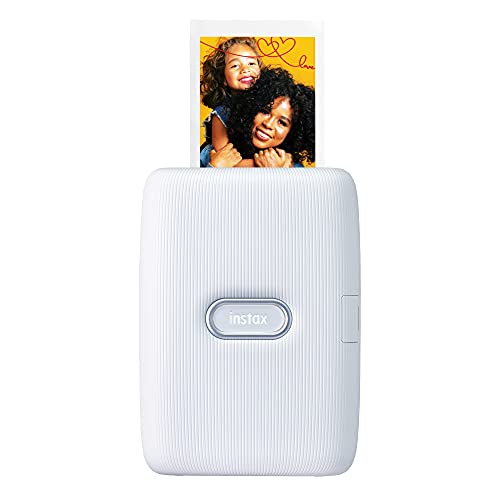
Fujifilm Instax Mini Link Smartphone Printer (Ash White)

Canboc Case for Fujifilm Instax Mini Link

cudinham Mini Sticker Printer X6 with 10 Rolls

HPRT CP4100 Portable 4×6 Bluetooth Photo Printer

HPRT CP4100 Portable 4×6 Wi-Fi Photo Printer
Fujifilm Instax Mini Link 2 (Clay White)
A Closer Look At Each Pick
This is the Instax Mini Link in its denim-flavored first-generation form, the model that turned smartphone printers into a lifestyle accessory rather than a novelty gadget. The dark denim finish leans casual, the body sits light enough to toss in a tote, and Bluetooth pairing with the free companion app makes printing about as friction-free as pocket printers get.
Real-world owners tend to print mostly at parties, on trips, or to drop into scrapbooks, since the credit-card-sized film is what gives Instax its signature look. Compared to the protective Canboc case we’ll cover next, this is the actual printing engine rather than a carry solution.
What It Does Well
- App-driven workflow turns phone photos into physical prints in roughly 12 seconds per shot.
- Lightweight, pocketable shell slips easily into a backpack or purse.
- Fun social features and templates in the app keep creative options fresh.
- Battery delivers enough prints per charge for a full evening out.
Things To Consider
- Ongoing film costs add up quickly for heavy users.
- Print image area is small compared to a standard 4×6 photo printer.
Who It Suits Best
Casual users who want a grab-and-go party printer and don’t mind paying per shot for that nostalgic film aesthetic.
Where Another Pick Suits Better
The HPRT CP4100 fits better when you want true photo quality in a larger 4×6 format rather than the small Instax footprint.
Canboc’s hard-shell case solves the most common complaint about pocket printers: they feel fragile in a packed bag. The PU exterior wraps an EVA shell that shrugs off the bumps of a daily commute, and the interior mesh pocket swallows extra paper and cables without crowding the printer itself.
Note that this listing is case-only; the printer and accessories ship separately. It’s built around the HP Sprocket but also fits the KODAK Step and Lifeprint 2×3 models, so cross-brand households aren’t locked out.
Practical Advantages
- Hard-shell EVA construction absorbs drops better than fabric pouches.
- Mesh pocket keeps photo paper and cables neatly stowed.
- Cross-brand compatibility covers Sprocket, KODAK Step, and Lifeprint printers.
- Compact footprint slips into backpacks and carry-ons without fuss.
Points To Note
- Does not include the printer, paper, or charging cable.
- Tight fit means bulkier third-party paper packs may not close cleanly.
Feature Snapshot
Made For
Sprocket-owning commuters and travelers who actually throw their printer into a bag instead of leaving it on a desk.
Skip It When
Canboc’s Fujifilm-focused case is the better fit if you own an Instax Mini Link rather than a Sprocket.
The Instax Mini Link 2 in Soft Pink is the printer that leans hardest into creative play. The headline addition is INSTAXAiR, an in-app tool that lets you draw bubbles, petals, glitter, and neon accents onto photos before they hit the film, which gives scrapbookers and journalers a layer of customization the original Link never offered.
Compared to the Dark Denim first-generation model above, this second-gen unit adds motion gestures and richer color overlays, all wrapped in a pastel shell that fits bedroom-desk aesthetics.
Where It Excels
- INSTAXAiR drawing feature adds bubbles, petals, and neon effects before printing.
- Motion gestures in the app speed up repeat prints and mode switching.
- Soft Pink finish suits gift-giving and pastel-themed setups.
- Battery and Bluetooth workflow match the original Link for easy travel use.
Honest Caveats
- Heavier creative editing runs the phone battery down faster.
- Pastel finish shows wear more visibly than darker Link colorways.
Right Fit For
Creative hobbyists and journaling fans who want playful on-print effects rather than a faithful photo replica.
Swap It Out When
The Fujifilm Instax Mini Link 2 in Clay White is the calmer-color alternative for shoppers who prefer a more neutral finish.
This is the same first-generation Mini Link hardware as the Dark Denim unit, finished instead in a soft Ash White that fits minimal or Scandinavian-style interiors. For shoppers who care about how a gadget looks sitting on a shelf, the neutral tone makes a real difference.
Everything below the surface, app features, print speed, Bluetooth workflow, runs identically to the other colorways. You’re paying for finish rather than function here.
Where It Helps
- Ash White finish blends into neutral or modern home decor.
- Same app workflow as the rest of the Mini Link line for easy onboarding.
- Compact shell suits desk setups without dominating the surface.
- Lightweight enough to move between rooms as needed.
Worth Bearing In Mind
- Light colorway may show dirt or scuffs over time.
- Lacks the AR drawing features of the Mini Link 2 generation.
Best Suited To
Style-conscious first-time shoppers who want the Mini Link experience in a color that doesn’t shout.
Consider Something Else When
The Fujifilm Instax Mini Link 2 in Soft Pink earns the nod if in-app creative tools matter more than finish color.
This Canboc shell is the carry companion for Instax Link owners, sized for the Mini Link, Mini Link 2, Mini Link 3, and Mini Link+. That compatibility is the real story, since households that upgrade across Link generations don’t need to swap cases every time.
Like its Sprocket sibling earlier, this is case-only packaging. The mesh bag inside holds a spare film pack and a USB cord, which covers the everyday carry checklist.
A Favorable Mix
- Compatible across Mini Link, Mini Link 2, Mini Link 3, and Mini Link+ printers.
- Hard EVA shell resists the daily bumps of backpack carry.
- Interior mesh pocket fits film packs and cables.
- Compact enough to slip into a tote or carry-on.
Small Caveats
- Does not include the printer or film; case only.
Feature Rundown
Whose Shelf It Belongs On
Instax Link owners planning to upgrade across generations, or households with multiple Link models in rotation.
Look Elsewhere When
Shoppers carrying an HP Sprocket need the Canboc Sprocket-specific case instead.
The cudinham X6 is a different breed of mini-printer: it doesn’t print photos, it prints stickers. Thermal technology, meaning it uses heat rather than ink, keeps running costs near zero and side-steps the mess of cartridges. The bundle ships with 10 rolls of paper, which is enough starter stock to cover a season of journaling or planner work.
For scrapbookers and bullet-journal fans, the appeal is obvious. Print your own icons, labels, and tiny notes on demand.
Useful Touches
- Inkless thermal printing cuts out cartridge replacements and smudges.
- Bundled 10 rolls give a long runway before restocking.
- Pocket-sized build fits a pencil pouch or small bag.
- Low per-print cost suits crafters who print in volume.
Practical Considerations
- Black-and-white output only; no color printing.
- Print resolution is modest compared to photo-grade devices.
Who Will Love This
Journalers, scrapbookers, students, and label-makers who print small monochrome designs more often than full photos.
A Better Fit Elsewhere
The Fujifilm Instax Mini Link is the smarter choice when you want actual photo prints instead of stickers.
The HPRT CP4100 jumps to the other end of the mini-printer scale. Instead of Instax-sized prints, you get real 4×6 photos using dye-sublimation, a process where dyes are heated into the paper for richer color and longer-lasting results. The 300 DPI output and bundled 108 sheets plus 2 ribbons get you through a full vacation before restocking.
It’s larger than the Instax units above, more of a “carry it in a backpack” device than a pocket one, but the photo quality is in a different league.
What Makes Sense
- 4×6 dye-sublimation prints with 300 DPI resolution.
- Bundled 108 sheets and 2 ribbons cover heavy first-use volume.
- Laminated output resists fingerprints, water, and fading.
- Bluetooth connectivity and companion editing app for creative tweaks.
Trade-Offs To Consider
- Larger footprint than credit-card-sized Instax printers.
- Replacement ribbon-and-paper bundles cost more than Instax film.
Technical Highlights
Perfect Match For
Shoppers who want real photo prints they can frame, gift, or archive rather than small keepsake film.
Reach For A Different Pick When
The HPRT CP4100 Wi-Fi version is the smoother choice if your home network already handles wireless printing.
This is the Wi-Fi sibling of the Bluetooth CP4100 reviewed above, swapping direct Bluetooth pairing for home-network printing. Same dye-sublimation engine, same 4×6 output, same laminated finish that resists water and fingerprints, just a different connectivity story.
For households where multiple people want to send prints without re-pairing, Wi-Fi is genuinely easier. For solo phone users, Bluetooth is plenty.
What Pays Off
- Wi-Fi connectivity lets multiple household devices print without re-pairing.
- Laminated output holds up to handling, spills, and sunlight.
- 108-sheet starter bundle covers long first runs.
- Editing app adds creative control over final prints.
Where It Is Less Suited
- Wi-Fi setup adds a step versus Bluetooth-only models.
- Larger than pocket printers; not a true grab-and-go device.
Built With In Mind
Multi-device households that want one shared photo printer on the home network.
Another Choice May Suit
The Fujifilm Instax Mini Link fits better when pocket portability matters more than 4×6 print quality.
The Clay White colorway finishes the Mini Link 2 lineup in a warm, ceramic-style tone that reads as home-decor-friendly rather than tech-toy. Underneath the shell, this is the same INSTAXAiR-equipped second-generation hardware as the Soft Pink version reviewed earlier.
It also makes a strong gift pick, since the neutral palette sidesteps the “is this their color?” gamble that brighter finishes create.
Positive Takeaways
- Clay White finish suits neutral home decor and gift-giving.
- INSTAXAiR adds drawing effects that the original Link lacked.
- Same reliable Bluetooth-and-app workflow as the rest of the line.
- Battery covers a full evening of casual printing.
Some Limits To Know
- Light finish can show scuffs over long-term use.
- Instax film is more expensive per print than 4×6 alternatives.
Who Should Grab It
Gift shoppers and neutral-aesthetic homeowners who want Mini Link 2 features without bright colorways.
Not Your Match When
The Fujifilm Instax Mini Link in Ash White is the calmer alternative if you’d rather skip the AR drawing features entirely.
What Matters Most Before Choosing Mini-Printers
Print Format Sets The Whole Use Case
Pocket printers split into three real buckets: credit-card Instax film, 4×6 photo prints, and monochrome thermal stickers. Each one suits a different kind of owner, and choosing wrong means paying for a format you’ll rarely use. Think about where the finished print will end up, in a wallet, in a frame, or in a planner, before anything else.
Connectivity Shapes Daily Habits
Bluetooth works well for solo phone users, but households with multiple devices usually find Wi-Fi smoother. Some printers offer both. Editing-app quality also varies, so a quick look at the app’s review feedback tells you a lot about day-to-day friction.
Running Costs Often Outweigh The Sticker Price
A cheap printer with expensive film or ribbon refills ends up costing more than a pricier unit with bundled supplies. The HPRT CP4100 ships with 108 sheets and 2 ribbons, while Instax models require ongoing film purchases. Calculate cost-per-print before deciding, especially for heavy-use scenarios like scrapbooking or party events.
Portability vs. Photo Quality
Smallest units like the Instax Mini Link and the cudinham X6 fit pockets and pouches, while the HPRT CP4100 trades pocket-friendliness for true photo-grade output. There’s no single winner, only the right balance for your routine.
Key Considerations Across These Picks
Common Shopping Slip Ups
The biggest mistake is buying a pocket photo printer and expecting standard photo prints. Instax-style units deliver wallet-sized keepsakes, not 4×6 frames. Conversely, picking a 4×6 dye-sublimation printer for party favors ends with prints that don’t fit small envelopes. Match the format to the project before anything else, and double-check that your phone’s app store actually supports the printer’s companion app before checkout.
The Upgrade Payoff
The step up to the HPRT CP4100 family costs more up front but trades Instax-style film for laminated, water-resistant, longer-lasting photo prints. For shoppers building albums or photo gifts, that durability and the larger print size justify the higher price over time. For casual party-print users, the Instax line keeps things simpler and cheaper per session.