A cluttered pantry, a tangle of mystery cables, lunch boxes that all look the same, school supplies that multiply overnight. Tiny labeling jobs add up fast, and most folks want a printer that fits in a drawer, pairs over Bluetooth, and prints without ink cartridges. That’s where a modern mini-label maker earns its keep. The picks below cover Bluetooth printers, dedicated keyboard models, fresh tape refills, and protective cases, so you can match the tool to the task without overspending on features you won’t touch.
The Choices Worth Comparing

SUPVAN E10 Bluetooth Label Maker with 3 Tapes (Green)

Grapsa Mini Portable Printer Case with Mesh Pocket

NIIMBOT Label Maker Tape 12mm x 30mm (White)

NIIMBOT D110 Upgraded Version Mini Label Maker (White)

NIIMBOT D110 Mini Label Maker for Home School (White)
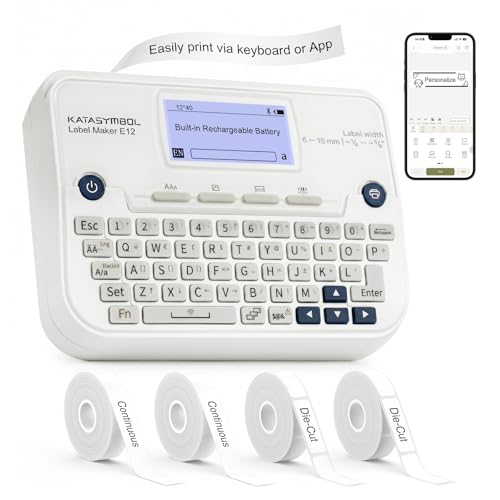
SUPVAN E12 Keyboard & Bluetooth Label Maker with 4 Tapes

NIIMBOT D110 Upgrade Mini Label Maker for Daily Use

SnawikiBag Label Printer Case for Phomemo and NIIMBOT

NIIMBOT D110 Mini Label Maker for Home School (Blue)

SUPVAN E11 Keyboard & Bluetooth Label Maker with 4 Tapes
The Details Behind The Selections
The SUPVAN E10 lands at the top of the list because it strips the experience back to the basics that matter. The printer pairs over Bluetooth to a companion app, runs on a rechargeable battery that goes roughly a month between charges, and uses thermal printing (a method that heats the paper to form text, so there’s no ink or toner to replace). For first-timers, that combination removes almost every friction point: no cartridges, no registration fees, and no keyboard learning curve.
The green shell adds a little visual personality in a sea of white mini printers, and the bundled three-tape pack covers the common widths for jars, bins, and cables. It’s a comfortable entry point if you mostly label pantry containers, storage bins, or kid craft supplies. Compared to the keyboard-equipped SUPVAN picks later in this roundup, the E10 leans fully on the phone app, which is faster for templates but tougher if you want to type on the device itself.
What Makes Sense
- App-only workflow means no keyboard to learn, no cartridges to track.
- Rechargeable battery rated for roughly a month of typical use per charge.
- Thermal printing removes the recurring cost and mess of ink or toner.
- Three starter tapes cover common label widths right out of the box.
- The green finish stands out on a crowded shelf or in a drawer.
Worth Bearing In Mind
- App-driven only, so a flaky phone connection can stall quick label runs.
- Green colorway may not blend with neutral home-office decor.
- Thermal labels can fade in direct sunlight over long stretches, depending on the environment.
Made For
First-time label users who want a friendly app and a printer they can stash in a kitchen drawer between uses.
Look Elsewhere When
Office organizers who type lots of labels at the desk will find the SUPVAN E12 a better fit thanks to its built-in keyboard.
This Grapsa case isn’t a printer at all, which is exactly why it earns a place on a mini-label maker list. Pocket printers live in bags, get tossed into backpacks, and roll around in glove boxes. A purpose-built case with a mesh pocket and detachable strap keeps the device plus a couple of spare rolls together, so you’re not hunting for a charging cable when inspiration strikes. Think of it as the accessory the printer boxes rarely include.
The mesh pocket stretches to hold label rolls and a short USB cable, and the strap lets you clip the case onto a tote or belt loop. It’s a sensible add-on if you already own a Phomemo-style mini printer. One practical note worth mentioning: the fit is sized for compact printers, so a larger keyboard model like the SUPVAN E12 likely won’t slide in.
Where It Excels
- Detachable strap keeps the printer close at hand in busy spaces.
- Mesh pocket holds spare label rolls and a charging cable in one tidy spot.
- Padded shell helps absorb bumps from daily backpack or tote use.
Trade-Offs To Consider
- Not a printer, so it only makes sense alongside one of the other picks.
- Sized for compact Bluetooth models, not keyboard-equipped units.
Right Fit For
Mobile organizers who already own a pocket printer and want a single carry for the device, cables, and rolls.
Where Another Pick Suits Better
Anyone buying their first label maker should pair the SnawikiBag Label Printer Case with the NIIMBOT D110 Upgrade for daily use.
Tape refills don’t print anything, but they keep a label maker useful long after the starter rolls run out. This NIIMBOT three-pack covers the 12mm x 30mm (roughly 0.47″ x 1.18″) size, which is a versatile width for spice jars, drawer fronts, and small electronics. Direct thermal (a print method that turns paper dark where it’s heated) output means crisp black-on-white text without a separate ink ribbon.
Compatibility is the key thing to check, and these rolls line up with the D11, D110, and D101 printers in the NIIMBOT lineup. Owners who standardize on that ecosystem can stock up without second-guessing fit. For mixed fleets, you may find the 12mm width is the common denominator that pairs across most compact printers.
Everyday Perks
- Three rolls per pack stretch the value of an already-small printer investment.
- White self-adhesive backing peels cleanly off most smooth surfaces.
- Direct thermal output keeps text sharp without separate ink cartridges.
Small Caveats
- Limited to 12mm width, so wider jar labels need a different roll.
- Direct thermal text can fade under strong UV exposure over time.
Who Will Love This
Existing NIIMBOT D-series owners who label frequently and want a budget refill ready to swap in.
Skip It When
Shoppers without a compatible printer should start with the NIIMBOT D110 Upgrade Mini Label Maker instead.
The D110 Upgraded Version leans into a flexible starter kit. The box includes three rolls in different finishes and sizes: white 14 x 40, clear 14 x 30, and green 12 x 40, so you can test how labels look on glass jars, plastic bins, and colored folders without buying more tape up front. That’s a meaningful advantage over single-roll starter bundles.
The unit itself stays pocket-friendly, and Bluetooth pairing lets you design labels from your phone. If you’ve ever wanted a clear label on a freezer container so the contents show through, that 14 x 30 clear roll is the headline feature here. Compared to the SUPVAN E10 earlier in this list, the D110 trades the green styling for a more neutral white finish and a slightly broader format mix.
Where It Helps
- Three included tapes in white, clear, and green cover most home labeling projects.
- Compact body slips into a pocket or small bag for on-the-spot labeling.
- Bluetooth app editing supports icons, fonts, and batch printing for projects.
Some Limits To Know
- Clear tape can look cloudy on dark surfaces, so matching the surface matters.
- App-only operation may frustrate anyone who prefers typing on a hardware keyboard.
Quick Facts
Best Suited To
Home organizers tackling mixed surfaces, from glass jars to plastic bins, who want format variety right away.
Not Your Match When
Users who type lots of repetitive labels at a desk will appreciate the SUPVAN E11’s built-in keyboard more.
At roughly 149 grams, this D110 makes a strong case for portability. It’s the kind of weight you forget is in a backpack pocket, and the Bluetooth workflow means a phone handles the heavy lifting. For students labeling notebooks, pencil cases, and shared classroom supplies, that lightweight body matters more than people expect.
It’s also a sensible pick for small home offices where space on the desk is at a premium. The print quality matches other D110 versions, so you’re not trading clarity for the lighter build. Compared to the blue D110 covered later in this roundup, this white version slots into existing setups without drawing attention.
Real-World Strengths
- About 149g body weight keeps the printer easy to carry all day.
- Pocketable form factor fits standard backpack pockets and small totes.
- Bluetooth editing means most design work happens on a familiar phone screen.
Things To Consider
- Lighter body can feel less substantial than larger desktop models.
- App dependence means a dying phone battery can stop a labeling session.
Who Should Grab It
Students and parents tackling back-to-school labeling who want a printer that disappears into a backpack.
Another Choice May Suit
Anyone who labels from a fixed desk will find the SUPVAN E12’s keyboard faster for batch runs.
The E12 is where the SUPVAN line opens up for serious labeling. A built-in keyboard lets you type and print without a phone, while Bluetooth adds the option to design from the app when you want templates. The backlit LCD screen stays readable in low light, which sounds minor until you find yourself labeling a dim closet shelf at the end of a long day.
Four included tapes give you more room to experiment with widths and finishes, and the rechargeable battery keeps the unit untethered from a wall outlet. Compared to the SUPVAN E10 earlier, the E12 is a clear upgrade for productivity: faster repetitive jobs, no app bottleneck, and a screen that previews before you commit to printing.
Real Benefits
- Built-in QWERTY keyboard cuts the phone out of fast repetitive jobs.
- Backlit LCD makes label previews readable in dim storage areas.
- Four starter tapes cover common widths for home and office use.
- Bluetooth app mode unlocks custom templates and icon libraries.
Practical Considerations
- Larger body than pocket-only models, so it’s less bag-friendly.
- More buttons and menus mean a small learning curve for first-time users.
Feature Snapshot
Built With In Mind
Home-office organizers who label file folders, pantry bins, and garage containers regularly and want speed without a phone.
Swap It Out When
Strictly portable users may prefer the lighter NIIMBOT D110 Mini Label Maker for Home School in white.
This version of the D110 sells itself on refined day-to-day print quality. The thermal output looks clean on everyday labels, and the small body fits the kind of spot on a desk or kitchen counter where it actually gets used. If you label once or twice a week rather than as a weekend project, this is the trim-and-tidy choice.
The Bluetooth app handles icons, multiple fonts, and batch lists, which adds up to faster sessions when you’re working through a freezer overhaul. Compared to the SUPVAN E12 reviewed earlier, this D110 skips the hardware keyboard but stays noticeably smaller. For most kitchens, that’s the right trade.
The Upside
- Compact body takes up minimal counter or shelf space.
- App-based batch printing handles freezer and pantry overhauls efficiently.
- Direct thermal output produces legible black text on white tape without ink.
Points To Note
- No hardware keyboard, so high-volume labeling leans on the phone.
Whose Shelf It Belongs On
Regular home organizers who label weekly and want a tidy, low-footprint printer that disappears on a counter.
Reach For A Different Pick When
Frequent office labelers handling dozens of files daily will appreciate the SUPVAN E11’s keyboard workflow.
The SnawikiBag case covers a broader compatibility list than the Grapsa case earlier, fitting Phomemo D30, D35, D30S, D30 Pro, NIIMBOT D11 and D110, plus the JADENS D110 in the same shell. A mesh pocket inside stores roughly six rolls of label stickers, which means fewer trips back to the supply drawer mid-project.
The smooth zipper and integrated handle strap keep the package portable, and the hard shell offers a layer of protection against the drops and spills that tend to happen in craft rooms. For households running more than one mini printer, a single case that fits the whole family of compact models makes storage simpler.
Useful Strengths
- Wide compatibility across Phomemo, NIIMBOT, and JADENS compact models.
- Mesh pocket holds roughly six tape rolls plus the charging cable.
- Carry handle strap supports grab-and-go portability between rooms.
Areas To Watch
- Hard shell adds bulk, so it isn’t ideal for thin laptop bags.
- Compatibility stops at compact printers, not keyboard-equipped models.
Perfect Match For
Multi-printer households and craft rooms where label rolls and accessories tend to scatter.
Where A Sibling Pick Shines
Single-printer minimalists who want a slimmer carry should consider the Grapsa Mini Portable Printer Case instead.
This is the same pocket-friendly D110 platform with a blue finish, which sounds trivial until it solves a real problem: keeping track of which household member owns which printer. Labeling supplies for two kids gets easier when each has a visually distinct device, and a colored shell ends the “whose charger is this” debate.
The internal specs match the white D110, so print quality and Bluetooth behavior stay consistent. The blue body also helps the printer turn up in a cluttered backpack or junk drawer. Compared to the SUPVAN E10 reviewed first, this D110 trades the green shell for a more saturated blue and keeps the app-driven workflow.
A Few Highlights
- Distinctive blue finish makes ownership easy to identify at a glance.
- Lightweight 149g body stays comfortable in small hands and bags.
- Bluetooth workflow keeps label design on the familiar phone screen.
Honest Caveats
- Color is the only meaningful difference from the white D110.
- Bold finish may not blend into neutral home-office decor.
Who Will Love This
Families sharing printers between siblings or roommates who want a quick visual cue for ownership.
Consider Something Else When
Anyone who labels frequently at a desk should reach for the SUPVAN E11 with its built-in keyboard instead.
The E11 rounds out the SUPVAN keyboard family with a slightly leaner feature set than the E12, focused on the core desk-labeling workflow. A built-in keyboard handles quick prints without a phone, and Bluetooth kicks in when you want templates or icon work from the app. For a busy desk, that flexibility saves real time.
The 1200 mAh rechargeable battery is sized for roughly a month of typical use per charge, so the E11 sits on the desk without constant charging interruptions. Four included tapes get a small office up and running on day one. Versus the E12, this E11 trims the backlit LCD, which is a fair trade if you mostly label in a well-lit room.
Points In Its Favor
- Built-in keyboard plus Bluetooth app covers quick prints and detailed designs.
- 1200 mAh battery supports extended stretches between recharges.
- Four starter tapes handle common home and office widths out of the box.
Potential Sticking Points
- Lacks a backlit screen, which can slow labeling in dim corners.
- Larger body than pocket-only printers, so it’s less bag-friendly.
Key Attributes
The Right Fit
Frequent desk labelers handling files, bins, and shelves who want a keyboard workflow without a backlit display.
A Better Fit Elsewhere
Labelers working in dim closets and storage rooms will appreciate the SUPVAN E12’s backlit LCD more.
Picking The Right Mini-Label Maker Without Overbuying
Match The Form Factor To Your Workspace
Pocket-sized Bluetooth models such as the NIIMBOT D110 line slide into a drawer and pair with a phone, which suits kitchens, dorm rooms, and craft corners where the printer lives most of its life between uses. Keyboard-equipped units like the SUPVAN E11 and E12 earn their extra bulk when labeling happens at a desk, since typing addresses and file names directly on the device is faster than tapping through a phone app for every job. For shoppers who split time between desk and closet, the backlit LCD on the E12 pays off in low light.
Decide What Kind Of Tape You Print Most
A 12mm roll fits spice jars and small electronics, while 14mm or wider tape reads better on pantry bins and file folders. Thermal labels look crisp on white but can fade under strong direct sunlight over long stretches, so outdoor storage may call for a different surface treatment. If you want to experiment, the NIIMBOT D110 Upgraded Version’s mixed starter pack (white, clear, green) lets you test finishes before committing to a refill routine.
Think About Charging And Battery Life
Most modern mini-label makers run on rechargeable lithium cells rather than AA batteries, so daily charging isn’t part of the deal. The SUPVAN E11’s 1200 mAh cell is sized for roughly a month of typical use per charge, which fits a busy home office. The NIIMBOT D110 family trims weight for portability, so battery capacity is naturally smaller. Owners commonly report that keeping a short USB-C or micro-USB cable in the same drawer as the printer avoids mid-project dead batteries.
Don’t Forget Storage And Accessories
A hard case like the SnawikiBag Label Printer Case or the Grapsa Mini Portable Printer Case extends a printer’s life by absorbing drops and keeping spare rolls together. Six-roll mesh pockets are useful if you label frequently across widths, while slimmer cases suit single-printer households. Tape refills like the NIIMBOT Label Maker Tape 12mm x 30mm are worth stocking before the starter rolls run out, since swapping mid-project interrupts the momentum of a labeling session.
What To Watch Before You Click
Slip-Ups Shoppers Often Hit
A common trap is buying a tape width that doesn’t match the printer, since not every refill fits every model. The NIIMBOT 12mm x 30mm rolls only pair with D11, D110, and D101 printers, so check the compatibility list before you stock up. Another mistake is choosing a Bluetooth-only model when the real workflow happens at a desk: typing dozens of file labels on a phone is slower than it sounds. Finally, shoppers sometimes overlook case fit, so a hard case built for compact printers won’t fit a keyboard-equipped SUPVAN unit.
Where The Higher-Tier Models Earn Their Price
Stepping up to the SUPVAN E12 or E11 adds a hardware keyboard, which pays off when you’re labeling more than a handful of items per session. The E12’s backlit screen matters most in dim storage rooms, while the E11’s larger 1200 mAh battery helps a desk setup run longer between charges. If your labeling is occasional, the phone-driven models cover the basics without the extra cost, but heavy users quickly feel the time savings from a built-in keyboard.
Frequently Asked Questions
How Do Mini-Label Makers Print Without Ink?
They use direct thermal printing, which heats special paper to form text and images, so there’s no ink cartridge or toner to replace. The trade-off is that text can fade in direct sunlight over long stretches, depending on the environment.
Can I Use Any Tape With Any Mini Printer?
No. Each printer family supports specific tape widths and roll sizes, and the manufacturer lists compatible models. The NIIMBOT 12mm x 30mm rolls, for example, are sized for the D11, D110, and D101 printers.
Are Mini-Label Makers Good For Office Filing?
Keyboard-equipped models like the SUPVAN E11 and E12 handle repetitive file labeling faster than phone-only printers. For occasional office use, a compact Bluetooth model still does the job, just with a slower tap-and-print rhythm.
How Long Does The Battery Last On A Mini Printer?
Most rechargeable mini-label makers run for weeks of typical home use between charges, depending on how often you print. Heavy office use drains the battery faster than occasional kitchen labeling.
Do Mini-Label Makers Need A Subscription Or App Fee?
The companion apps from the major brands are typically free with no registration fee, and they handle templates, fonts, and icons. Some apps offer optional premium template packs, but core printing features are usually included.
Closing Remarks
Mini-label makers shine when they match the way you actually label. Pocket Bluetooth models cover casual home projects, keyboard-equipped units speed up desk work, and protective cases keep everything together between sessions. Match the form factor to your workspace, pick tape widths that fit your most common containers, and you’ll spend more time organizing and less time fighting the printer.