A home office without a multifunction printer feels like a kitchen without a sink, you end up running between rooms for every fax, scan, and double-sided page. Remote workers, small-business owners, and hybrid households all hit the same wall: the cheap single-function printer can’t keep up, the office-grade unit won’t fit the closet, and nobody wants to buy ink the size of a toaster. The seven multifunction printer scanner copiers below cover the realistic scenarios, from a tight dorm desk to a busy front-office counter, so the right fit shows up fast.
A Closer Look At The Lineup

Canon PIXMA TR4720 All-in-One Wireless Printer (Black)

Brother Monochrome Laser HL-L2390DW Printer
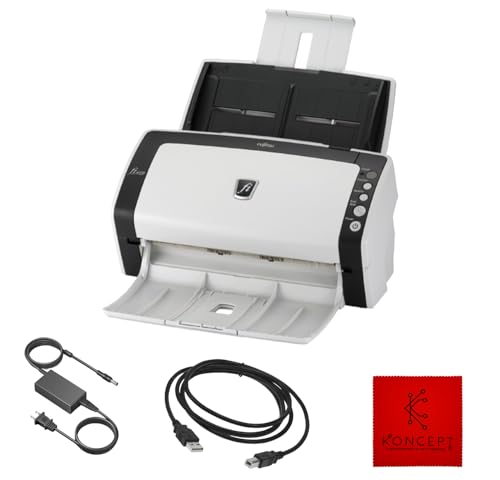
FI-6130Z Fujitsu Duplex Sheet-Fed Document Scanner
Brother Monochrome Laser MFC-L2710DW Multifunction Printer

Brother Monochrome Laser DCP-L2550DW Multifunction Printer

P1 Pro Portable Inkless Thermal Printer (Grey)

FI-7160 Fujitsu Duplex Document Scanner (Renewed)
A Breakdown Of The Leading Choices
The Canon PIXMA TR4720 is the kind of printer that disappears into a shelf and still pulls duty as the household’s fax machine, photo lab, and homework helper. It runs print, copy, scan, and fax in a single black housing that sits comfortably on a closet desk, which is more useful than it sounds when the dining table doubles as your workspace.
For households juggling a mix of school forms, tax documents, and the occasional glossy birthday photo, the four-cartridge ink system handles both color and black-and-white without forcing a swap. The auto document feeder (ADF) chews through multi-page contracts hands-free, and the Canon PRINT Inkjet/SELPHY app keeps everything accessible from a phone. If most of your week is text and the occasional color page, this is a sensible anchor pick.
What Makes Sense
- True four-in-one design covers print, copy, scan, and fax in one compact unit.
- ADF saves time on multi-page contracts, tax packets, and school permission slips.
- Mobile app support makes it practical to print from a phone without booting a laptop.
- Color ink system produces passable photos for casual prints and crafts.
- Easy cartridge swap means fewer service calls and a gentler learning curve.
Trade Offs
- Inkjet running costs climb fast with heavy color pages; budget toner shoppers should plan accordingly.
- Print speed is modest, so a stack of 50-page reports will feel slow.
- Photo output looks fine but does not match a six-ink photo specialist.
Key Specs
Who Should Grab It
Hybrid households that print school forms, occasional color pages, and need a fax on standby.
Where Another Pick Suits Better
Offices running hundreds of pages a week will find the Brother MFC-L2710DW a faster, toner-based fit.
The Brother HL-L2390DW shows up on this list for a specific reason: it prints a lot of crisp black-and-white pages without ever needing the user to think about ink. Laser technology, a process that fuses fine plastic-based toner powder onto paper using heat, is well-suited to long text documents, legal briefs, and the kind of invoicing work that buries an inkjet in cartridge swaps.
The flatbed scan glass on top adds copy and scan duties, which makes it a quasi-multifunction unit for anyone whose printing skews overwhelmingly monochrome. Wireless networking plus automatic duplex (double-sided) printing tightens daily routines in a small office or home workspace. Compared to the Canon PIXMA TR4720, you lose color and fax but pick up toner-style economy on text.
Real Benefits
- Monochrome laser engine delivers sharp text page after page.
- Automatic duplex printing cuts paper use on long reports and contracts.
- Flatbed scanner adds copy and scan without an extra machine on the desk.
Points To Note
- No color printing, so any color job has to go to a different device.
- No built-in fax, which the Canon TR4720 includes for households that still need it.
- Owners commonly report the unit runs warm in tight enclosed shelves, so ventilation matters.
Feature Card
Best Suited To
Writers, accountants, and remote staff who print mostly monochrome text and want scan-and-copy on the side.
Look Elsewhere When
Anyone who needs weekly color marketing materials should step up to the Canon PIXMA TR4720.
When the day’s paperwork runs thicker than a chapter book, a flatbed scanner becomes the bottleneck. The FI-6130Z is a dedicated sheet-fed document scanner that pulls pages through an automatic feeder, which is why it earns a slot on a multifunction list, even though it does not print.
Freelancers, sole traders, and bookkeepers running shoeboxes of receipts and signed contracts through their fingers find that a sheet-fed duplex (two-sided) scanner like this one absorbs in minutes what would take an hour at the copier. It ships with a 24V power supply and USB cable, and it pairs naturally with a separate printer, such as the Brother HL-L2390DW, to assemble a personal digitizing station.
The Good Stuff
- Duplex sheet-fed design captures both sides of a page in a single pass.
- Compact footprint suits a counter beside a laptop rather than a full filing cabinet.
- Refurbished availability lowers the barrier to owning a professional-grade scanner.
Honest Caveats
- Does not print or copy, so a second device is required for output.
- Compatibility is documented for Windows XP through Windows 10 only, which is a real limitation for newer shops.
- Best results require the host PC to stay awake during long jobs; plan scan runs accordingly.
The Right Fit
Bookkeepers, paralegals, and freelancers who scan dozens of receipts or signed contracts each week.
Skip It When
Casual users with one document a week will find the Brother MFC-L2710DW covers scan duties without a second machine.
The Brother MFC-L2710DW is the all-rounder that small home-based teams end up relying on without much fanfare. Print, copy, scan, and fax live under one hood, and the laser engine means that even a month of invoices does not flatten your toner budget the way an inkjet would.
Wireless networking and automatic duplex printing keep the day moving when multiple people share the device, and the unit’s footprint still fits a closet corner. Compared to the Canon TR4720 earlier in this list, you trade color output for toner economy and a faster page cadence. For black-and-white heavy offices that still need fax and scan, this is the practical middle of the road.
The Case For It
- Four functions in one chassis suits mixed daily document tasks.
- Laser toner cuts cost-per-page compared to inkjet for text-heavy runs.
- Wireless and mobile printing keep the device reachable from laptops and phones.
- Automatic duplex printing reduces paper on two-sided reports.
Small Caveats
- No color printing, so brochures and flyers need a separate solution.
- Document feeder capacity is modest; large scan jobs require multiple refills.
- The toner cartridge replacement process is straightforward but works best on a flat, clear surface.
Feature Snapshot
Made For
Small home offices that produce mostly black-and-white documents and still need fax capability.
Not Your Match When
High-volume shops that print stacks daily will want the faster Brother DCP-L2550DW instead.
The Brother DCP-L2550DW is built for the kind of week where the printer never stops: invoice batches, scanned contracts, school pickup forms, all before lunch. Its 50-sheet automatic document feeder takes multi-page copy and scan jobs without supervision, and the print speed keeps up at a brisk cadence for a home-office unit.
It steps up from the MFC-L2710DW with a larger feeder and faster engine, while keeping the same monochrome laser economy that keeps running costs predictable. Color is still off the table, but fax is also dropped here, which tightens the focus on print-copy-scan workflows. For an established small office, this is the unit that ages well.
Notable Gains
- 50-sheet ADF handles multi-page copy and scan jobs without babysitting.
- Class-leading print speed for the size class pushes through big document runs.
- Compact for the capacity, so it fits where larger office printers would not.
Worth Noting
- No fax, which some small businesses still rely on for legal and medical forms.
- Monochrome only, so any color work goes to a secondary device.
- Higher up-front cost compared to the smaller MFC-L2710DW.
At A Glance
Who It Suits Best
Established small offices that print and scan daily and want speed without buying a floor-standing copier.
Another Choice May Suit
Anyone who needs fax should look at the Brother MFC-L2710DW instead for a similar form factor with that function.
The P1 Pro is a different animal from the rest of this list: a compact thermal printer (a printer that uses heat on specially coated paper rather than ink or toner) that fits in a backpack and prints US Letter documents straight from a phone. For remote workers and travel-heavy roles, it solves the awkward “I need this signed now” moment at a hotel desk.
It pairs with the CamScanner app and several optimized filters for contracts, receipts, and handwritten notes, which makes it a soft multifunction tool even without a traditional scanner. Wireless printing from iPhone, Android, laptop, or PC covers the cross-platform reality of most digital nomads. Compared to the desk-bound Brother units above, this trades volume for portability.
What Helps Most
- Thermal printing removes ink and toner from the equation, with no cartridges to replace.
- Wireless support for phones and laptops makes it useful across most travel setups.
- Compact grey housing fits in a carry-on alongside a laptop sleeve.
Practical Considerations
- Thermal paper output behaves differently from regular print, which can matter for official documents.
- Print speed and capacity are far below a desk laser, so it is not a primary office printer.
- Specialty paper is required, which is an ongoing consumable cost to factor in.
Whose Shelf It Belongs On
Traveling consultants, remote workers, and field technicians who occasionally need a paper trail on the road.
A Better Fit Elsewhere
Anyone printing 200 pages a week will get more value from the Brother MFC-L2710DW.
The FI-7160 is the workhorse scanner that small-to-mid offices lean on when paper piles faster than people can file it. Rated for 4,000 scans per day at 60 pages per minute in mono or color, it handles both sides of a document in a single pass, which is exactly what a busy intake desk needs.
Unlike the FI-6130Z earlier in this list, the FI-7160 trades portability for a deeper paper feeder and faster throughput, which makes sense for permanent installations. It connects over USB 3.0 with a 24V power cable, and it handles document sizes up to 8.5 x 14 inches, including legal pages. Pair it with a printer such as the Brother DCP-L2550DW to round out a digitizing-and-printing station.
What Pays Off
- 60 ppm duplex scanning chews through big document batches without slowdown.
- 600 DPI resolution captures fine print and small receipts cleanly.
- 8.5 x 14 inch capacity covers most office document formats, including legal.
- 4,000 scans-per-day duty cycle suits steady small-office volume.
Less Ideal Details
- Renewed condition means cosmetic variation is normal; expect minor scuffs.
- Does not print, so a printer is still required for output tasks.
- USB 3.0 connection needs a compatible host port for full throughput.
Feature Rundown
Perfect Match For
Mid-volume offices that scan hundreds of pages a day and want a renewed professional-grade unit.
Reach For A Different Pick When
Light users who only need occasional scans should pick the Brother MFC-L2710DW instead and skip the dedicated scanner.
What To Weigh Before Choosing Multifunction Printer Scanner Copiers
Match The Engine To The Workload
Inkjet printers, which spray microscopic liquid ink droplets onto paper, handle color photos and mixed documents well, while laser printers, which use heat to fuse dry toner powder, run cheaper on long text runs. Households printing a few school forms a week feel the difference less than offices burning through hundreds of pages. The Canon PIXMA TR4720 leans inkjet for color flexibility; the Brother MFC-L2710DW and DCP-L2550DW lean laser for text economy.
Count The Functions You Actually Use
A true four-in-one adds fax, which still matters for some medical and legal offices. If fax is unused, the three-function Brother DCP-L2550DW trims the feature list without trimming capability. For pure scanning volume, a dedicated unit like the FI-7160 outpaces any all-in-one’s feeder.
Mind The Footprint And Feeder
ADF capacity (automatic document feeder, the top tray that pulls pages through automatically) drives how often you refill during big jobs. A 50-sheet feeder like the DCP-L2550DW saves real time on multi-page contracts. Compact units like the Canon TR4720 trade feeder depth for shelf-friendly dimensions.
Plan For Connectivity And Consumables
Wireless networking, mobile app support, and duplex printing all reduce daily friction. Thermal units like the P1 Pro skip ink and toner entirely but require specialty paper, so ongoing supply costs deserve a glance before you commit.
Sharpening The Decision Across These Picks
Common Shopping Slip Ups
Many shoppers fixate on the lowest sticker price and ignore the cost of consumables over a year of real use. Others pick a four-in-one when a three-function laser would actually cover their workload, then leave the fax unused. Match the device to the workflow rather than to the feature checklist.
Where The Extra Money Goes
Higher-tier picks like the FI-7160 and DCP-L2550DW charge more for faster engines, deeper feeders, and longer duty cycles (manufacturer-rated maximum monthly page volume). The upgrade pays off when daily volume is high, but light users typically get all they need from a smaller unit like the Canon TR4720 or Brother HL-L2390DW.
Frequently Asked Questions
What Is The Difference Between Inkjet And Laser In A Multifunction Printer?
Inkjet printers spray liquid ink and tend to handle color photos and mixed media well, while laser printers use heat-fused toner and run cheaper on long text runs. For mostly black-and-white documents, laser is usually the more economical choice.
Do Multifunction Printer Scanner Copiers Still Need A Separate Fax Line?
Models with built-in fax, like the Canon PIXMA TR4720 and Brother MFC-L2710DW, require a standard phone line or VoIP adapter for sending and receiving. If fax is rarely used, a three-function unit may be the cleaner fit.
How Important Is Automatic Duplex Printing?
Automatic duplex (double-sided) printing is a major convenience for anyone printing multi-page reports, contracts, or handouts. It cuts paper use and keeps finished documents looking more professional without manual flipping.
Can A Portable Thermal Printer Replace A Home Office Unit?
A portable thermal printer like the P1 Pro handles travel and light on-the-road work well, but it is not designed for high-volume daily printing at home. Most households benefit from a desk-bound multifunction unit as the primary device.
What Does A Renewed Document Scanner Typically Include?
A renewed document scanner like the FI-6130Z or FI-7160 is a pre-owned unit that has been inspected and refurbished for resale. Expect full functionality with possible minor cosmetic wear, and check the seller’s coverage terms before purchase.
Wrap Up
The right multifunction printer scanner copier is the one that disappears into your routine and only draws attention when something actually needs printing. Color-heavy households will lean toward the Canon PIXMA TR4720, while text-heavy offices get more value from a Brother laser unit. High-volume scanners and travel-friendly thermal printers fill the rest of the field. Match the machine to the workflow, and the rest of the week takes care of itself.