Running a home office or small business means juggling printing, scanning, and copying in one compact footprint, and the right machine changes how smoothly your day flows. A solid scanner copier printer saves you from trips to the print shop, cuts down on paper clutter, and handles everything from kid homework to tax documents without breaking a sweat. The picks below lean on ink tank efficiency, document-fed scanning muscle, and color accuracy that holds up for photos and reports alike. Match the machine to your workload, not the other way around.
A Quick View Of The Lineup
Epson EcoTank ET-2720 Wireless Color All-in-One Supertank Printer (White)
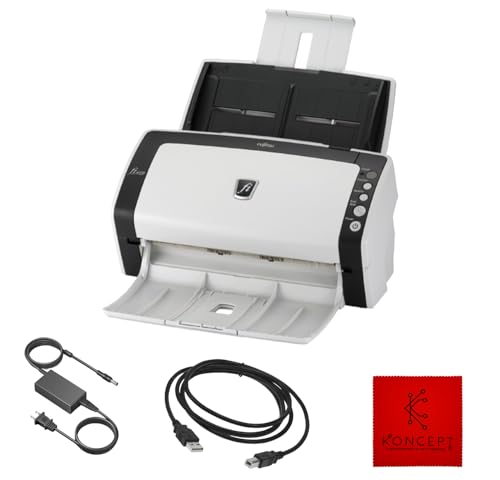
FI-6130Z Fujitsu Duplex Sheet-Fed Document Scanner (Renewed)
Epson EcoTank ET-2720 Wireless Color All-in-One Supertank Printer (Black)

Canon Pixma TS6320 Wireless All-in-One Photo Printer (Black)

Epson EcoTank ET-2980 Wireless Color All-in-One Supertank Printer
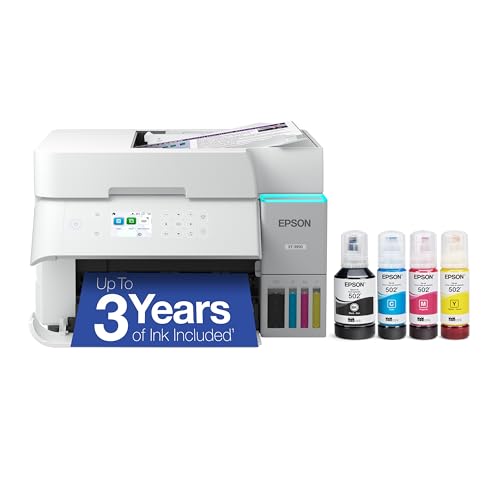
Epson EcoTank ET-3950 Wireless Color All-in-One Supertank Printer

FI-7160 Fujitsu Document Scanner (Renewed)

Epson EcoTank Pro ET-5800 Wireless All-in-One Supertank Printer
The Strengths Of Each Pick
The white Epson EcoTank ET-2720 is the kind of machine that disappears into a kitchen counter or a small desk and just keeps working. Its refillable ink tanks sidestep the cartridge treadmill entirely, so you pour bottles in instead of hunting for replacements. For light home printing, schoolwork, and the occasional color page, that approach pays off quickly.
Wireless setup over Wi-Fi makes it easy to push jobs from a laptop or phone without cable juggling. The flatbed scanner handles tax forms, kids’ artwork, and ID cards without complaint. Owners of small home offices tend to appreciate the low ink cost the most, especially when monthly print volumes stay modest.
Practical Advantages
- Cartridge-free ink tanks lower long-term running costs for families who print a few pages most days.
- Wireless connectivity lets you place the unit wherever power reaches, not just near the router.
- Compact white housing fits neatly on a shelf, side table, or shared workspace.
- Built-in scanner and copier remove the need for a separate flatbed device.
- Refill bottles are simple enough that most people manage top-ups without spilling.
Things To Consider
- Print speed is modest, so bulk jobs can take a while to finish.
- No automatic document feeder (ADF) means multi-page scans require placing pages by hand.
- Photo output is decent but not aimed at serious photography workflows.
Key Specs
Made For
Households and home offices with light monthly print needs who want to escape cartridge costs without paying premium prices.
Look Elsewhere When
You regularly scan multi-page stacks; the FI-7160 Fujitsu Document Scanner handles that workload far more efficiently.
The FI-6130Z is a dedicated sheet-fed scanner, which means it skips the printer side entirely and focuses on getting paper into your computer fast. Small clinics, accountant offices, and back-room archive projects benefit from its duplex (double-sided) capture in a single pass. It connects over USB and pulls power from a 24V adapter, so it lives near a desk rather than a router.
This is a renewed unit, which makes it accessible for tighter budgets that still want Fujitsu’s scanning pedigree. Receipt batches, signed contracts, and intake forms feed through quickly, and the resulting files land in searchable PDFs. The trade-off is that this is a scanner only, so you’ll need a separate printer for output.
Points In Its Favor
- Duplex scanning captures both sides of a page in one pass.
- USB connectivity keeps the setup simple on most office computers.
- Renovated condition helps keep the cost down for small operations.
Points To Keep In Mind
- No printing or copying built in, so it supplements rather than replaces an all-in-one.
- Only works with Windows XP through Windows 10, which rules out newer Windows 11 setups.
- Roller cleaning is a periodic task that busy offices cannot skip.
Who It Suits Best
Back-office workers digitizing receipts, intake forms, and signed paperwork who already have a separate printer for output.
Swap It Out When
You need print, scan, and copy in one box; the Epson EcoTank ET-2720 covers all three without a second device.
The black variant of the ET-2720 carries identical guts to the white version, with a chassis that disappears into darker desks and entertainment centers. If your home office leans modern or you keep gear on a black shelf, this finish simply looks more at home. Functionally, the ink tanks, scanner, and copier all behave the same way.
You still get the cartridge-free experience, so a single set of bottle refills covers a long stretch of mixed color and text output. Wireless printing from phones works without fuss, and the flatbed handles one-off scan and copy tasks cleanly. It’s a small detail, but color-matched housing does help when the printer sits in plain sight.
Where It Helps
- Black finish suits minimalist or monochrome setups better than a white box.
- Same low-cost refillable ink system as the white model.
- Wireless support keeps cables off the desk surface.
Honest Caveats
- Print speed is unchanged and still feels slow for large batches.
- Lacks an automatic document feeder for multi-page scanning jobs.
- Photo quality is fine for everyday use, not for color-critical projects.
Best Suited To
Shoppers who like the ET-2720’s refill system but want a darker housing that blends into a styled workspace.
A Better Fit Elsewhere
You shoot a lot of borderless photos; the Canon Pixma TS6320 uses a five-ink setup designed for richer color output.
The Canon Pixma TS6320 is aimed at people who care about color accuracy, not just speed. A five-individual-ink system splits out photo black and gray alongside the standard CMYK (cyan, magenta, yellow, key/black) set, which translates to smoother gradients and less grain in skin tones. The 1.44-inch OLED screen and LED status bar keep you informed without making you leave the chair.
For mixed households, it handles documents well, but the real payoff is when a school project, photo book, or craft print hits the tray. Mobile printing from iOS and Android is straightforward, and the auto-expandable output tray means the printer can sit idle without an open tray gathering dust. It’s a different philosophy than the EcoTank line, trading ultra-low ink costs for better photo fidelity.
What Pays Off
- Five-ink setup delivers noticeably better photo output than standard four-color printers.
- OLED display and LED status bar make menu navigation quick.
- Auto-expanding output tray keeps the footprint compact until you actually print.
- Mobile printing works smoothly across common phone platforms.
Trade Offs
- Cartridge-based ink raises per-page costs compared to refillable tank printers.
- No automatic document feeder, so multi-page scans need manual placement.
- Print speed sits in the casual-use range rather than the office range.
Quick Facts
Who Will Love This
Creators, scrapbookers, and families who print photos regularly and want richer color than a standard inkjet can manage.
Reach For A Different Pick When
You print hundreds of pages a month; the Epson EcoTank ET-3950 keeps long-term ink costs far lower.
The EcoTank ET-2980 steps up from the older ET-2720 with a faster PrecisionCore Heat-Free print engine, the same kind of technology used in larger Epson office machines. “Heat-free” means the printhead doesn’t need a warm-up cycle, which speeds up the first page out and keeps power use down. For families that print all day long between homework, recipes, and shipping labels, that responsiveness matters.
It still uses refillable ink tanks, so the running cost story stays strong, and wireless setup keeps the unit flexible about where it lives. The flatbed scanner handles school art projects and tax forms without complaint. You may find the absence of an ADF limiting, but for the average family printer, the speed and ink savings are the real headline.
Notable Gains
- Faster print engine cuts wait time on multi-page homework and report jobs.
- Heat-free design reduces warm-up lag for the first page out.
- Refillable ink tanks keep color and text pages affordable over time.
- Wireless connectivity supports flexible placement in any room.
Worth Noting
- No automatic document feeder for hands-free multi-page scanning.
- Photo quality sits in the casual range, not the photo-enthusiast range.
- Larger footprint than the older ET-2720 models, so plan your shelf space.
Feature Snapshot
The Right Fit
Busy households that print every weekday and want faster output than the entry-level EcoTank offers.
Consider Something Else When
You need a true office workhorse; the Epson EcoTank Pro ET-5800 is built for higher monthly volumes.
The ET-3950 targets families and remote workers who run a printer close to daily. It sits a step above the ET-2980 with higher-capacity ink tanks and a stronger spec sheet aimed at sustained output. Think of it as the EcoTank for people who have stopped thinking about whether they should print and started just printing.
Refillable tanks remain the headline feature, so even heavy weeks of lesson plans, coloring sheets, and work reports stay affordable. The flatbed scanner handles the occasional passport or document copy. Wireless setup across phones and laptops is reliable, and the build feels sturdy enough to live on a permanent desk rather than a closet shelf.
Everyday Wins
- Larger ink tanks than the ET-2720 and ET-2980 lines, so refills come less often.
- Cartridge-free design keeps color and text pages cheap to produce.
- Wireless connectivity covers phones, tablets, and laptops without extra apps.
Potential Drawbacks
- Larger footprint means it needs a dedicated spot on the desk or shelf.
- Photo output is solid but not at enthusiast photo-printer levels.
Perfect Match For
Families and remote workers who print most days and want a tank-based machine that keeps up without constant refills.
Not Your Match When
You only print a handful of pages each month; the Epson EcoTank ET-2720 in white or black covers light use at a lower entry cost.
The FI-7160 is the workhorse of the Fujitsu scanner line, aimed squarely at offices that push paper all day. It captures up to 60 pages per minute in both color and mono (black and white), with a stated daily duty cycle of around 4,000 scans. An 80-sheet automatic document feeder means you can load a stack and walk away while it works.
USB 3.0 (a fast data connection standard) keeps file transfer snappy even at high resolution, and the 600 DPI optical sensor handles fine print, small receipts, and faded records with clarity. This renewed unit cuts the cost of entry for shops that need enterprise-grade speed without the new-unit markup. It does not print or copy, so plan to pair it with a separate output device.
Noteworthy Benefits
- High page-per-minute rating keeps large scan jobs moving fast.
- Large automatic document feeder handles thick stacks without babysitting.
- 600 DPI optical resolution captures small text and faded details.
- USB 3.0 interface moves large files to the computer quickly.
Things To Weigh
- No print or copy function, so it sits next to a separate printer for output tasks.
- Roller replacement and cleaning are part of long-term ownership at this duty cycle.
- Renewed condition means cosmetic wear may show on the housing.
Technical Highlights
Built With In Mind
Small offices, legal practices, and accounting teams that scan hundreds of pages a day and need reliable throughput.
Where A Sibling Pick Shines
You mostly scan receipts and small batches; the FI-6130Z Fujitsu Duplex Sheet-Fed Document Scanner handles lighter volumes at a lower entry cost.
The EcoTank Pro ET-5800 sits at the top of Epson’s supertank family, with the kind of speed and paper handling that small businesses actually need. It adds fax and Ethernet (a wired network connection) alongside Wi-Fi, so it drops into a real office network without fuss. The PrecisionCore Heat-Free engine keeps first-page-out times short and supports higher monthly volumes than the home-focused ET models.
Refillable ink bottles still anchor the running-cost story, so even with the higher purchase price, the per-page economics stay friendly. It prints, scans, copies, and faxes, which makes it a true single-device replacement for older four-in-one office machines. The footprint is large, so this is a desk-or-stand purchase rather than a shelf-top one.
Why It Works Well
- Cartridge-free supertank design slashes per-page color and mono costs.
- Ethernet port supports wired office networks alongside wireless.
- Fax function covers workflows that still rely on traditional phone-line transmission.
- Heat-free print engine delivers fast first pages and high monthly duty cycles.
Room For Improvement
- Large footprint requires a dedicated spot on a desk or printer stand.
- Higher entry price than the home-focused EcoTank models.
- Overkill for shoppers who only print a few pages a week.
Spec Overview
Right Fit For
Home offices and small businesses that print, scan, copy, and fax in serious volume and want a single device to handle it all.
Skip It When
You mostly print photos and a few documents; the Canon Pixma TS6320 delivers richer color for a creative workflow.
Matching The Right Machine To Your Workload
Choosing a scanner copier printer comes down to honest questions about your real workload, not the spec sheet. Start with monthly volume, because that single number decides between a cartridge-based photo printer and a refillable supertank. Heavy users save more with tank systems, while casual users may not refill often enough to justify the higher purchase price.
Print quality splits into two distinct lanes. Standard inkjet output handles schoolwork, contracts, and shipping labels with ease, but photo enthusiasts benefit from a five-ink system like the Canon Pixma TS6320, which adds photo black and gray for smoother gradients. If your prints mostly stay on plain paper, the difference is academic, and tank printers win on running cost.
Scanner type shapes daily friction more than most shoppers expect. Flatbed scanners handle books, IDs, and fragile originals well but require manual page placement. Sheet-fed scanners with an automatic document feeder (ADF) clear stacks of receipts or contracts unattended, which is essential for office work. Match the scanner style to the document types you touch most often.
Connectivity matters for placement, not just convenience. Wireless works for most home setups, while Ethernet (a wired network port) earns its keep in busy offices where Wi-Fi congestion slows jobs. Duplex scanning, which captures both sides of a page in one pass, saves time for anyone handling two-sided contracts or reports regularly.
Key Considerations Across These Picks
Common Shopping Slip Ups
Chasing the lowest sticker price often backfires with printers, because ink costs pile up faster than the device itself. A cartridge model that looks affordable can cost more in the first year of use than a refillable tank printer at twice the price. Always weigh total ownership over the first 12 to 24 months, not just the box price.
Overbuying speed and duty cycle for light home use is the flip-side trap. A heavy-duty office machine wastes desk space and money for a household that prints 30 pages a week. Match the machine to the realistic monthly volume rather than aspirational worst-case days.
What The Higher Tier Buys
Stepping up to the EcoTank Pro ET-5800 adds fax, Ethernet, faster print engines, and higher monthly duty cycles. For a small business, those features pay back through time saved on every job. For a home user, the same upgrade adds cost and footprint without changing the day-to-day experience much.
Frequently Asked Questions
What is the difference between an inkjet and an ink tank printer?
An inkjet uses small replaceable cartridges, while an ink tank printer uses refillable reservoirs that you top up with bottled ink. Tank printers cost less per page and reduce cartridge waste, though they usually cost more upfront.
Do I need an automatic document feeder?
An automatic document feeder (ADF) pulls pages through the scanner without manual placement, which saves time on multi-page contracts, receipts, or report stacks. Single-page or occasional scanning needs are fine with a flatbed only.
How important is duplex scanning?
Duplex scanning captures both sides of a page in a single pass, which speeds up two-sided documents and reduces wear from flipping pages manually. For office work, it is a meaningful time-saver; for casual home use, it is a nice-to-have.
Can I print from my phone?
Most modern wireless all-in-ones support mobile printing through apps like AirPrint, Mopria, or vendor utilities. Confirm the specific model supports your phone platform before buying, especially for older Windows or niche environments.
What is a supertank printer?
A supertank printer uses large refillable ink reservoirs instead of small cartridges, which lowers the cost per page and extends the time between refills. The trade-off is a higher purchase price and a slightly larger footprint.
Bottom Line
The best scanner copier printer is the one that matches your volume, your document mix, and the space you actually have. Start with how many pages you print and scan each month, then narrow down by ink system and scanner style. The right machine fades into the background and just handles the work, which is exactly what you want from gear this essential.