Paperwork still finds its way onto desks, into shoeboxes, and onto kitchen counters. The right scanner turns that slow grind into a few quick taps, sending clean digital files wherever they need to go. This lineup balances speed, image quality, and the kind of features that actually matter for daily document work.
The Lineup, Simplified

Fujitsu ScanSnap iX1500 Color Duplex Document Scanner (Black)

VIISAN VS13AM 4K Document Camera with OCR

VIISAN K48 48MP A3 Overhead Book Scanner

Anleo Hard Travel Case for ScanSnap iX100

VIISAN DL16 A3 Overhead Document Scanner

VIISAN 3120 A3 Flatbed Scanner 1200 DPI
VIISAN S48 Duo A2/A3 Overhead Book Scanner
VIISAN K48 48MP AI Book Scanner & Camera

Fujitsu ScanSnap iX500 Deluxe Scanner
The Details Behind The Selections
The ScanSnap iX1500 trades button-mashing for a generous touchscreen that puts destinations and profiles right where you can tap them. Daily paperwork, receipts, and stacks of mixed-size sheets flow through the duplex feeder without ceremony, and the unit feels at home on a desk where space is at a premium.
For anyone running a paper-heavy home office or a small back-office operation, the on-device shortcut icons cut the friction of routing scans to cloud folders or email. Setup tends to go smoothly on both Mac and PC, and the unit looks polished enough to leave out in plain sight rather than tuck away in a closet.
What Makes Sense
- Touchscreen interface simplifies profile selection at the device.
- Duplex (two-sided) capture handles mixed stacks in a single pass.
- Cloud routing shortcuts reduce repetitive menu digging during a workday.
- Compact footprint fits comfortably beside a laptop on most desks.
Points To Note
- Feeder rollers need occasional cleaning to stay jam-free with heavy use.
- Subscription software features add ongoing cost beyond the initial purchase.
Key Product Details
Right Fit For
Home office owners and small business operators who scan receipts, contracts, and multi-page documents several times a week.
Consider Something Else When
You mostly digitize bound books or fragile originals, where the VIISAN K48 48MP A3 Overhead Book Scanner handles curves and creases more gracefully.
The VS13AM sits over your desk and streams a 4K close-up of whatever is sitting beneath it. Teachers, presenters, and remote tutors use it to share worksheets and receipts in real time, and the built-in OCR (optical character recognition, which converts printed text into editable, searchable files) helps turn those captures into editable documents.
Unlike the sheet-fed ScanSnap iX1500 reviewed above, this unit never pulls paper through rollers. You lay items flat, hit capture, and the camera does the rest. That makes it a friendly match for sticky notes, business cards, and odd-sized materials that tend to jam traditional feeders.
Notable Gains
- 4K overhead clarity keeps fine print legible on a shared screen.
- OCR workflow converts captured pages into searchable, editable text.
- Live view supports real-time teaching and demonstrations.
- Compact arm folds down for storage between sessions.
Things To Weigh Up
- Capture speed depends on your own pacing rather than an automatic feeder.
- Ambient light can affect image consistency across the day.
Made For
Educators, trainers, and remote presenters who show paperwork live to an audience and want a quick digital copy at the same time.
Swap It Out When
You process long stacks of loose sheets daily and would benefit from the Fujitsu ScanSnap iX1500’s automated duplex feeding instead.
The K48 leans into high-resolution overhead capture at up to 600 DPI, the dots-per-inch measurement that controls how much fine detail a scan preserves. That level of detail helps when preserving crisp type from old manuals, delicate illustrations, or archival records that cannot be reshot later.
Compared with the VS13AM above, this model focuses less on live streaming and more on producing clean still files. Auto page flattening and laser positioning help align open books and loose sheets without a lot of fuss, which matters when pages resist lying flat on their own.
A Favorable Mix
- 600 DPI output captures fine print and line art faithfully.
- Auto page flattening reduces manual editing of curved spreads.
- Laser positioning lines up subjects before each capture.
- A3 capture area covers oversized pages and layouts.
Small Caveats
- Higher resolution files mean larger storage footprints per page.
- Best results come from a stable desk and consistent lighting.
Feature Snapshot
Best Suited To
Researchers, librarians, and archivists who need high-resolution digital copies of bound or detailed printed material.
Look Elsewhere When
You mainly need fast duplex sheet scanning for invoices and contracts, where the ScanSnap iX1500 is the more efficient daily driver.
The Anleo case is a protective shell built specifically around the ScanSnap iX100 mobile scanner. Its EVA (ethylene-vinyl acetate) construction, a tough, semi-rigid foam that absorbs minor bumps, shrugs off the scuffs that come with tossing gear into a laptop bag or overhead bin.
This is an accessory rather than a scanner, so its role is narrow but valuable. Anyone carrying the iX100 between home, office, and client sites will appreciate a dedicated spot for cables and the scanner body, keeping everything together between trips.
Strengths Worth Knowing
- Custom-shaped EVA shell cushions the iX100 against everyday knocks.
- Interior pocket keeps USB cable and small accessories in one place.
- Zipper closure secures contents during crowded commutes.
Points To Keep In Mind
- Scanner and accessories are sold separately; the case is standalone.
Whose Shelf It Belongs On
Mobile professionals who already own a ScanSnap iX100 and want a tidy, protective home for it on the road.
Where Another Pick Suits Better
Anyone who needs an actual scanner should look at the Fujitsu ScanSnap iX1500 or one of the VIISAN models above for full capture capability.
The DL16 pairs a 16MP camera with anti-glare LED lighting, so glossy magazine spreads and laminated pages stop fighting back against the lens. The 300 DPI output lands in comfortable territory for everyday documents and most artwork reproductions.
Where the K48 above pushes resolution to its limits, this model trades some pixel count for a smoother lighting setup. That makes it a sensible pick for design studios, classrooms, and small archives working with mixed reflective and matte materials.
What Stands Out
- Anti-glare LED panel tames reflections on coated stock and lamination.
- A3 capture area handles large layouts without stitching.
- Auto page flattening eases the burden of curved book spreads.
- OCR support turns captured pages into searchable files.
Honest Caveats
- Lower DPI than higher-end VIISAN models limits fine-art reproduction.
- Overhead format means captures take longer than auto-fed alternatives.
Who It Suits Best
Designers, educators, and archivists who frequently scan glossy layouts, sheet music, and mixed-media documents.
Not Your Match When
Your main workload is high stacks of loose paper, where the ScanSnap iX1500 duplex feeder saves considerably more time.
The VIISAN 3120 brings back the familiar flatbed format and stretches it to A3 territory. Press a book, photo, or oversized document against the glass, close the lid, and the 1200 DPI CIS sensor, a compact image sensor that reads the page without bulky mirrors, handles the rest. The frameless edge is a quiet win when scanning right up to the margin.
Photo enthusiasts, scrapbookers, and small print shops tend to gravitate here. The unit scans a full A3 page in roughly eight seconds, which keeps the workflow moving even when juggling a stack of originals across an afternoon.
Where It Excels
- 1200 DPI resolution preserves photo detail and subtle tonal shifts.
- Frameless glass edge captures content right up to the page boundary.
- CIS sensor keeps the body slim enough for a small studio shelf.
- Auto-scan mode speeds up repeat jobs of similar originals.
A Few Limitations
- Flatbed workflow means one sheet at a time without batch scanning.
- Lid pressure on thick books may leave a slight edge shadow in scans.
Quick Facts
Perfect Match For
Photographers, scrapbookers, and small studios that need high-resolution, single-sheet scans of oversized originals.
Reach For A Different Pick When
Your volume comes from stacks of loose pages, where the Fujitsu ScanSnap iX500 keeps things hands-off.
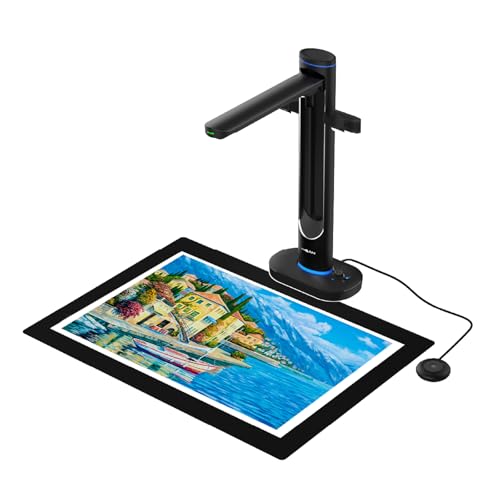
The S48 Duo doubles up on lenses to capture oversized books and documents without flattening them against glass. Two 48MP sensors work side by side to cover up to A2 territory, which means rare maps, large atlases, and engineering drawings fit in a single capture.
Text-to-speech support makes it friendly for distance learning and accessibility work, while OCR handles the searchable-text side of archival projects. It is a heavier unit than most of the picks above, so a stable desk and dedicated space go a long way toward a smooth experience.
A Few Highlights
- Dual-camera setup covers A2/A3 materials without manual stitching.
- 600 DPI output suits detailed archival and reproduction work.
- OCR plus text-to-speech support broadens accessibility use cases.
- Overhead design avoids pressing fragile bindings flat.
Trade-Offs To Consider
- Larger footprint than single-camera overhead models.
- Premium position in the lineup means higher cost than entry-level picks.
Who Should Grab It
Libraries, archivists, and educators who handle oversized books, maps, and historical documents on a regular basis.
A Better Fit Elsewhere
Casual home users will find the VIISAN K48 more than capable for everyday book scanning at a friendlier size.
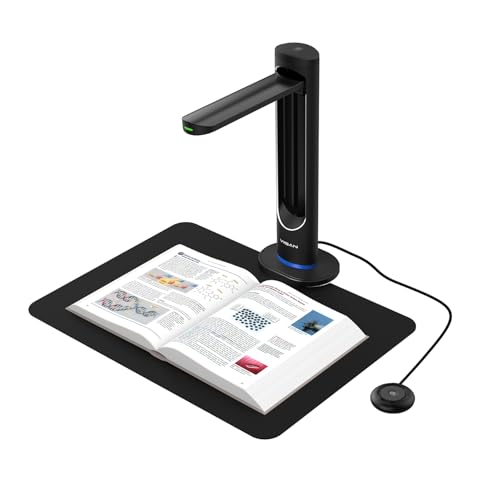
This version of the K48 leans on a Sony 48MP CMOS sensor (a light-capturing chip known for low noise and accurate color) and AI-driven page smoothing to tame stubborn curved spreads. Books that refuse to lie flat, vintage manuals with tight bindings, and oversize textbooks come through looking far more uniform than a basic overhead capture would produce.
The AI focus sets it apart from the standard K48 reviewed earlier. Anyone who has wrestled with thick reference books will appreciate the time saved on post-scan cleanup, even if it means a slightly steeper investment than the base model.
What Pays Off
- AI smoothing flattens curved spreads with minimal manual editing.
- Sony 48MP CMOS sensor delivers accurate color and low-noise captures.
- 600 DPI output supports detailed archival and study use.
- Laser positioning helps frame pages consistently across sessions.
Potential Compromises
- AI smoothing is software-dependent and may need occasional updates.
- Higher file sizes demand more local or cloud storage per page.
Built With In Mind
Students, researchers, and hobbyists who digitize thick textbooks and reference volumes at home.
Skip It When
Your work centers on loose receipts and one-page forms, where the VIISAN VS13AM keeps things simple at a smaller size.
The iX500 has earned a long track record on desks where speed and reliability matter most. Duplex feeding, USB or Wi-Fi connection to a single computer, and a 25 ppm (pages per minute) color pace keep stacks moving without babysitting.
Compared to the touchscreen-driven iX1500 reviewed first, the iX500 leans on the bundled software for routing and profiles. Users who prefer a software-driven workflow, or anyone keeping an older PC setup humming, may find this older flagship an easier fit than chasing newer features.
Useful Highlights
- 25 ppm duplex capture handles everyday stacks efficiently.
- USB or Wi-Fi connection to a single computer keeps cabling flexible.
- Mature ScanSnap software ecosystem with broad format support.
Where It May Fall Short
- No touchscreen; workflow control happens inside the companion software.
- Older model may lack refinements found in newer ScanSnap releases.
Quick Technical Notes
Right Fit For
PC-focused home offices that want a steady, software-driven scanner without chasing the newest model on the market.
Where A Sibling Pick Shines
Touchscreen lovers and shortcut-driven workflows will appreciate the iX1500’s on-device controls instead.
Choosing The Right Document Scanner For Your Setup
Document scanners come in three broad shapes, and each rewards a different working style. Sheet-fed models like the ScanSnap iX1500 and iX500 push stacks through quickly, making them a natural fit for offices that handle receipts, contracts, and multi-page reports day after day. Flatbed scanners like the VIISAN 3120 give you a glass surface for delicate photos, scrapbook pages, or oversized originals that would not survive a roller feed. Overhead scanners from VIISAN sit above the page, capturing books, glossy layouts, and irregular objects without ever pressing them flat.
Resolution, expressed in DPI (dots per inch), determines how much fine detail survives the scan. Everyday paperwork generally looks fine around 300 DPI, while photo prints, archival documents, and fine line art benefit from 600 DPI or higher. A 48MP camera sensor translates that resolution into sharp, usable files, especially when paired with auto-flattening or laser positioning for books.
Speed matters most when stacks are tall. A 25 ppm duplex scanner chews through paperwork that would take much longer on a flatbed. For occasional or single-page work, a flatbed or overhead scanner offers more flexibility without rushing you.
Connectivity has grown beyond the old USB-only setup. Modern scanners offer Wi-Fi alongside USB, letting you place the unit wherever it fits best rather than tethering it to a single desktop. Software ecosystems matter too: mature suites tend to add OCR, cloud routing, and searchable PDFs without extra subscriptions.
Key Considerations Across These Picks
Mistakes Worth Dodging
Picking a flatbed scanner for daily receipt piles is a common regret. Those jobs cry out for sheet-fed duplex capture, and the hours saved add up quickly. Another slip is ignoring capture area. Standard letter-size scanners crop anything larger, while A3-capable units like the VIISAN 3120 or DL16 spare you from stitching images later.
Why Top Tier Costs More
Higher-tier models invest in better sensors, anti-glare lighting, AI page flattening, and dual-camera arrays. Those upgrades pay off when you scan fragile books, glossy artwork, or oversized maps regularly. For casual paperwork, a mid-range sheet-fed scanner delivers the essentials without overspending on features you will rarely use.
Frequently Asked Questions
What is the difference between sheet-fed, flatbed, and overhead scanners?
Sheet-fed scanners pull pages through rollers, flatbed scanners lay items on a glass surface, and overhead scanners capture from above without ever touching the page.
How much resolution do most users need?
Around 300 DPI covers everyday documents, while 600 DPI or higher is worth it for photos, archives, and detailed line art.
Do these scanners work with both Windows and Mac?
Most models in this list support both operating systems, though checking the product page for current driver details is always wise.
Can a document scanner help with organizing receipts and invoices?
Yes. Sheet-fed duplex models paired with OCR software turn piles of receipts into searchable, sortable digital records in minutes.
Are overhead scanners hard to set up?
Generally no. They typically connect via USB, fold into compact shapes, and include software that guides you through the first capture.
Wrap Up
The right document scanner depends less on chasing the highest spec sheet and more on how paperwork actually moves through your day. Heavy stacks of receipts and contracts point toward a sheet-fed workhorse, while books, photos, and oversized materials call for flatbed or overhead capture. Match the format to your real workload and the rest falls neatly into place.